
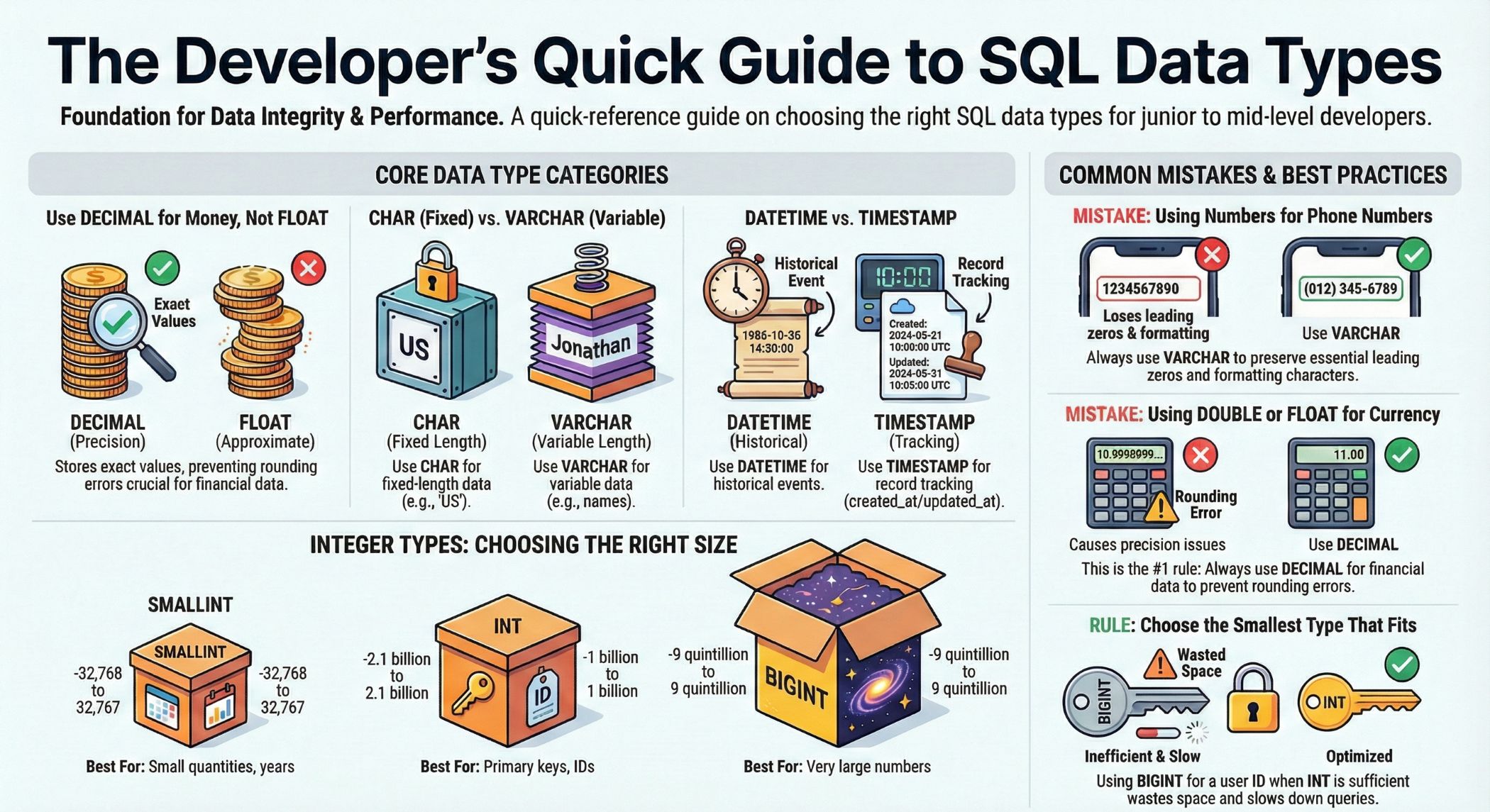
Understanding SQL Data Types: The Foundation of Database Design
In the world of database management, SQL data types serve as the fundamental building blocks that define how data is stored, processed, and retrieved. Whether you’re working with MySQL, PostgreSQL, SQL Server, or Oracle, understanding data types is crucial for creating efficient, reliable, and scalable database systems.
A data type is essentially a classification that specifies which type of value a column can hold. It determines not only the kind of data that can be stored but also the operations that can be performed on that data, how much storage space it requires, and how the database engine processes it internally.
💡 Why Data Types Matter:
- Data Integrity: Ensures only valid data enters your database
- Storage Optimization: Minimizes disk space usage and improves performance
- Query Performance: Enables faster data retrieval and manipulation
- Data Validation: Prevents errors at the database level
Throughout this comprehensive guide, we’ll explore every major SQL data type category, provide practical examples, and share best practices that will help you make informed decisions when designing your database schemas.
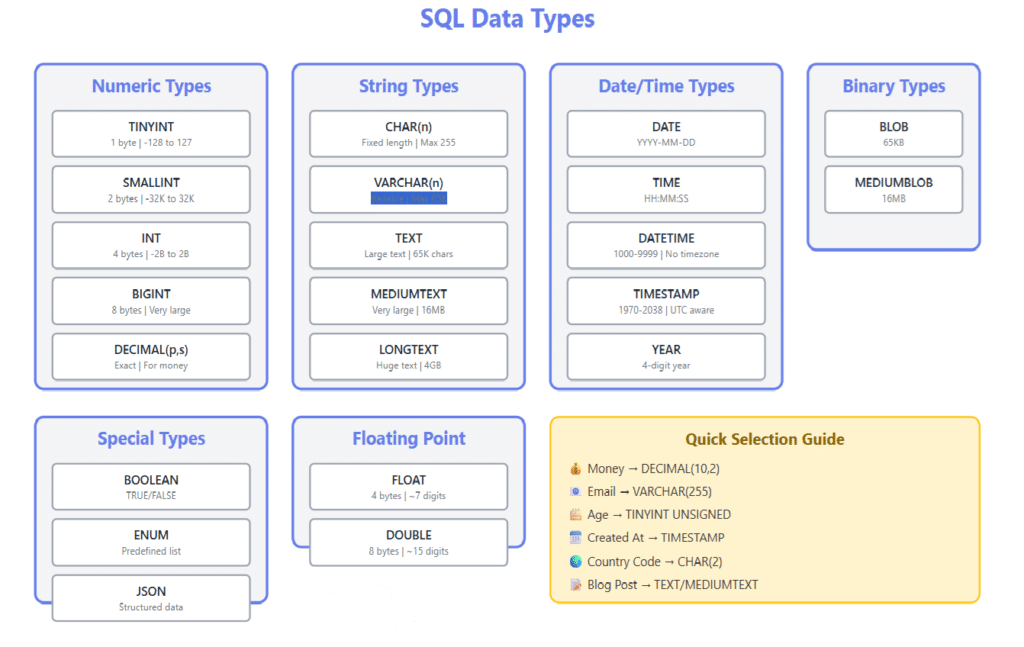
Numeric Data Types: Working with Numbers in SQL
Numeric data types are used to store numbers, including integers, decimals, and floating-point values. Choosing the right numeric type is essential for both accuracy and performance.
Integer Data Types
Integer types store whole numbers without decimal points. SQL provides several integer types with different storage sizes and ranges:
| Data Type | Storage Size | Range | Use Case |
|---|---|---|---|
| TINYINT | 1 byte | 0 to 255 (unsigned) -128 to 127 (signed) | Age, small counts, flags |
| SMALLINT | 2 bytes | 0 to 65,535 (unsigned) -32,768 to 32,767 (signed) | Year, small quantities |
| MEDIUMINT | 3 bytes | 0 to 16,777,215 (unsigned) -8,388,608 to 8,388,607 (signed) | Medium-range counters |
| INT / INTEGER | 4 bytes | 0 to 4,294,967,295 (unsigned) -2,147,483,648 to 2,147,483,647 (signed) | Primary keys, IDs, quantities |
| BIGINT | 8 bytes | 0 to 18,446,744,073,709,551,615 (unsigned) -9,223,372,036,854,775,808 to 9,223,372,036,854,775,807 (signed) | Large numbers, timestamps |
📝 Example: Creating a Table with Integer Types
CREATE TABLE products (
product_id INT PRIMARY KEY AUTO_INCREMENT,
category_id SMALLINT NOT NULL,
stock_quantity MEDIUMINT DEFAULT 0,
view_count BIGINT DEFAULT 0,
is_featured TINYINT(1) DEFAULT 0,
creation_year SMALLINT
);
Decimal and Numeric Types
For precise calculations involving money or scientific data, use DECIMAL or NUMERIC types. These fixed-point types store exact numeric values without rounding errors.
Syntax: DECIMAL(precision, scale)
- Precision: Total number of digits
- Scale: Number of digits after the decimal point
CREATE TABLE financial_transactions (
transaction_id INT PRIMARY KEY,
amount DECIMAL(10, 2), -- Max: 99999999.99
tax_rate DECIMAL(5, 4), -- Max: 9.9999
total DECIMAL(12, 2) ); -- Example
insert INSERT INTO financial_transactions (transaction_id, amount, tax_rate) VALUES (1, 1250.75, 0.0825);
⚠️ Important: Always use DECIMAL for monetary values. Never use FLOAT or DOUBLE for money as they can introduce rounding errors that compound over time.
Floating-Point Types
Floating-point types store approximate numeric values with decimal points. They’re ideal for scientific calculations where slight imprecision is acceptable.
| Data Type | Storage | Precision | Use Case |
|---|---|---|---|
| FLOAT | 4 bytes | ~7 decimal digits | Scientific measurements, coordinates |
| DOUBLE / REAL | 8 bytes | ~15 decimal digits | High-precision scientific data |
CREATE TABLE scientific_data (
measurement_id INT PRIMARY KEY,
temperature FLOAT,
latitude DOUBLE,
longitude DOUBLE,
pressure_reading DOUBLE );
INSERT INTO scientific_data VALUES (1, 98.6, 40.7128, -74.0060, 1013.25);
String and Character Data Types: Storing Text in SQL
String data types are used to store text, from single characters to large documents. Proper selection impacts storage efficiency and query performance significantly.
Fixed-Length vs Variable-Length Strings
| Data Type | Max Length | Storage | Best For |
|---|---|---|---|
| CHAR(n) | 255 | Fixed (n bytes) | Fixed-length data: country codes, status flags |
| VARCHAR(n) | 65,535 | Variable (actual length + 1-2 bytes) | Variable-length text: names, emails, descriptions |
| TEXT | 65,535 | Variable (actual length + 2 bytes) | Long text: articles, comments |
| MEDIUMTEXT | 16,777,215 | Variable (actual length + 3 bytes) | Very long text: blog posts, documentation |
| LONGTEXT | 4,294,967,295 | Variable (actual length + 4 bytes) | Extremely large text: books, logs |
📝 Example: String Data Types in Action
CREATE TABLE users (
user_id INT PRIMARY KEY AUTO_INCREMENT,
username VARCHAR(50) NOT NULL UNIQUE,
email VARCHAR(255) NOT NULL UNIQUE,
country_code CHAR(2), -- Fixed: 'US', 'UK', 'CA'
phone_number VARCHAR(20),
bio TEXT,
status CHAR(1) DEFAULT 'A' -- A=Active, I=Inactive );
INSERT INTO users (username, email, country_code, bio, status) VALUES ( 'johndoe', 'john@example.com', 'US', 'Software developer passionate about databases and SQL optimization.', 'A' );
💡 CHAR vs VARCHAR Decision Guide:
- Use CHAR when data is always the same length (state codes, status flags, SSNs)
- Use VARCHAR when length varies significantly (names, addresses, descriptions)
- CHAR pads spaces to fill the length; VARCHAR stores only actual data plus length indicator
Unicode and Character Sets
For international applications, you’ll need Unicode support:
CREATE TABLE international_content (
content_id INT PRIMARY KEY,
title VARCHAR(200) CHARACTER SET utf8mb4,
description TEXT CHARACTER SET utf8mb4,
language_code CHAR(5) ) CHARACTER SET utf8mb4 COLLATE utf8mb4_unicode_ci; -- Supports emoji and all international characters
INSERT INTO international_content (content_id, title, language_code) VALUES (1, 'Hello World! 👋 Привет! こんにちは', 'multi');
Date and Time Data Types: Managing Temporal Data
Temporal data types store dates, times, and timestamps. Proper handling of time-based data is critical for many applications.
| Data Type | Format | Range | Use Case |
|---|---|---|---|
| DATE | YYYY-MM-DD | 1000-01-01 to 9999-12-31 | Birthdate, hire date, event date |
| TIME | HH:MM:SS | -838:59:59 to 838:59:59 | Duration, time of day |
| DATETIME | YYYY-MM-DD HH:MM:SS | 1000-01-01 00:00:00 to 9999-12-31 23:59:59 | Event timestamp, log entries |
| TIMESTAMP | YYYY-MM-DD HH:MM:SS | 1970-01-01 00:00:01 to 2038-01-19 03:14:07 UTC | Record creation/modification time |
| YEAR | YYYY | 1901 to 2155 | Year only data |
📝 Example: Working with Date and Time
CREATE TABLE events (
event_id INT PRIMARY KEY AUTO_INCREMENT,
event_name VARCHAR(100),
event_date DATE,
start_time TIME,
created_at DATETIME DEFAULT CURRENT_TIMESTAMP,
updated_at TIMESTAMP DEFAULT CURRENT_TIMESTAMP ON UPDATE CURRENT_TIMESTAMP );
-- Insert example
INSERT INTO events (event_name, event_date, start_time) VALUES ('Database Workshop', '2026-03-15', '14:30:00');
-- Query examples
SELECT * FROM events WHERE event_date BETWEEN '2026-03-01' AND '2026-03-31'; SELECT event_name, YEAR(event_date) AS event_year FROM events;
💡 DATETIME vs TIMESTAMP:
- DATETIME: Stores absolute time, not affected by timezone. Range: 1000-9999.
- TIMESTAMP: Stores UTC time, converts to server timezone. Range: 1970-2038.
- Use DATETIME for historical data or dates far in the future
- Use TIMESTAMP for record tracking (created_at, updated_at)
Working with Timestamps and Time Zones
-- Setting timezone for session SET time_zone = '+00:00'; -- UTC -- Creating a table with proper timestamp handling
CREATE TABLE user_activity (
activity_id BIGINT PRIMARY KEY AUTO_INCREMENT,
user_id INT NOT NULL,
action VARCHAR(50),
activity_timestamp TIMESTAMP DEFAULT CURRENT_TIMESTAMP,
activity_date DATE GENERATED ALWAYS AS (DATE(activity_timestamp)),
INDEX idx_activity_date (activity_date) );
-- Querying with timezone conversion
SELECT activity_id, activity_timestamp, CONVERT_TZ(activity_timestamp, '+00:00', '+05:30') AS ist_time FROM user_activity;
Binary Data Types: Storing Files and Binary Data
Binary data types store non-textual data such as images, documents, and serialized objects.
| Data Type | Max Size | Storage | Use Case |
|---|---|---|---|
| BINARY(n) | 255 bytes | Fixed | Fixed-length binary data, hashes |
| VARBINARY(n) | 65,535 bytes | Variable | Variable binary data, small files |
| BLOB | 65,535 bytes | Variable | Small binary objects |
| MEDIUMBLOB | 16 MB | Variable | Images, documents |
| LONGBLOB | 4 GB | Variable | Large files, videos |
📝 Example: Storing Binary Data
CREATE TABLE user_profiles (
profile_id INT PRIMARY KEY AUTO_INCREMENT,
user_id INT NOT NULL, avatar MEDIUMBLOB, -- Store profile picture resume_pdf MEDIUMBLOB,
password_hash BINARY(32), -- Fixed 256-bit hash created_at TIMESTAMP DEFAULT CURRENT_TIMESTAMP );
-- In practice, you'd typically store files externally -- and keep only file paths in the database
CREATE TABLE documents (
document_id INT PRIMARY KEY AUTO_INCREMENT,
filename VARCHAR(255),
file_path VARCHAR(500), -- Path to file storage
file_size BIGINT, -- Size in bytes
mime_type VARCHAR(100),
upload_date TIMESTAMP DEFAULT CURRENT_TIMESTAMP );
⚠️ Best Practice: While databases can store binary files, it’s often better to store files on a file system or object storage (like AWS S3) and keep only the file path/URL in the database. This approach offers better performance and scalability.
Boolean Data Types: True/False Values
Boolean types store true/false values, though implementation varies across database systems.
-- MySQL uses TINYINT(1) for boolean
CREATE TABLE settings (
setting_id INT PRIMARY KEY AUTO_INCREMENT,
user_id INT NOT NULL,
email_notifications BOOLEAN DEFAULT TRUE,
-- Stored as
TINYINT(1) dark_mode BOOLEAN DEFAULT FALSE,
is_premium BOOLEAN DEFAULT FALSE );
-- PostgreSQL has native BOOLEAN type
CREATE TABLE feature_flags (
flag_id SERIAL PRIMARY KEY,
feature_name VARCHAR(50),
is_enabled BOOLEAN DEFAULT FALSE,
created_at TIMESTAMP DEFAULT CURRENT_TIMESTAMP );
-- Insert examples
INSERT INTO settings (user_id, email_notifications, dark_mode) VALUES (1, TRUE, FALSE);
-- Query with boolean
SELECT * FROM settings WHERE email_notifications = TRUE AND is_premium = FALSE;
💡 Boolean Storage Across Database Systems:
- MySQL: Uses TINYINT(1), stores 0 (false) and 1 (true)
- PostgreSQL: Native BOOLEAN type, stores TRUE/FALSE
- SQL Server: BIT type, stores 0/1
- Oracle: No native boolean; use NUMBER(1) or CHAR(1)
Special and Advanced Data Types
ENUM and SET Types
ENUM and SET types allow you to define a list of permitted values, providing built-in validation.
-- ENUM: Single value from a defined list
CREATE TABLE orders (
order_id INT PRIMARY KEY AUTO_INCREMENT,
customer_id INT NOT NULL,
status ENUM('pending', 'processing', 'shipped', 'delivered', 'cancelled') DEFAULT 'pending', priority ENUM('low', 'medium', 'high', 'urgent') DEFAULT 'medium',
created_at TIMESTAMP DEFAULT CURRENT_TIMESTAMP );
-- SET: Multiple values from a defined list
CREATE TABLE user_permissions (
user_id INT PRIMARY KEY,
permissions SET('read', 'write', 'delete', 'admin') DEFAULT 'read' );
-- Insert examples
INSERT INTO orders (customer_id, status, priority) VALUES (101, 'processing', 'high'); INSERT INTO user_permissions (user_id, permissions) VALUES (1, 'read,write,admin');
JSON Data Type
Modern databases support JSON for storing structured data without a fixed schema.
CREATE TABLE user_metadata (
user_id INT PRIMARY KEY,
preferences JSON,
activity_log JSON,
created_at TIMESTAMP DEFAULT CURRENT_TIMESTAMP );
-- Insert JSON data
INSERT INTO user_metadata (user_id, preferences) VALUES (1, JSON_OBJECT( 'theme', 'dark', 'language', 'en', 'notifications', JSON_OBJECT( 'email', true, 'push', false, 'sms', true ) ));
-- Query JSON data
SELECT user_id, JSON_EXTRACT(preferences, '$.theme') AS theme, JSON_EXTRACT(preferences, '$.notifications.email') AS email_notif FROM user_metadata WHERE JSON_EXTRACT(preferences, '$.language') = 'en';
Spatial Data Types (Geographic Data)
-- Store geographic coordinates
CREATE TABLE locations (
location_id INT PRIMARY KEY AUTO_INCREMENT,
name VARCHAR(100), coordinates POINT NOT NULL,
boundary POLYGON,
SPATIAL INDEX(coordinates) );
-- Insert geographic data
INSERT INTO locations (name, coordinates) VALUES ('Central Park', ST_GeomFromText('POINT(-73.9654 40.7829)'));
-- Find nearby locations
SELECT name, ST_Distance_Sphere( coordinates, ST_GeomFromText('POINT(-73.9712 40.7831)') ) AS distance_meters FROM locations HAVING distance_meters < 1000 ORDER BY distance_meters;
Choosing the Right Data Type: Decision Framework
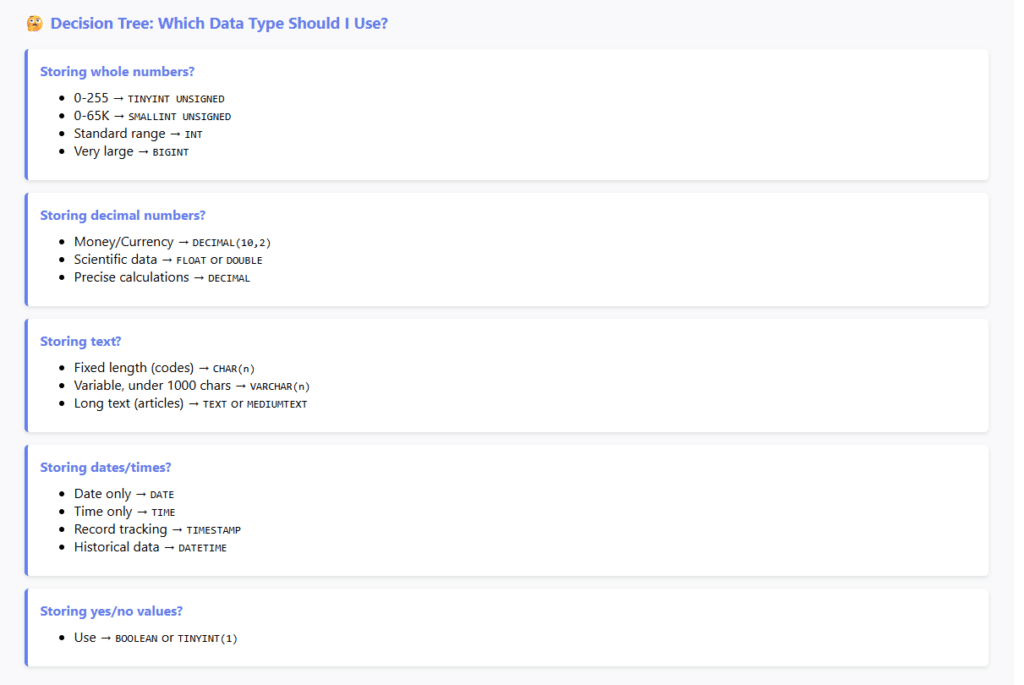
Selecting the appropriate data type is crucial for database performance, storage efficiency, and data integrity. Here’s a systematic approach:
1. Understand Your Data Requirements
-- Bad: Oversized types waste space
CREATE TABLE products_bad ( product_id BIGINT, -- INT would suffice for most cases name VARCHAR(1000), -- Most names are under 100 chars price DOUBLE, -- Use DECIMAL for money! stock INT -- Could be SMALLINT for most inventories );
-- Good: Right-sized types
CREATE TABLE products_good ( product_id INT PRIMARY KEY AUTO_INCREMENT, name VARCHAR(200) NOT NULL, price DECIMAL(10, 2) NOT NULL, stock SMALLINT UNSIGNED DEFAULT 0, INDEX idx_name (name(20)) );
2. Consider Future Growth
| Scenario | Poor Choice | Better Choice | Reasoning |
|---|---|---|---|
| User IDs | SMALLINT | INT | 65K users may be outgrown quickly |
| Transaction amounts | FLOAT | DECIMAL(12,2) | Prevents rounding errors in money |
| Timestamps | TIMESTAMP | DATETIME | Avoid 2038 problem for long-term data |
| Country codes | VARCHAR(50) | CHAR(2) | ISO codes are always 2 characters |
3. Performance Considerations
💡 Performance Tips:
- Smaller is faster: Use the smallest type that accommodates your data range
- Fixed beats variable: CHAR performs slightly better than VARCHAR for fixed-length data
- Integer indexing: Integer keys are faster to index and search than strings
- Avoid TEXT/BLOB in frequent queries: These types slow down sorting and searching
- Use appropriate precision: Don’t use DECIMAL(20,10) when DECIMAL(10,2) suffices
4. Data Type Conversion Examples
-- Explicit type conversion
SELECT CAST(price AS DECIMAL(10,2)) AS formatted_price,
CONVERT(order_date, DATE) AS date_only,
CAST(quantity AS UNSIGNED) AS positive_quantity FROM orders;
-- Implicit conversion (automatic)
SELECT * FROM products WHERE product_id = '123';
-- String '123' converted to INT
-- Date formatting and conversion
SELECT DATE_FORMAT(created_at, '%Y-%m-%d') AS date_only, TIME_FORMAT(created_at, '%H:%i:%s') AS time_only, UNIX_TIMESTAMP(created_at) AS unix_time FROM users;
SQL Data Types Best Practices
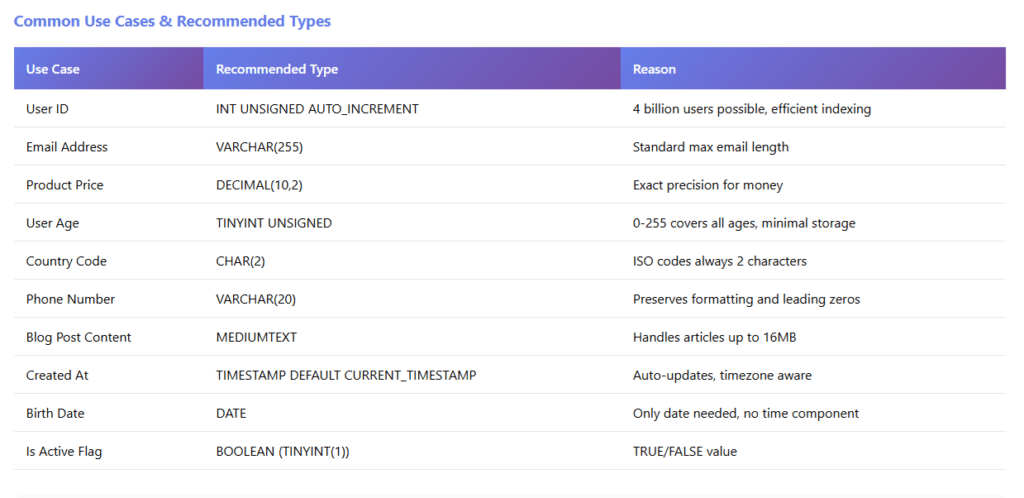
1. Data Integrity and Validation
-- Use constraints with appropriate data types
CREATE TABLE employees (
employee_id INT PRIMARY KEY AUTO_INCREMENT,
first_name VARCHAR(50) NOT NULL,
last_name VARCHAR(50) NOT NULL,
email VARCHAR(255) NOT NULL UNIQUE,
salary DECIMAL(10, 2) CHECK (salary > 0),
hire_date DATE NOT NULL,
birth_date DATE CHECK (birth_date < CURDATE()),
department_id SMALLINT, is_active BOOLEAN DEFAULT TRUE,
CONSTRAINT chk_hire_after_birth CHECK (hire_date > birth_date + INTERVAL 16 YEAR) );
2. Optimize Storage and Indexing
-- Efficient table design
CREATE TABLE blog_posts (
post_id INT PRIMARY KEY AUTO_INCREMENT,
title VARCHAR(200) NOT NULL,
slug VARCHAR(200) NOT NULL UNIQUE,
excerpt TEXT, -- Short summary content MEDIUMTEXT,
-- Full article
author_id INT NOT NULL,
category_id SMALLINT,
view_count INT UNSIGNED DEFAULT 0,
is_published BOOLEAN DEFAULT FALSE,
published_at DATETIME,
created_at TIMESTAMP DEFAULT CURRENT_TIMESTAMP,
updated_at TIMESTAMP DEFAULT CURRENT_TIMESTAMP ON UPDATE CURRENT_TIMESTAMP,
-- Indexes for common queries
INDEX idx_author (author_id), INDEX idx_category (category_id), INDEX idx_published (is_published, published_at), FULLTEXT INDEX idx_search (title, excerpt) ) ENGINE=InnoDB;
3. Common Mistakes to Avoid
❌ Common Data Type Mistakes:
- Using VARCHAR for fixed-length data: Use CHAR for country codes, status flags
- Storing phone numbers as INT: Use VARCHAR – leading zeros matter!
- Using TEXT for short strings: VARCHAR is more efficient for fields under 1000 chars
- Forgetting UNSIGNED for non-negative values: Doubles your positive range
- Using DOUBLE for currency: Always use DECIMAL for financial data
- Oversizing columns: VARCHAR(1000) when most values are under 50 chars
- Not considering NULL: Use NOT NULL when appropriate to save storage
4. Database-Specific Considerations
-- MySQL specific features
CREATE TABLE mysql_example (
id INT AUTO_INCREMENT PRIMARY KEY,
status ENUM('active', 'inactive') DEFAULT 'active',
tags SET('featured', 'premium', 'sale'), data JSON ) ENGINE=InnoDB CHARACTER SET utf8mb4;
-- PostgreSQL specific features
CREATE TABLE postgres_example (
id SERIAL PRIMARY KEY,
data JSONB,
-- Binary JSON, faster queries tags TEXT[], -- Array type ip_address INET, -- IP address type price_range INT4RANGE -- Range type );
-- SQL Server specific features
CREATE TABLE sqlserver_example ( id INT IDENTITY(1,1) PRIMARY KEY, unique_id UNIQUEIDENTIFIER DEFAULT NEWID(), data NVARCHAR(MAX), -- Unicode support created_at DATETIME2 DEFAULT GETDATE() );
5. Documentation and Naming Conventions
-- Well-documented table with clear naming
CREATE TABLE customer_orders (
-- Primary key order_id BIGINT PRIMARY KEY AUTO_INCREMENT COMMENT 'Unique order identifier',
-- Foreign keys customer_id INT NOT NULL COMMENT 'Reference to customers table',
shipping_address_id INT COMMENT 'Reference to addresses table',
-- Order details order_number VARCHAR(20) NOT NULL UNIQUE COMMENT 'Human-readable order number', total_amount DECIMAL(12, 2) NOT NULL COMMENT 'Total order value in USD',
tax_amount DECIMAL(10, 2) DEFAULT 0 COMMENT 'Tax amount in USD',
shipping_cost DECIMAL(8, 2) DEFAULT 0 COMMENT 'Shipping fee in USD',
-- Status tracking order_status ENUM('pending', 'confirmed', 'shipped', 'delivered', 'cancelled') DEFAULT 'pending' COMMENT 'Current order status',
-- Timestamps order_date DATETIME NOT NULL DEFAULT CURRENT_TIMESTAMP COMMENT 'Order placement date', shipped_date DATETIME COMMENT 'Date order was shipped',
delivered_date DATETIME COMMENT 'Date order was delivered',
-- Indexes for performance
INDEX idx_customer (customer_id),
INDEX idx_status (order_status),
INDEX idx_order_date (order_date) ) ENGINE=InnoDB COMMENT='Customer order records';
Frequently Asked Questions (FAQ)
Q1: What’s the difference between CHAR and VARCHAR?
CHAR is a fixed-length data type that always uses the specified number of bytes, padding with spaces if necessary. VARCHAR is variable-length and uses only the storage needed for the actual data plus 1-2 bytes for length information.
Use CHAR for fixed-length data (like state codes: ‘CA’, ‘NY’) and VARCHAR for variable-length data (like names or email addresses). CHAR can be slightly faster for fixed-length data, but VARCHAR saves storage space for variable-length content.
Q2: Should I use FLOAT or DECIMAL for storing prices?
Always use DECIMAL for storing monetary values. FLOAT and DOUBLE are floating-point types that store approximate values and can introduce rounding errors. For example, 0.1 + 0.2 might not exactly equal 0.3 with floating-point arithmetic.
DECIMAL stores exact numeric values, making it perfect for financial calculations. Use DECIMAL(10, 2) for most currency values, which allows for values up to 99,999,999.99.
Q3: When should I use TEXT instead of VARCHAR?
Use VARCHAR when you know the maximum length of your data and it’s under 65,535 bytes. Use TEXT types (TEXT, MEDIUMTEXT, LONGTEXT) for large content where you don’t want to specify a maximum length.
VARCHAR is better for indexed columns and frequently searched fields. TEXT types are stored separately from the main table data and are better for large content like blog posts or article bodies that won’t be frequently searched or sorted.
Q4: What’s the difference between DATETIME and TIMESTAMP?
DATETIME stores date and time values from ‘1000-01-01 00:00:00’ to ‘9999-12-31 23:59:59’ and doesn’t change with timezone settings. It uses 8 bytes of storage.
TIMESTAMP stores values from ‘1970-01-01 00:00:01’ UTC to ‘2038-01-19 03:14:07’ UTC, automatically converts between UTC and the server timezone, and uses 4 bytes. Use DATETIME for historical dates or far future dates; use TIMESTAMP for tracking record creation/modification times.
Q5: How do I choose between INT, BIGINT, and SMALLINT?
Choose based on the range of values you need to store:
- TINYINT: 0-255 (or -128 to 127) – use for ages, small counts, boolean flags
- SMALLINT: 0-65,535 (or -32,768 to 32,767) – use for years, small inventories
- INT: ~4 billion values – use for most IDs, quantities, standard counters
- BIGINT: ~18 quintillion values – use for very large numbers, timestamps in milliseconds
Always add UNSIGNED if you know the value will never be negative – this doubles your positive range!
Q6: Should I store file content in the database or just file paths?
In most cases, store file paths or URLs rather than the actual file content. Storing files in the database (using BLOB types) can lead to:
- Slower database backups and performance
- Increased database size and memory usage
- Difficulty serving files efficiently to users
Instead, store files on a file system or object storage (like AWS S3) and save only the file path, name, and metadata in the database. This approach offers better performance, scalability, and cost-effectiveness.
Q7: Can I change a column’s data type after creating a table?
Yes, you can use the ALTER TABLE statement, but proceed with caution:
ALTER TABLE products MODIFY COLUMN price DECIMAL(12, 2);
-- Or in some databases:
ALTER TABLE products ALTER COLUMN price TYPE DECIMAL(12, 2);
Important considerations: (1) Changing data types can be time-consuming on large tables, (2) Data may be truncated or converted incorrectly, (3) Always backup your data first, (4) Test the change on a copy of the table, (5) Some changes may require rebuilding indexes.
Q8: What is the UNSIGNED modifier and when should I use it?
The UNSIGNED modifier removes the ability to store negative numbers, doubling the positive range of integer types. For example:
- INT: -2,147,483,648 to 2,147,483,647
- INT UNSIGNED: 0 to 4,294,967,295
Use UNSIGNED for columns that will never contain negative values, such as: quantities, counts, prices, IDs, and ages. This optimization saves storage space in some scenarios and makes your data model more explicit about valid values.
🎯 SQL Data Types Quiz
Test your knowledge with 7 challenging questions!
Conclusion: Mastering SQL Data Types
Understanding SQL data types is fundamental to database design and optimization. The right SQL data types choices impact not only how efficiently your database stores data, but also query performance, data integrity, and application reliability.
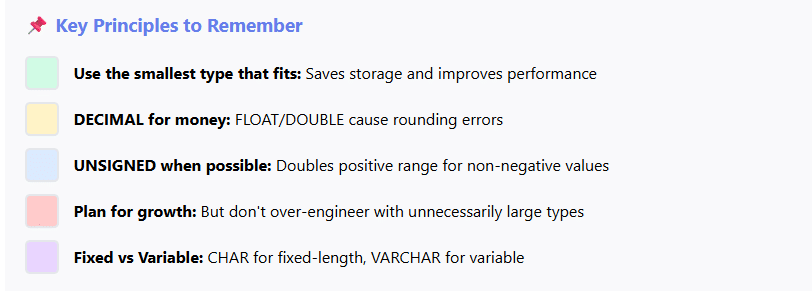
Key Takeaways:
- Choose the smallest data type that accommodates your data range to optimize storage and performance
- Always use DECIMAL for financial data to avoid rounding errors
- Consider using UNSIGNED modifiers for non-negative numeric values
- Use appropriate string types: CHAR for fixed-length, VARCHAR for variable-length data
- Understand the differences between DATETIME and TIMESTAMP for temporal data
- Document your schema and use clear, consistent naming conventions
- Plan for future growth but don’t over-engineer with unnecessarily large types
- Test data type changes on non-production environments first
By applying the principles and best practices covered in this guide, you’ll be well-equipped to design efficient, scalable database schemas that serve your applications reliably for years to come. Remember that good database design is an iterative process – don’t be afraid to refine your choices as you learn more about your data patterns and requirements.
🎓 Continue Learning:
- Practice creating tables with various data types in your preferred database system
- Experiment with type conversions and their performance implications
- Study the documentation specific to your database platform (MySQL, PostgreSQL, SQL Server, etc.)
- Analyze existing database schemas to understand real-world data type choices
- Use tools like EXPLAIN to understand how data types affect query performance