
What Is the SQL FETCH Clause?
If you have ever built a web application that displays data in pages — think search results, product listings, or transaction histories — you have already run into the core problem that SQL FETCH solves: how do you retrieve only a specific slice of rows from a large result set?
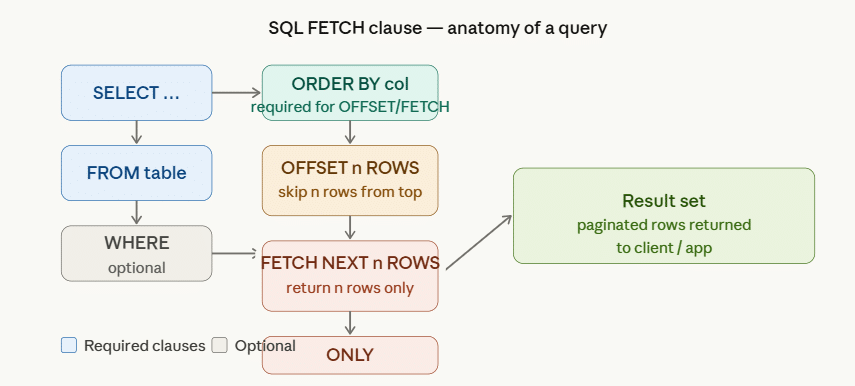
The SQL FETCH clause is part of the ISO SQL:2008 standard and is used alongside the OFFSET clause to skip a defined number of rows and then return a fixed number of rows from the remaining set. Together, OFFSET ... FETCH gives you precise, declarative control over result-set slicing without resorting to application-layer filtering or database-specific hacks.
In plain English:
- OFFSET says: “Skip the first N rows.”
- FETCH says: “Now return the next M rows.”
This two-part combination is the foundation of server-side SQL pagination — a critical technique for every database developer, backend engineer, and data analyst working with large datasets.
Why OFFSET FETCH Matters
Before OFFSET FETCH was standardised, developers relied on dialect-specific workarounds: TOP in SQL Server, LIMIT … OFFSET in MySQL and PostgreSQL, ROWNUM in Oracle. These work, but they create portability nightmares when you need to switch databases or write cross-platform SQL. OFFSET FETCH is the ANSI-standard answer supported by SQL Server 2012+, Oracle 12c+, PostgreSQL 8.4+, and IBM DB2 — making it the preferred approach in modern database development.
SQL FETCH vs. TOP vs. LIMIT — Key Differences
Understanding when to use FETCH versus alternatives is essential for writing portable, maintainable SQL.
| Feature | OFFSET … FETCH | TOP (SQL Server) | LIMIT … OFFSET (MySQL/PostgreSQL) |
|---|---|---|---|
| ANSI Standard? | ✅ Yes (SQL:2008) | ❌ No | ❌ No |
| Supports skipping rows? | ✅ Yes (OFFSET) | ❌ No | ✅ Yes |
| Requires ORDER BY? | ✅ Yes | ❌ No | ❌ No |
| Databases supported | SQL Server, Oracle, PostgreSQL, DB2 | SQL Server, MS Access | MySQL, PostgreSQL, SQLite |
| Best for pagination? | ✅ Excellent | ❌ Not designed for it | ✅ Good |
Key takeaway: If you are writing code that must run on multiple database engines, or if you need true pagination with row-skipping, OFFSET FETCH is the right choice. TOP is quick and convenient for one-off queries on SQL Server but does not support skipping rows. LIMIT … OFFSET is the MySQL/PostgreSQL equivalent and behaves similarly.
SQL FETCH Syntax Explained
The full OFFSET … FETCH syntax in SQL Server and Oracle looks like this:
sql
SELECT column1, column2, ...
FROM table_name
WHERE condition            -- optional
ORDER BY column_name [ASC | DESC]
OFFSET n ROWS
FETCH { FIRST | NEXT } m { ROW | ROWS } ONLY;
Let’s break down each component:
SELECT … FROM … WHERE
Standard clauses. The WHERE clause is optional but filters the working set before pagination is applied.
ORDER BY (Required!)
This is mandatory when using OFFSET FETCH. Without a deterministic sort order, the concept of “skip the first 10 rows” is meaningless — the database engine has no consistent way to determine which rows come first. Always specify ORDER BY with a unique or near-unique column (like a primary key or timestamp) for stable pagination.
OFFSET n ROWS
Specifies how many rows to skip from the beginning of the ordered result set. n must be zero or a positive integer. Using OFFSET 0 ROWS is valid and simply means: do not skip any rows — return from the beginning.
sql
OFFSET 10 ROWS   -- skip the first 10 rows
OFFSET 0 ROWS    -- skip nothing (start from row 1)
FETCH FIRST | NEXT m ROWS ONLY
Returns the next m rows after the offset. FIRST and NEXT are functionally identical — they are interchangeable keywords provided for readability. ROW and ROWS are also interchangeable. The ONLY keyword closes the clause.
sql
FETCH NEXT 5 ROWS ONLY    -- return the next 5 rows
FETCH FIRST 1 ROW ONLY    -- return only 1 row
OFFSET FETCH in Action — Real-World Examples
Let’s work through practical examples using a realistic table. We’ll use an Employees table with the following structure:
sql
CREATE TABLE Employees (
    EmployeeID   INT PRIMARY KEY,
    FirstName    VARCHAR(50),
    LastName     VARCHAR(50),
    Department   VARCHAR(50),
    Salary       DECIMAL(10, 2),
    HireDate     DATE
);
Example 1 — Basic FETCH: Return the First 5 Rows
sql
SELECT EmployeeID, FirstName, LastName, Salary
FROM Employees
ORDER BY Salary DESC
OFFSET 0 ROWS
FETCH NEXT 5 ROWS ONLY;
What this does: Orders all employees by salary (highest first), skips zero rows, and returns the top 5 earners. This is equivalent to “Page 1 of a paginated list with 5 results per page.”
Result (sample):
| EmployeeID | FirstName | LastName | Salary |
|---|---|---|---|
| 101 | Sarah | Mitchell | 120,000 |
| 203 | David | Chen | 115,500 |
| 87 | Priya | Sharma | 112,000 |
| 145 | James | O’Brien | 108,750 |
| 312 | Ana | Pereira | 105,000 |
Example 2 — OFFSET FETCH: Skip the First 10 Rows
sql
SELECT EmployeeID, FirstName, LastName, Salary
FROM Employees
ORDER BY Salary DESC
OFFSET 10 ROWS
FETCH NEXT 5 ROWS ONLY;
What this does: Skips the top 10 earners and returns employees ranked 11 through 15. This is “Page 3” of a 5-rows-per-page paginated result.
Example 3 — Single Row Fetch: Get the Nth Highest Salary
sql
SELECT EmployeeID, FirstName, LastName, Salary
FROM Employees
ORDER BY Salary DESC
OFFSET 2 ROWS
FETCH NEXT 1 ROW ONLY;
What this does: Skips the top 2 salaries and returns just one row — the employee with the 3rd-highest salary. This is a clean, readable alternative to the old correlated subquery approach.
Compare this to the legacy method:
sql
-- Legacy approach (less readable, harder to maintain)
SELECT TOP 1 Salary
FROM Employees
WHERE Salary NOT IN (
    SELECT TOP 2 Salary FROM Employees ORDER BY Salary DESC
)
ORDER BY Salary DESC;
The OFFSET FETCH version is not only more concise, it is also more performant on large datasets.
Example 4 — OFFSET FETCH with WHERE and Multi-Column ORDER BY
sql
SELECT EmployeeID, FirstName, LastName, Department, HireDate
FROM Employees
WHERE Department = 'Engineering'
ORDER BY HireDate ASC, LastName ASC
OFFSET 5 ROWS
FETCH NEXT 10 ROWS ONLY;
What this does: Filters to Engineering employees only, sorts by hire date (oldest first, then alphabetically by last name for ties), skips the first 5, and returns the next 10. This is exactly the kind of query you’d run to power a “View All” page with pagination on a staff directory.
Example 5 — Dynamic OFFSET with Variables (SQL Server)
In real applications, page numbers and page sizes come from user input, not hardcoded values. Here is how you implement dynamic pagination in SQL Server using variables:
sql
DECLARE @PageNumber INT = 3;
DECLARE @PageSize   INT = 10;

SELECT EmployeeID, FirstName, LastName, Department, Salary
FROM Employees
ORDER BY EmployeeID ASC
OFFSET (@PageNumber - 1) * @PageSize ROWS
FETCH NEXT @PageSize ROWS ONLY;
What this does: For page 3 with 10 rows per page, OFFSET computes to (3 - 1) × 10 = 20, meaning it skips 20 rows and returns rows 21–30. Change @PageNumber to any positive integer to navigate anywhere in the dataset.
Pagination with OFFSET FETCH
Pagination is the most common real-world use case for OFFSET FETCH. Here is a complete, production-ready pattern you can adapt for any application.
The Pagination Formula
OFFSET = (PageNumber - 1) × PageSize
FETCH  = PageSize
| Page | PageSize | OFFSET | Rows Returned |
|---|---|---|---|
| 1 | 10 | 0 | 1–10 |
| 2 | 10 | 10 | 11–20 |
| 3 | 10 | 20 | 21–30 |
| N | 10 | (N-1)×10 | N×10-9 to N×10 |
Getting the Total Row Count for UI Pagination
A complete pagination UI needs to know the total number of rows to render page navigation controls. The standard pattern is to run two queries: one for the count, one for the page data.
sql
-- Query 1: Total count (for "Page X of Y" UI)
SELECT COUNT(*) AS TotalRows
FROM Employees
WHERE Department = 'Engineering';

-- Query 2: Page data
SELECT EmployeeID, FirstName, LastName, Salary
FROM Employees
WHERE Department = 'Engineering'
ORDER BY EmployeeID ASC
OFFSET 20 ROWS
FETCH NEXT 10 ROWS ONLY;
Alternatively, in SQL Server you can use COUNT(*) OVER() in a single query to get both the total and the page data at once:
sql
SELECT
    EmployeeID,
    FirstName,
    LastName,
    Salary,
    COUNT(*) OVER() AS TotalRows
FROM Employees
WHERE Department = 'Engineering'
ORDER BY EmployeeID ASC
OFFSET 20 ROWS
FETCH NEXT 10 ROWS ONLY;
This is more expensive per query but reduces round-trips to the database — useful in high-latency environments.
SQL FETCH in Different Databases
SQL Server (2012 and later)
SQL Server fully supports the OFFSET … FETCH NEXT … ROWS ONLY syntax as shown throughout this tutorial. It was introduced in SQL Server 2012. If you are on SQL Server 2008 or earlier, you must use the ROW_NUMBER() workaround (see Advanced section below).
sql
-- SQL Server
SELECT ProductName, Price
FROM Products
ORDER BY Price DESC
OFFSET 10 ROWS
FETCH NEXT 5 ROWS ONLY;
Oracle Database (12c and later)
Oracle introduced OFFSET FETCH in Oracle 12c. The syntax is identical to SQL Server.
sql
-- Oracle 12c+
SELECT ProductName, Price
FROM Products
ORDER BY Price DESC
OFFSET 10 ROWS FETCH NEXT 5 ROWS ONLY;
For Oracle 11g and earlier, use ROWNUM:
sql
-- Oracle legacy (pre-12c)
SELECT * FROM (
    SELECT a.*, ROWNUM rn FROM (
        SELECT ProductName, Price FROM Products ORDER BY Price DESC
    ) a WHERE ROWNUM <= 15
) WHERE rn > 10;
PostgreSQL
PostgreSQL uses LIMIT … OFFSET as its native syntax, but it also supports FETCH as an alias since version 8.4. Both work correctly.
sql
-- PostgreSQL (ANSI standard)
SELECT ProductName, Price
FROM Products
ORDER BY Price DESC
OFFSET 10 ROWS
FETCH NEXT 5 ROWS ONLY;

-- PostgreSQL (native, same result)
SELECT ProductName, Price
FROM Products
ORDER BY Price DESC
LIMIT 5 OFFSET 10;
MySQL / MariaDB
MySQL does not support the FETCH clause. Use LIMIT … OFFSET:
sql
-- MySQL / MariaDB
SELECT ProductName, Price
FROM Products
ORDER BY Price DESC
LIMIT 5 OFFSET 10;
IBM DB2
DB2 supports the full ANSI OFFSET FETCH syntax.
sql
-- IBM DB2
SELECT ProductName, Price
FROM Products
ORDER BY Price DESC
OFFSET 10 ROWS
FETCH NEXT 5 ROWS ONLY;
Performance Tips for OFFSET FETCH
OFFSET FETCH is powerful, but it can cause performance problems on very large tables if used naively. Here are the most important optimisation techniques.
1. Always Index Your ORDER BY Column(s)
The single biggest performance improvement you can make. Without an index on the ORDER BY column, the database must sort the entire table for every query — which becomes extremely slow on millions of rows.
sql
-- Add an index on the column(s) used in ORDER BY
CREATE INDEX idx_employees_salary ON Employees(Salary DESC);
CREATE INDEX idx_employees_hiredate ON Employees(HireDate ASC, LastName ASC);
2. Avoid Large OFFSET Values (Keyset Pagination)
A common but often overlooked problem: as OFFSET grows larger, the query gets slower, not faster. This is because the database must still read and discard all the skipped rows before returning the page you want. On page 1,000 with 20 rows per page, it is discarding 19,980 rows on every query.
The solution for high-page-number scenarios is keyset pagination (also called cursor-based pagination or seek pagination):
sql
-- Instead of OFFSET, use the last seen value as a filter
-- "Get the next 10 employees after EmployeeID 5432"
SELECT EmployeeID, FirstName, LastName, Salary
FROM Employees
WHERE EmployeeID > 5432
ORDER BY EmployeeID ASC
FETCH NEXT 10 ROWS ONLY;
This approach performs consistently regardless of “page depth” because it uses an index seek rather than a scan-and-discard.
3. Use Covering Indexes
If your query selects only a few columns, create a covering index that includes all selected columns so the database does not need to touch the base table at all.
sql
CREATE INDEX idx_emp_covering
ON Employees(Salary DESC)
INCLUDE (EmployeeID, FirstName, LastName);
4. Avoid SELECT * with OFFSET FETCH
Always specify only the columns you need. SELECT * forces the engine to read every column from the table even if you only display three of them, wasting I/O and memory bandwidth — especially painful when paginating large rows.
Common Mistakes and How to Fix Them
Mistake 1: Missing ORDER BY
sql
-- ❌ ERROR: OFFSET requires ORDER BY
SELECT * FROM Products
OFFSET 5 ROWS
FETCH NEXT 10 ROWS ONLY;

-- ✅ CORRECT
SELECT * FROM Products
ORDER BY ProductID ASC
OFFSET 5 ROWS
FETCH NEXT 10 ROWS ONLY;
Error message in SQL Server: “The ORDER BY clause is invalid in views, inline functions, derived tables, subqueries, and common table expressions, unless TOP, OFFSET or FOR XML is also specified.”
Mistake 2: Negative OFFSET Values
sql
-- ❌ ERROR: OFFSET must be >= 0
OFFSET -5 ROWS

-- ✅ CORRECT: Clamp to zero when necessary
OFFSET CASE WHEN @Skip < 0 THEN 0 ELSE @Skip END ROWS
Mistake 3: Using FETCH Without OFFSET
In SQL Server, FETCH requires OFFSET. Always include the OFFSET clause, even if it is OFFSET 0 ROWS.
sql
-- ❌ ERROR in SQL Server (FETCH without OFFSET)
SELECT * FROM Products
ORDER BY ProductID
FETCH NEXT 5 ROWS ONLY;

-- ✅ CORRECT
SELECT * FROM Products
ORDER BY ProductID
OFFSET 0 ROWS
FETCH NEXT 5 ROWS ONLY;
Mistake 4: Non-Deterministic ORDER BY
If you order by a non-unique column, rows with the same value can appear in different positions across different pages, leading to missing or duplicated rows in paginated results.
sql
-- ❌ RISKY: Department is not unique — unstable pagination
ORDER BY Department ASC

-- ✅ STABLE: Add a unique tiebreaker
ORDER BY Department ASC, EmployeeID ASC
Mistake 5: Forgetting to Filter Before Paginating
Pagination should happen after filtering, not before. If you page through the full table and then filter, you waste resources reading rows you will discard.
sql
-- ✅ Filter first, then paginate
SELECT EmployeeID, FirstName, Salary
FROM Employees
WHERE Department = 'Sales'     -- filter applied first by the optimizer
ORDER BY Salary DESC
OFFSET 10 ROWS
FETCH NEXT 5 ROWS ONLY;
Advanced Use Cases
OFFSET FETCH in CTEs (Common Table Expressions)
sql
WITH RankedEmployees AS (
    SELECT
        EmployeeID,
        FirstName,
        LastName,
        Salary,
        DENSE_RANK() OVER (PARTITION BY Department ORDER BY Salary DESC) AS SalaryRank
    FROM Employees
)
SELECT EmployeeID, FirstName, LastName, Salary, SalaryRank
FROM RankedEmployees
WHERE SalaryRank <= 3
ORDER BY Department, SalaryRank
OFFSET 0 ROWS
FETCH NEXT 10 ROWS ONLY;
This returns the top 3 earners per department, then paginates those results — a powerful pattern for executive dashboards and departmental reports.
OFFSET FETCH in Stored Procedures
sql
CREATE PROCEDURE usp_GetEmployeesPaged
    @Department  VARCHAR(50),
    @PageNumber  INT = 1,
    @PageSize    INT = 10
AS
BEGIN
    SET NOCOUNT ON;

    SELECT
        EmployeeID,
        FirstName,
        LastName,
        Salary,
        HireDate
    FROM Employees
    WHERE Department = @Department
    ORDER BY HireDate DESC, EmployeeID ASC
    OFFSET (@PageNumber - 1) * @PageSize ROWS
    FETCH NEXT @PageSize ROWS ONLY;
END;
GO

-- Usage
EXEC usp_GetEmployeesPaged @Department = 'Engineering', @PageNumber = 2, @PageSize = 15;
ROW_NUMBER() Workaround for SQL Server 2008
If you are on SQL Server 2008 or earlier and cannot use OFFSET FETCH, use ROW_NUMBER():
sql
WITH NumberedRows AS (
    SELECT
        EmployeeID, FirstName, LastName, Salary,
        ROW_NUMBER() OVER (ORDER BY Salary DESC) AS RowNum
    FROM Employees
)
SELECT EmployeeID, FirstName, LastName, Salary
FROM NumberedRows
WHERE RowNum BETWEEN 11 AND 20;  -- Page 2 of 10-row pages
This is the classic workaround and still works on all versions of SQL Server.
Frequently Asked Questions (FAQ)
Q1. What is the difference between FETCH FIRST and FETCH NEXT?
They are completely interchangeable in SQL. FIRST is typically used when OFFSET 0 ROWS is specified (because you are fetching from the beginning), while NEXT is used with a non-zero offset (you are fetching the next set after skipping some). Both compile to the same execution plan.
Q2. Can I use OFFSET FETCH without ORDER BY?
No. In SQL Server, Oracle, and PostgreSQL, ORDER BY is mandatory when using OFFSET FETCH. The clause requires a deterministic ordering to know which rows to skip. Attempting to use it without ORDER BY will raise a syntax error.
Q3. Does OFFSET FETCH work in SQL Server 2008?
No. OFFSET FETCH was introduced in SQL Server 2012. For SQL Server 2008 and earlier, use the ROW_NUMBER() pattern shown in the Advanced section.
Q4. Is FETCH the same as LIMIT in SQL?
Functionally yes — FETCH NEXT n ROWS ONLY is the ANSI-standard equivalent of MySQL’s LIMIT n. The key differences are: FETCH is the SQL standard while LIMIT is a MySQL/PostgreSQL extension; FETCH is explicitly paired with OFFSET as separate clauses, while LIMIT n OFFSET m compresses both into one; and FETCH requires ORDER BY while LIMIT does not (though you should always use it).
Q5. What happens if OFFSET is larger than the total number of rows?
The query returns zero rows — no error is thrown. This is the correct behaviour and is useful for detecting the “last page” condition in paginated applications: if the result set is empty, you have gone past the last page.
Q6. Can OFFSET FETCH be used with aggregate queries?
Yes, but you typically paginate the grouped result set using a CTE or subquery:
sql
WITH DeptSalaries AS (
    SELECT Department, AVG(Salary) AS AvgSalary
    FROM Employees
    GROUP BY Department
)
SELECT Department, AvgSalary
FROM DeptSalaries
ORDER BY AvgSalary DESC
OFFSET 0 ROWS
FETCH NEXT 5 ROWS ONLY;
Q7. How do I get the total row count alongside paginated results?
Use COUNT(*) OVER() as a window function to include the total count in every row of the paginated result:
sql
SELECT
    EmployeeID, FirstName, Salary,
    COUNT(*) OVER() AS TotalCount
FROM Employees
ORDER BY Salary DESC
OFFSET 10 ROWS
FETCH NEXT 5 ROWS ONLY;
Q8. Which is faster — OFFSET FETCH or ROW_NUMBER()?
For small-to-medium offset values, OFFSET FETCH is generally faster because it is a native operation with direct query plan support. For very large offset values (deep pagination), ROW_NUMBER() with a BETWEEN filter can sometimes be more efficient. In practice, the difference is small — the bigger win comes from indexing the ORDER BY column correctly.
Q9. Can I use a variable for OFFSET and FETCH in SQL Server?
Yes. SQL Server allows expressions in both clauses:
sql
DECLARE @Skip INT = 20, @Take INT = 10;
SELECT * FROM Orders
ORDER BY OrderDate DESC
OFFSET @Skip ROWS
FETCH NEXT @Take ROWS ONLY;
Q10. Does MySQL support the FETCH clause?
MySQL does not support the OFFSET … FETCH syntax in the context of SELECT statements. Use LIMIT m OFFSET n instead. MySQL 8.0 introduced FETCH only in the context of window functions and cursor-based operations inside stored procedures — not as a standalone SELECT pagination clause.
Summary
The SQL FETCH clause, used together with OFFSET, is the ANSI-standard way to paginate query results and skip rows in any SQL result set. Key takeaways from this tutorial:
- Always pair
OFFSETandFETCHwith a deterministicORDER BYclause. - Use the formula
OFFSET (Page - 1) × PageSize ROWSto implement dynamic pagination. - For very deep pagination (large page numbers), consider keyset/cursor-based pagination instead of large OFFSET values to maintain consistent performance.
OFFSET FETCHis supported natively in SQL Server 2012+, Oracle 12c+, PostgreSQL 8.4+, and IBM DB2.- Index your
ORDER BYcolumns and avoidSELECT *to get the best performance from paginated queries.
Whether you are building an API endpoint, a reporting dashboard, or a data-processing pipeline, mastering OFFSET FETCH is an essential skill for any developer working with relational databases.