

Introduction to SQL ORDER BY Clause
Sorting data is one of the most fundamental operations in database management. Whether you’re organizing customer records by name, arranging sales data by revenue, or listing products by price, the SQL ORDER BY clause is your go-to tool for arranging query results in a meaningful order.
The ORDER BY clause in SQL allows you to sort your result set based on one or more columns in either ascending (ASC) or descending (DESC) order. Understanding how to effectively use ORDER BY is crucial for anyone working with databases, from beginners to advanced database administrators.
In this comprehensive guide, we’ll explore everything you need to know about the SQL ORDER BY clause, including syntax, practical examples, advanced sorting techniques, and best practices for optimal performance.
📌 What You’ll Learn:
- Basic ORDER BY syntax and usage
- Sorting in ascending and descending order
- Multi-column sorting techniques
- NULL value handling
- Performance optimization strategies
- Advanced sorting with CASE statements
- Database-specific implementations
What is the SQL ORDER BY Clause?
The ORDER BY clause is a SQL statement used to sort the result set of a query based on specified column(s). By default, ORDER BY sorts data in ascending order, but you can explicitly specify descending order when needed.
Key Characteristics of ORDER BY:
- Position: Always appears at the end of a SELECT statement
- Default behavior: Sorts in ascending order (A-Z, 0-9, oldest to newest)
- Multiple columns: Can sort by multiple columns simultaneously
- Flexibility: Works with various data types (numeric, text, date, etc.)
- NULL handling: NULL values are typically placed first (ascending) or last (descending)
Basic SQL ORDER BY Syntax

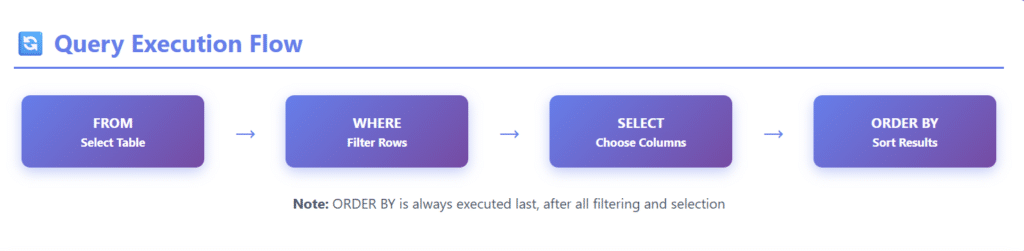
The basic syntax of the ORDER BY clause is straightforward:
SELECT column1, column2, column3
FROM table_name
ORDER BY column1 [ASC|DESC];
Syntax Breakdown:
SELECT: Specifies the columns to retrieveFROM: Identifies the table containing the dataORDER BY: Sorts the results[ASC|DESC]: Optional sorting direction (ASC is default)
Sorting in Ascending Order (ASC)
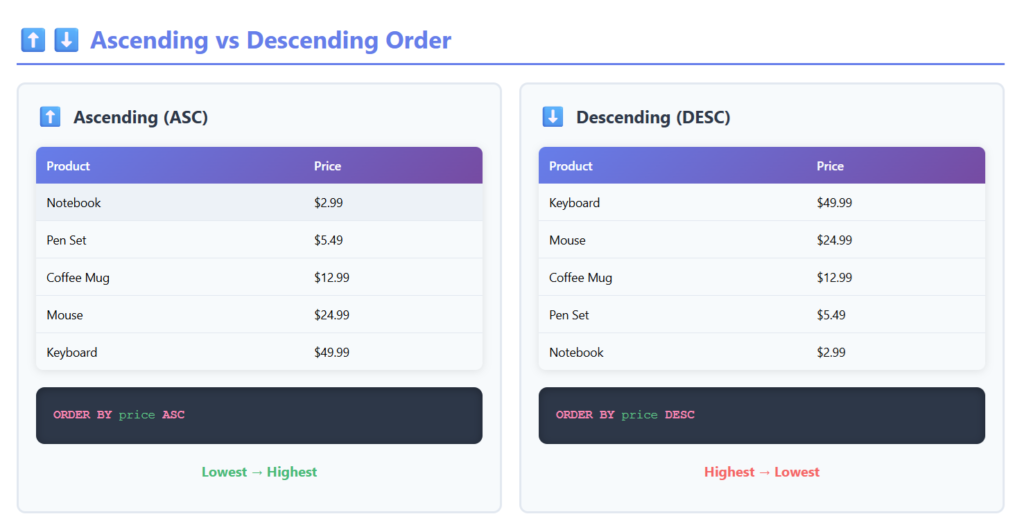
Ascending order arranges data from smallest to largest, A to Z, or oldest to newest. This is the default sorting behavior in SQL.
Example 1: Sorting Products by Price (Ascending)
SELECT product_name, price, category
FROM products
ORDER BY price ASC;
Result:
| product_name    | price  | category     |
|----------------|--------|--------------|
| Notebook       | 2.99   | Stationery   |
| Pen Set        | 5.49   | Stationery   |
| Coffee Mug     | 12.99  | Kitchen      |
| Wireless Mouse | 24.99  | Electronics  |
| Keyboard       | 49.99  | Electronics  |
Since ASC is the default, you can omit it:
SELECT product_name, price, category
FROM products
ORDER BY price;  -- Same result as ORDER BY price ASC
💡 Pro Tip: Since ASC is the default, you can omit it:
ORDER BY price;produces the same result asORDER BY price ASC;
Example 2: Sorting Employees by Name
SELECT employee_id, first_name, last_name, hire_date
FROM employees
ORDER BY last_name ASC, first_name ASC;
Result:
| employee_id | first_name | last_name | hire_date  |
|-------------|------------|-----------|------------|
| 104         | Alice      | Anderson  | 2020-03-15 |
| 108         | David      | Anderson  | 2021-06-22 |
| 102         | Bob        | Johnson   | 2019-11-08 |
| 105         | Emma       | Smith     | 2020-07-19 |
| 101         | John       | Wilson    | 2018-05-12 |
Sorting in Descending Order (DESC)
Descending order arranges data from largest to smallest, Z to A, or newest to oldest. You must explicitly specify DESC to sort in descending order.
Example 3: Sorting Sales by Revenue (Descending)
SELECT order_id, customer_name, order_total, order_date
FROM orders
ORDER BY order_total DESC;
Result:
| order_id | customer_name  | order_total | order_date |
|----------|----------------|-------------|------------|
| 1045     | Acme Corp      | 15750.00    | 2024-01-28 |
| 1052     | Global Tech    | 12340.50    | 2024-02-03 |
| 1038     | Nexus Ltd      | 9875.25     | 2024-01-15 |
| 1049     | Prime Solutions| 7250.00     | 2024-02-01 |
| 1041     | Tech Innovators| 5490.75     | 2024-01-22 |
This query helps identify your highest-value orders, which is crucial for sales analysis and customer relationship management.
Example 4: Finding Most Recent Records
SELECT post_id, title, author, published_date
FROM blog_posts
ORDER BY published_date DESC
LIMIT 10;
This query retrieves the 10 most recent blog posts, displaying them with the newest first—perfect for a “Recent Posts” section on a website.
Sorting by Multiple Columns
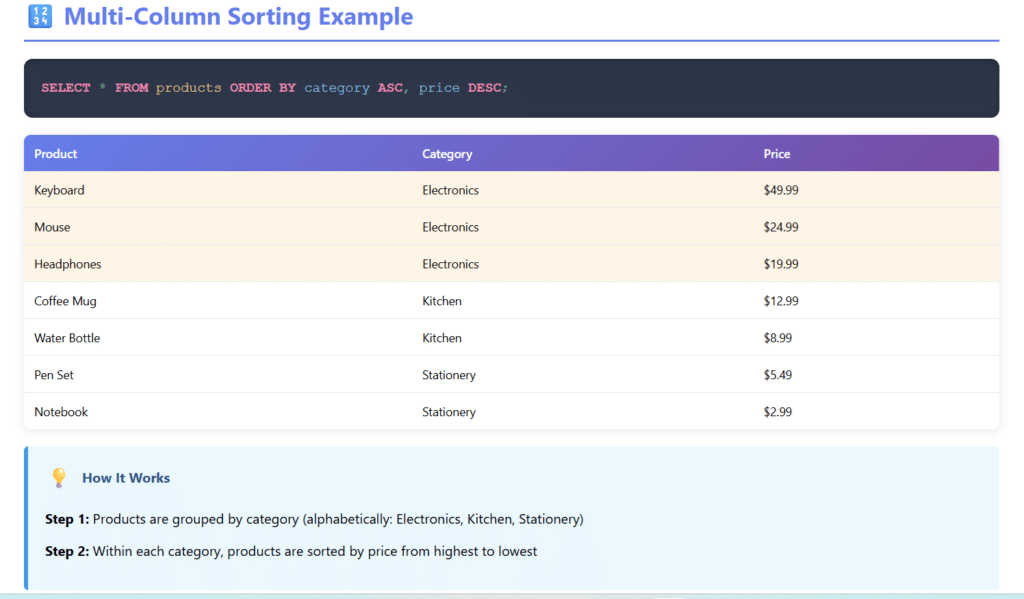
One of the most powerful features of ORDER BY is the ability to sort by multiple columns. SQL processes the columns from left to right, using subsequent columns as tiebreakers.
Example 5: Multi-Level Sorting
SELECT product_name, category, price, stock_quantity
FROM products
ORDER BY category ASC, price DESC;
Result:
| product_name     | category    | price  | stock_quantity |
|-----------------|-------------|--------|----------------|
| Keyboard        | Electronics | 49.99  | 23             |
| Wireless Mouse  | Electronics | 24.99  | 45             |
| Headphones      | Electronics | 19.99  | 67             |
| Coffee Mug      | Kitchen     | 12.99  | 102            |
| Water Bottle    | Kitchen     | 8.99   | 78             |
| Pen Set         | Stationery  | 5.49   | 234            |
| Notebook        | Stationery  | 2.99   | 456            |
How it works:
- First, products are grouped by category (alphabetically: Electronics, Kitchen, Stationery)
- Within each category, products are sorted by price from highest to lowest
Example 6: Complex Employee Sorting
SELECT employee_id, department, last_name, first_name, salary
FROM employees
ORDER BY department ASC, salary DESC, last_name ASC;
This query:
- Groups employees by department (alphabetically)
- Within each department, sorts by salary (highest to lowest)
- For employees with the same salary, sorts by last name (alphabetically)
Sorting by Column Position
Instead of column names, you can use column positions (numbers) in the ORDER BY clause. The numbering starts at 1 for the first column in the SELECT list.
Example 7: Sorting by Position
SELECT product_name, category, price
FROM products
ORDER BY 3 DESC, 2 ASC;
This is equivalent to:
SELECT product_name, category, price
FROM products
ORDER BY price DESC, category ASC;
Note: While this approach works, it’s generally not recommended for production code because:
- It’s less readable
- Column position changes if you modify the SELECT clause
- It can lead to maintenance issues
Sorting with Expressions and Functions
ORDER BY can sort results based on calculated expressions or SQL functions, not just raw column values.
Example 8: Sorting by Calculated Values
SELECT product_name, price, discount_percentage,
       (price - (price * discount_percentage / 100)) AS final_price
FROM products
ORDER BY final_price ASC;
This sorts products by their price after applying the discount.
Example 9: Sorting by String Functions
SELECT first_name, last_name, email
FROM customers
ORDER BY LENGTH(last_name) DESC, last_name ASC;
This query:
- First sorts customers by the length of their last name (longest first)
- Then alphabetically for customers with same-length last names
Example 10: Sorting by Date Parts
SELECT order_id, customer_name, order_date
FROM orders
ORDER BY YEAR(order_date) DESC, MONTH(order_date) DESC, DAY(order_date) DESC;
Or more simply:
SELECT order_id, customer_name, order_date
FROM orders
ORDER BY order_date DESC;
Handling NULL Values in ORDER BY
NULL values represent missing or unknown data. Different database systems handle NULLs differently when sorting:
Default NULL Behavior:
- Most databases (MySQL, PostgreSQL, SQL Server): NULLs appear first in ASC, last in DESC
- Oracle: NULLs appear last in ASC, first in DESC
Example 11: Sorting with NULL Values
SELECT employee_id, first_name, last_name, manager_id
FROM employees
ORDER BY manager_id ASC;
Result (MySQL/PostgreSQL):
| employee_id | first_name | last_name | manager_id |
|-------------|------------|-----------|------------|
| 101         | Sarah      | CEO       | NULL       |
| 102         | John       | VP        | NULL       |
| 103         | Alice      | Manager   | 101        |
| 104         | Bob        | Developer | 103        |
| 105         | Emma       | Designer  | 103        |
Controlling NULL Position
PostgreSQL:
SELECT employee_id, first_name, manager_id
FROM employees
ORDER BY manager_id ASC NULLS LAST;
MySQL (workaround):
SELECT employee_id, first_name, manager_id
FROM employees
ORDER BY manager_id IS NULL, manager_id ASC;
This places NULLs last by using manager_id IS NULL as the primary sort (FALSE=0 comes before TRUE=1).

CASE Statements in ORDER BY
CASE expressions allow you to create custom sorting logic based on conditions.
Example 12: Custom Priority Sorting
SELECT task_id, task_name, priority, due_date
FROM tasks
ORDER BY
    CASE priority
        WHEN 'Critical' THEN 1
        WHEN 'High' THEN 2
        WHEN 'Medium' THEN 3
        WHEN 'Low' THEN 4
        ELSE 5
    END,
    due_date ASC;
This ensures tasks are sorted by priority (Critical first, then High, etc.) and by due date within each priority level.
Example 13: Conditional Sorting Direction
SELECT product_name, category, price, in_stock
FROM products
ORDER BY
    CASE
        WHEN in_stock = 1 THEN 0
        ELSE 1
    END,
    price ASC;
This displays in-stock items first, followed by out-of-stock items, with both groups sorted by price.
ORDER BY with LIMIT and OFFSET
Combining ORDER BY with LIMIT is common for pagination and retrieving top results.
Example 14: Top N Records
-- Top 5 highest-paid employees
SELECT employee_id, first_name, last_name, salary
FROM employees
ORDER BY salary DESC
LIMIT 5;
Example 15: Pagination
-- Page 3 of results (assuming 20 items per page)
SELECT product_id, product_name, price
FROM products
ORDER BY product_name ASC
LIMIT 20 OFFSET 40;
SQL Server uses different syntax:
SELECT product_id, product_name, price
FROM products
ORDER BY product_name ASC
OFFSET 40 ROWS
FETCH NEXT 20 ROWS ONLY;

Performance Considerations and Optimization
Sorting can be resource-intensive, especially with large datasets. Here are optimization strategies:

1. Use Indexes
Creating indexes on columns used in ORDER BY dramatically improves performance.
-- Create index on frequently sorted column
CREATE INDEX idx_products_price ON products(price);

-- Multi-column index for composite sorting
CREATE INDEX idx_products_category_price ON products(category, price);
2. Limit Result Sets
Always use WHERE clauses to filter data before sorting:
-- Inefficient: Sorts all records then filters
SELECT * FROM orders
ORDER BY order_date DESC
LIMIT 100;

-- More efficient: Filters first, then sorts fewer records
SELECT * FROM orders
WHERE order_date >= DATE_SUB(CURDATE(), INTERVAL 30 DAY)
ORDER BY order_date DESC;
3. Avoid Sorting by Expressions
Sorting by calculated columns prevents index usage:
-- Slower: Can't use index on price
SELECT * FROM products
ORDER BY price * 1.1 DESC;

-- Faster: Sort by indexed column, calculate in application
SELECT *, price * 1.1 AS price_with_tax
FROM products
ORDER BY price DESC;
4. Consider Covering Indexes
A covering index includes all columns in the query, eliminating table lookups:
-- Covering index for this specific query
CREATE INDEX idx_covering ON products(category, price, product_name);

SELECT product_name, category, price
FROM products
ORDER BY category, price;
Common ORDER BY Use Cases
Use Case 1: E-commerce Product Listings
-- Sort products by relevance, rating, and price
SELECT product_id, product_name, average_rating, price, popularity_score
FROM products
WHERE category = 'Electronics'
ORDER BY popularity_score DESC, average_rating DESC, price ASC
LIMIT 50;
Use Case 2: Social Media Feeds
-- Display recent posts with engagement metrics
SELECT post_id, user_id, content, created_at, likes_count, comments_count
FROM posts
WHERE user_id IN (SELECT following_id FROM followers WHERE user_id = 12345)
ORDER BY created_at DESC
LIMIT 20;
Use Case 3: Leaderboards and Rankings
-- Gaming leaderboard
SELECT rank() OVER (ORDER BY total_score DESC) AS rank,
       player_name, total_score, games_played
FROM players
ORDER BY total_score DESC
LIMIT 100;
Use Case 4: Report Generation
-- Monthly sales report
SELECT
    DATE_FORMAT(order_date, '%Y-%m') AS month,
    COUNT(*) AS total_orders,
    SUM(order_total) AS revenue
FROM orders
WHERE order_date >= '2024-01-01'
GROUP BY DATE_FORMAT(order_date, '%Y-%m')
ORDER BY month DESC;
ORDER BY Across Different SQL Databases
While ORDER BY is standardized, there are subtle differences across database systems:
MySQL
-- Case-insensitive sorting (default for text)
SELECT name FROM users ORDER BY name;

-- Case-sensitive sorting
SELECT name FROM users ORDER BY BINARY name;
PostgreSQL
-- Control NULL position
SELECT * FROM employees ORDER BY salary NULLS FIRST;

-- Custom collation
SELECT * FROM products ORDER BY product_name COLLATE "C";
SQL Server
-- TOP instead of LIMIT
SELECT TOP 10 * FROM products ORDER BY price DESC;

-- Pagination with OFFSET/FETCH
SELECT * FROM products
ORDER BY price
OFFSET 20 ROWS FETCH NEXT 10 ROWS ONLY;
Oracle
-- ROWNUM approach (before 12c)
SELECT * FROM (
    SELECT * FROM products ORDER BY price DESC
) WHERE ROWNUM <= 10;

-- Modern approach (12c+)
SELECT * FROM products ORDER BY price DESC
FETCH FIRST 10 ROWS ONLY;
Best Practices for Using ORDER BY
- Always specify ORDER BY explicitly: Never rely on default row order
- Use meaningful column names: Avoid sorting by position numbers
- Create appropriate indexes: For frequently sorted columns
- Be consistent with NULL handling: Decide on a standard approach
- Test with large datasets: Performance issues often appear at scale
- Combine with WHERE clauses: Filter before sorting when possible
- Document complex sorting logic: Especially with CASE statements
- Consider database-specific optimizations: Each RDBMS has unique features
- Use ASC/DESC explicitly: Even though ASC is default, be explicit for clarity
- Monitor query performance: Use EXPLAIN plans to identify bottlenecks
Common Mistakes to Avoid
Mistake 1: Forgetting ORDER BY
-- WRONG: No guaranteed order
SELECT * FROM products WHERE category = 'Books';

-- CORRECT: Explicit ordering
SELECT * FROM products WHERE category = 'Books' ORDER BY title ASC;
Mistake 2: Sorting After LIMIT (in subqueries)
-- WRONG: Limits first, then sorts
SELECT * FROM (
    SELECT * FROM orders LIMIT 100
) AS subquery
ORDER BY order_date DESC;

-- CORRECT: Sorts first, then limits
SELECT * FROM orders
ORDER BY order_date DESC
LIMIT 100;
Mistake 3: Inconsistent Multi-Column Sorting
-- UNCLEAR: What's the actual order?
SELECT * FROM products
ORDER BY category, price DESC, stock_quantity;

-- CLEAR: Explicit directions
SELECT * FROM products
ORDER BY category ASC, price DESC, stock_quantity ASC;
Advanced ORDER BY Techniques
Random Ordering
-- MySQL
SELECT * FROM products ORDER BY RAND() LIMIT 10;

-- PostgreSQL
SELECT * FROM products ORDER BY RANDOM() LIMIT 10;

-- SQL Server
SELECT TOP 10 * FROM products ORDER BY NEWID();
Weighted Sorting
SELECT product_name, price, rating, reviews_count,
       (rating * 0.6 + (reviews_count / 100) * 0.4) AS weighted_score
FROM products
ORDER BY weighted_score DESC;
Field-Specific Ordering
-- MySQL FIELD function
SELECT product_id, product_name, size
FROM products
WHERE size IN ('Small', 'Medium', 'Large', 'X-Large')
ORDER BY FIELD(size, 'Small', 'Medium', 'Large', 'X-Large');
Conclusion
The SQL ORDER BY clause is an essential tool for organizing and presenting data in a meaningful way. Whether you’re building reports, creating user interfaces, or analyzing data, mastering ORDER BY enables you to control exactly how your results appear.
Key Takeaways:
- ORDER BY sorts query results in ascending (ASC) or descending (DESC) order
- Default sorting is ascending; DESC must be specified explicitly
- Multiple columns can be used for hierarchical sorting
- Performance optimization through indexing is crucial for large datasets
- Different databases have subtle variations in ORDER BY implementation
- Combining ORDER BY with WHERE, LIMIT, and other clauses creates powerful queries
By understanding the concepts covered in this guide—from basic syntax to advanced techniques and optimization strategies—you’ll be well-equipped to sort data efficiently and effectively in any SQL database environment.
Remember: Always specify ORDER BY explicitly when the order of results matters. Relying on default behavior can lead to unpredictable results and difficult-to-debug issues in your applications.
Frequently Asked Questions (FAQ)
1. What is the default sorting order in SQL ORDER BY?
The default sorting order is ascending (ASC). If you don’t specify ASC or DESC, SQL will sort the data from lowest to highest (A-Z for text, smallest to largest for numbers, and oldest to newest for dates).
2. Can I sort by a column that isn’t in the SELECT clause?
Yes, in most cases you can sort by columns that aren’t selected. However, when using DISTINCT or GROUP BY, you typically can only sort by columns that appear in the SELECT list.
sql
-- This works
SELECT product_name FROM products ORDER BY price DESC;

-- This may fail with DISTINCT
SELECT DISTINCT category FROM products ORDER BY price DESC;  -- Error in some databases
3. How do I sort data randomly in SQL?
Different databases have different functions for random sorting:
- MySQL:
ORDER BY RAND() - PostgreSQL:
ORDER BY RANDOM() - SQL Server:
ORDER BY NEWID() - Oracle:
ORDER BY DBMS_RANDOM.VALUE
Note: Random sorting can be slow on large tables and isn’t recommended for production use on large datasets.
4. What’s the difference between ORDER BY and GROUP BY?
ORDER BY sorts the result set for display purposes, while GROUP BY aggregates rows with the same values into summary rows (used with aggregate functions like COUNT, SUM, AVG). ORDER BY comes after GROUP BY in SQL queries.
sql
-- GROUP BY aggregates, ORDER BY sorts the aggregated results
SELECT category, COUNT(*) as product_count
FROM products
GROUP BY category
ORDER BY product_count DESC;
5. Does ORDER BY affect query performance?
Yes, sorting can impact performance, especially on large datasets without proper indexes. To optimize:
- Create indexes on frequently sorted columns
- Filter data with WHERE before sorting
- Limit result sets with LIMIT/TOP
- Avoid sorting by calculated expressions when possible
6. How are NULL values handled in ORDER BY?
NULL handling varies by database:
- MySQL, PostgreSQL, SQL Server: NULLs first in ascending order, last in descending
- Oracle: NULLs last in ascending order, first in descending
You can control NULL positioning:
- PostgreSQL:
ORDER BY column NULLS FIRSTorNULLS LAST - MySQL:
ORDER BY column IS NULL, column ASC(places NULLs last)
7. Can I use ORDER BY with aggregate functions?
Yes, you can sort by aggregate functions when using GROUP BY:
SELECT category, AVG(price) as avg_price
FROM products
GROUP BY category
ORDER BY avg_price DESC;
8. What’s the maximum number of columns I can sort by?
Technically, most databases support sorting by many columns (often 100+), but practically:
- Sorting by 3-5 columns is common
- More than 5-6 columns becomes difficult to manage
- Each additional sort column adds computational overhead
9. Can ORDER BY be used in subqueries?
ORDER BY in subqueries is generally only useful when combined with LIMIT/TOP to get a specific subset:
-- Useful: Get top 5 sales, then use in outer query
SELECT * FROM (
    SELECT * FROM orders ORDER BY total DESC LIMIT 5
) AS top_orders
WHERE customer_id = 123;

-- Useless: ORDER BY ignored without LIMIT
SELECT * FROM (
    SELECT * FROM orders ORDER BY total DESC
) AS subquery;
10. How do I sort alphanumeric data correctly?
Standard ORDER BY treats alphanumeric data as strings, which can lead to unexpected results:
-- String sorting: "Item-1", "Item-10", "Item-2", "Item-20"
SELECT name FROM products ORDER BY name;
For natural sorting (Item-1, Item-2, Item-10, Item-20), you need database-specific solutions:
MySQL:
ORDER BY CAST(REGEXP_SUBSTR(name, '[0-9]+') AS UNSIGNED)
PostgreSQL:
ORDER BY REGEXP_REPLACE(name, '[^0-9]', '', 'g')::INTEGER
Test Your Knowledge: SQL ORDER BY Quiz
Ready to test what you’ve learned? Take this interactive quiz to assess your understanding of SQL ORDER BY!
🎯 SQL ORDER BY Quiz
Test your knowledge on SQL ORDER BY clause! Select the correct answer for each question.