
Introduction: Why SQL LIMIT and OFFSET Matter
Every developer working with databases eventually faces the same challenge: your query returns thousands of rows, but you only need a handful. Whether you are building a blog feed, an e-commerce product listing, or a leaderboard, displaying all records at once is impractical and slow.
That is exactly where the SQL LIMIT and OFFSET clauses come in.
These two keywords give you precise control over how many rows a query returns and where in the result set it starts reading. Mastering them is essential for building efficient, user-friendly applications with proper database pagination.
In this guide, you will learn:
- What LIMIT and OFFSET do and how they work together
- The correct syntax for MySQL, PostgreSQL, and SQLite
- Real-world use cases with working SQL examples
- How OFFSET pagination compares to keyset (cursor) pagination
- Performance tips and common mistakes to avoid
- Frequently asked questions answered by a database professional
Whether you are a beginner writing your first SELECT query or an experienced developer looking to optimize large-scale pagination, this guide covers everything you need.
What Is the SQL LIMIT Clause?
The SQL LIMIT clause restricts the number of rows returned by a SELECT statement. Instead of fetching every matching record from the database, LIMIT tells the database engine to stop after a specified count.
Basic LIMIT Syntax
SELECT column1, column2
FROM table_name
WHERE condition
ORDER BY column1
LIMIT number_of_rows;
LIMIT Example — Fetching the Top 5 Products
Suppose you have a products table and want to show only the five most expensive items:
SELECT product_name, price
FROM products
ORDER BY price DESC
LIMIT 5;
Result:
| product_name | price |
| Laptop Pro 16” | 2499.99 |
| Gaming Monitor 4K | 1199.99 |
| Mechanical Keyboard | 349.99 |
| Wireless Mouse | 129.99 |
| USB-C Hub | 89.99 |
By adding ORDER BY price DESC before LIMIT, you ensure the results are deterministic — you always get the top 5, not just any 5.
Best Practice: Always pair LIMIT with an ORDER BY clause. Without it, the database can return rows in any order, making your “top N” results unpredictable and unreliable.
What Is the SQL OFFSET Clause?
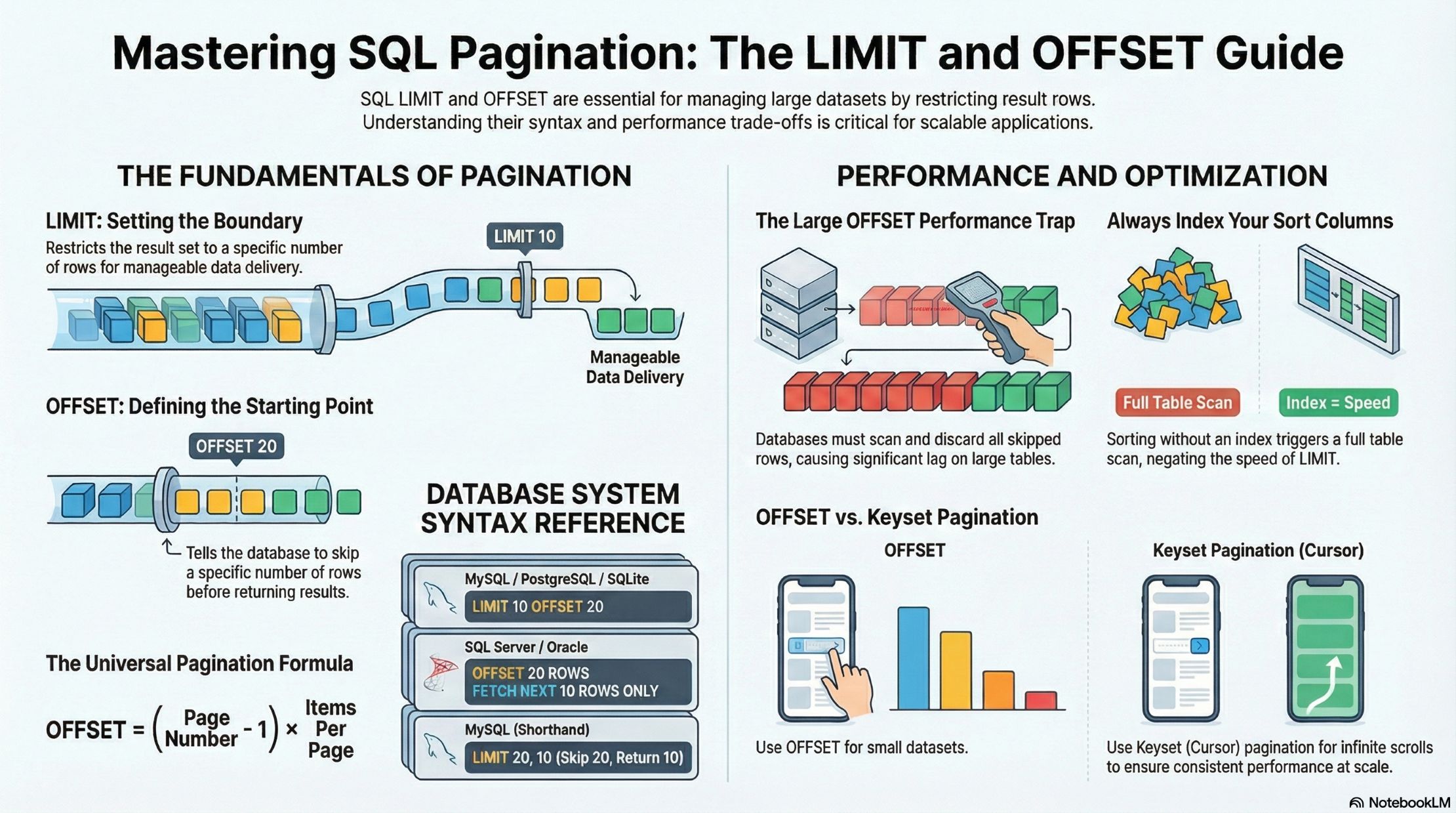
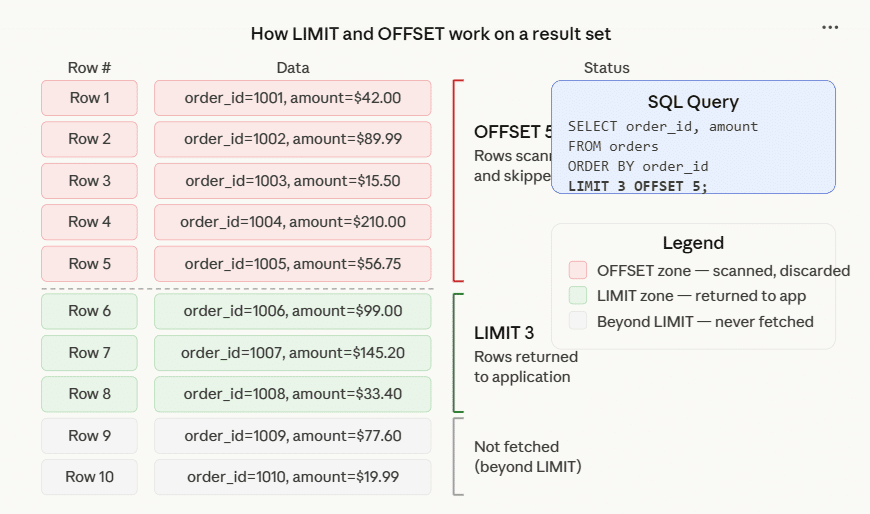
The SQL OFFSET clause tells the database to skip a specified number of rows before it starts returning results. On its own, OFFSET is rarely used. It becomes powerful when combined with LIMIT to implement pagination.
OFFSET Syntax
SELECT column1, column2
FROM table_name
ORDER BY column1
LIMIT number_of_rows OFFSET rows_to_skip;
OFFSET Example — Skipping the First 10 Rows
SELECT product_name, price
FROM products
ORDER BY price DESC
LIMIT 5 OFFSET 10;
This query skips the first 10 rows and returns the next 5. In a paginated product listing, this would be page 3 (assuming 5 items per page).
How LIMIT and OFFSET Work Together for Pagination
Database pagination is the process of dividing a large result set into smaller, manageable pages. The LIMIT and OFFSET combination is the most common approach for implementing it in SQL.
The Pagination Formula
OFFSET = (page_number – 1) × items_per_page
| Page | LIMIT | OFFSET | Rows Returned |
| 1 | 10 | 0 | Rows 1–10 |
| 2 | 10 | 10 | Rows 11–20 |
| 3 | 10 | 20 | Rows 21–30 |
| 4 | 10 | 30 | Rows 31–40 |
Full Pagination Example
Imagine an articles table in a blogging platform. A user is on page 4, and you show 10 articles per page:
-- Page 4, 10 articles per page
SELECT article_id, title, author, published_date
FROM articles
WHERE status = 'published'
ORDER BY published_date DESC
LIMIT 10 OFFSET 30;
This returns articles 31–40 from the sorted result set — exactly what page 4 needs.
SQL LIMIT and OFFSET Syntax by Database
The LIMIT/OFFSET syntax varies slightly across database systems. Here is a quick reference:
MySQL and MariaDB
-- Standard syntax
SELECT * FROM employees ORDER BY salary DESC LIMIT 10 OFFSET 20;
-- Shorthand syntax (LIMIT offset, count)
SELECT * FROM employees ORDER BY salary DESC LIMIT 20, 10;
MySQL supports both forms. The shorthand LIMIT 20, 10 means “skip 20, return 10” — note the order is reversed from the standard form, which often causes confusion.
PostgreSQL
SELECT * FROM employees ORDER BY salary DESC LIMIT 10 OFFSET 20;
PostgreSQL uses the standard ANSI syntax. It also supports FETCH FIRST (discussed below).
SQLite
SELECT * FROM employees ORDER BY salary DESC LIMIT 10 OFFSET 20;
SQLite follows the same syntax as MySQL and PostgreSQL.
SQL Server (T-SQL) — No LIMIT, Use TOP or FETCH
SQL Server does not support the LIMIT keyword. Instead, use:
TOP (for simple row restriction):
SELECT TOP 10 * FROM employees ORDER BY salary DESC;
OFFSET-FETCH (for pagination):
SELECT * FROM employees
ORDER BY salary DESC
OFFSET 20 ROWS FETCH NEXT 10 ROWS ONLY;
Oracle SQL
Oracle also uses OFFSET-FETCH:
SELECT * FROM employees
ORDER BY salary DESC
OFFSET 20 ROWS FETCH NEXT 10 ROWS ONLY;
Or the older ROWNUM approach:
SELECT * FROM (
  SELECT * FROM employees ORDER BY salary DESC
)
WHERE ROWNUM <= 10;
ANSI SQL Standard — FETCH FIRST
The SQL standard syntax works in PostgreSQL, SQL Server, Oracle, and DB2:
SELECT * FROM employees
ORDER BY salary DESC
FETCH FIRST 10 ROWS ONLY;
-- With offset:
SELECT * FROM employees
ORDER BY salary DESC
OFFSET 20 ROWS FETCH NEXT 10 ROWS ONLY;
Real-World Use Cases for SQL LIMIT and OFFSET
1. Blog or News Feed Pagination
One of the most common uses of LIMIT and OFFSET is building paginated content feeds.
-- Show posts for page 2 (10 posts per page)
SELECT post_id, title, excerpt, author_name, created_at
FROM blog_posts
JOIN authors ON blog_posts.author_id = authors.id
WHERE blog_posts.status = 'published'
ORDER BY blog_posts.created_at DESC
LIMIT 10 OFFSET 10;
2. E-Commerce Product Listings
Online stores typically display products in grids of 12, 24, or 48 per page:
-- Category page: Electronics, page 3, 24 products per page
SELECT product_id, name, price, rating, thumbnail_url
FROM products
WHERE category_id = 5
  AND is_available = true
ORDER BY rating DESC, price ASC
LIMIT 24 OFFSET 48;
3. Leaderboards and Rankings
Displaying a specific range of a leaderboard (e.g., positions 11–20):
SELECT
  ROW_NUMBER() OVER (ORDER BY score DESC) AS rank,
  username,
  score,
  country
FROM game_scores
ORDER BY score DESC
LIMIT 10 OFFSET 10;
4. Data Export in Batches
When exporting large datasets, processing records in batches prevents memory overload:
-- Batch 1: first 1000 records
SELECT * FROM customer_orders
WHERE order_date >= '2024-01-01'
ORDER BY order_id
LIMIT 1000 OFFSET 0;
-- Batch 2: next 1000 records
SELECT * FROM customer_orders
WHERE order_date >= '2024-01-01'
ORDER BY order_id
LIMIT 1000 OFFSET 1000;
5. Admin Dashboards — Recent Activity
Admin panels often show the most recent N events or user actions:
-- Show last 25 failed login attempts
SELECT user_id, ip_address, attempted_at, error_code
FROM login_logs
WHERE success = false
ORDER BY attempted_at DESC
LIMIT 25;
Using LIMIT with Other SQL Clauses
LIMIT with WHERE
SELECT order_id, customer_name, total_amount
FROM orders
WHERE total_amount > 500
ORDER BY total_amount DESC
LIMIT 10;
The WHERE clause filters rows first; LIMIT then restricts the filtered results.
LIMIT with GROUP BY and HAVING
-- Top 5 categories by average product price (only those above $50 avg)
SELECT
  category_name,
  COUNT(*) AS product_count,
  ROUND(AVG(price), 2) AS avg_price
FROM products
JOIN categories ON products.category_id = categories.id
GROUP BY category_name
HAVING AVG(price) > 50
ORDER BY avg_price DESC
LIMIT 5;
LIMIT with JOINs
-- Top 10 customers by total spending (with their most recent order)
SELECT
  c.customer_id,
  c.name,
  c.email,
  SUM(o.total_amount) AS lifetime_value,
  MAX(o.order_date) AS last_order_date
FROM customers c
JOIN orders o ON c.customer_id = o.customer_id
GROUP BY c.customer_id, c.name, c.email
ORDER BY lifetime_value DESC
LIMIT 10;
LIMIT with Subqueries
-- Get reviews for the 3 highest-rated products
SELECT r.product_id, r.reviewer_name, r.rating, r.review_text
FROM reviews r
WHERE r.product_id IN (
  SELECT product_id
  FROM products
  ORDER BY rating DESC
  LIMIT 3
)
ORDER BY r.product_id, r.rating DESC;
Note: Some databases (older MySQL versions) do not support LIMIT inside subqueries in certain contexts. Use a derived table or CTE as an alternative.
OFFSET Pagination vs. Keyset (Cursor) Pagination
While OFFSET pagination is easy to implement, it has a well-known performance problem at scale. Understanding both approaches will help you choose the right one for your application.
The Problem with Large OFFSET Values
When you use OFFSET 10000 LIMIT 10, the database still scans and discards 10,000 rows before returning your 10. On a table with millions of records, this becomes increasingly slow.
— SLOW on large datasets: scans and discards 100,000 rows
SELECT * FROM orders ORDER BY created_at DESC LIMIT 10 OFFSET 100000;
Keyset Pagination (Cursor-Based)
Keyset pagination avoids scanning skipped rows by using a “cursor” — typically the last ID or timestamp from the previous page.
-- First page
SELECT order_id, customer_name, created_at
FROM orders
ORDER BY created_at DESC, order_id DESC
LIMIT 10;
-- Next page (using last values from previous page as cursor)
-- Last record from page 1: created_at = '2024-03-15 10:30:00', order_id = 9850
SELECT order_id, customer_name, created_at
FROM orders
WHERE (created_at, order_id) < ('2024-03-15 10:30:00', 9850)
ORDER BY created_at DESC, order_id DESC
LIMIT 10;
Comparison Table
| Feature | OFFSET Pagination | Keyset Pagination |
| Ease of implementation | Simple | More complex |
| Jump to arbitrary page | Yes | No |
| Performance on large data | Degrades with offset size | Consistent performance |
| Works with changing data | Can miss/duplicate rows | Stable |
| Real-time feeds | Not ideal | Ideal |
| UI “jump to page 50” feature | Supported | Not supported |
Rule of thumb: Use OFFSET pagination for small datasets or when users need to jump to a specific page. Use keyset pagination for large tables, infinite scroll, or real-time feeds.
Performance Tips for LIMIT and OFFSET
1. Always Use an Index on the ORDER BY Column
Without an index, the database performs a full table scan to sort results before applying LIMIT.
-- Add an index on the column used in ORDER BY
CREATE INDEX idx_orders_created_at ON orders(created_at DESC);

-- Now this query is much faster
SELECT * FROM orders ORDER BY created_at DESC LIMIT 10;
2. Use a Covering Index for Frequently Paginated Queries
A covering index includes all columns needed by the query, avoiding a secondary table lookup.
-- Covers order_id, customer_id, created_at, and status without hitting the main table
CREATE INDEX idx_orders_covering ON orders(created_at DESC, order_id, customer_id, status);
3. Avoid SELECT * with Pagination
Fetching unnecessary columns increases I/O. Only select what you need:
-- BAD: Fetches all columns
SELECT * FROM products ORDER BY price DESC LIMIT 20;

-- GOOD: Fetches only what is displayed
SELECT product_id, name, price, thumbnail_url FROM products ORDER BY price DESC LIMIT 20;
4. Use COUNT with Caution
Many pagination UIs show “Page 3 of 47.” This requires a total count query:
-- Get total count (can be slow on large tables)
SELECT COUNT(*) FROM orders WHERE status = 'completed';

-- Then get the page
SELECT * FROM orders WHERE status = 'completed' ORDER BY created_at DESC LIMIT 10 OFFSET 20;
For very large tables, consider caching the total count or using approximate count methods.
5. Consider LIMIT 1 for Existence Checks
Instead of COUNT(*) > 0, use LIMIT 1 for faster existence checks:
-- Slower: scans the entire result
SELECT COUNT(*) FROM users WHERE email = 'test@example.com';

-- Faster: stops after finding the first match
SELECT 1 FROM users WHERE email = 'test@example.com' LIMIT 1;
Common Mistakes and How to Avoid Them
Mistake 1: Using LIMIT Without ORDER BY
-- WRONG: Results can differ on every run
SELECT * FROM customers LIMIT 10;

-- CORRECT: Deterministic results
SELECT * FROM customers ORDER BY customer_id LIMIT 10;
Mistake 2: Confusing MySQL’s LIMIT Shorthand
-- WRONG intention: developer wanted 20 results starting from row 5
SELECT * FROM orders LIMIT 5, 20;
-- This actually means: skip 5, return 20

-- CLEARER: Use the explicit OFFSET keyword
SELECT * FROM orders LIMIT 20 OFFSET 5;
Mistake 3: Assuming OFFSET Is Zero-Indexed (It Is)
-- OFFSET 0 returns the FIRST row (not the second)
SELECT * FROM products ORDER BY id LIMIT 1 OFFSET 0; -- First product
SELECT * FROM products ORDER BY id LIMIT 1 OFFSET 1; -- Second product
Many developers mistakenly use OFFSET 1 when they want the first page, which actually skips the first row.
Mistake 4: LIMIT in Subqueries (MySQL Gotcha)
Older versions of MySQL do not allow LIMIT in subqueries used with IN:
-- May fail in older MySQL versions
SELECT * FROM reviews WHERE product_id IN (
  SELECT id FROM products ORDER BY rating DESC LIMIT 5
);

-- Workaround: use a derived table
SELECT r.* FROM reviews r
JOIN (
  SELECT id FROM products ORDER BY rating DESC LIMIT 5
) top_products ON r.product_id = top_products.id;
Mistake 5: Skipping Rows That Were Inserted Between Page Requests
With OFFSET pagination, if rows are added or deleted between page requests, users may see duplicate or missing items. Keyset pagination solves this.
LIMIT 0 — A Special Case for Schema Discovery
Using LIMIT 0 returns no rows but does return the column metadata. This is useful for developers who want to inspect a query’s result structure without fetching data:
-- Returns column names and types, but no rows
SELECT product_id, name, price, category
FROM products
WHERE 1=1
LIMIT 0;
Some ORMs and query builders use this technique internally for schema introspection.
Implementing Pagination in Application Code
Here is how LIMIT and OFFSET translate into application logic using Python with a PostgreSQL database:
def get_paginated_products(page: int, per_page: int = 10) -> dict:
“””
Fetch paginated products from the database.
Args:
page: Current page number (1-indexed)
per_page: Number of items per page
Returns:
Dictionary with data, total_count, page info
“””
offset = (page – 1) * per_page
# Get total count
count_query = “””
SELECT COUNT(*)
FROM products
WHERE is_available = TRUE
“””
total_count = db.execute(count_query).scalar()
# Get paginated data
data_query = “””
SELECT product_id, name, price, rating, category
FROM products
WHERE is_available = TRUE
ORDER BY rating DESC, product_id ASC
LIMIT %s OFFSET %s
“””
products = db.execute(data_query, (per_page, offset)).fetchall()
return {
“data”: products,
“page”: page,
“per_page”: per_page,
“total_count”: total_count,
“total_pages”: ceil(total_count / per_page),
“has_next”: page < ceil(total_count / per_page),
“has_prev”: page > 1
}
And the equivalent in Node.js with MySQL:
async function getPaginatedUsers(page = 1, perPage = 10) {
const offset = (page – 1) * perPage;
const [rows] = await db.query(
`SELECT user_id, username, email, created_at
FROM users
WHERE is_active = 1
ORDER BY created_at DESC
LIMIT ? OFFSET ?`,
[perPage, offset]
);
const [[{ total }]] = await db.query(
`SELECT COUNT(*) AS total FROM users WHERE is_active = 1`
);
return {
data: rows,
page,
perPage,
total,
totalPages: Math.ceil(total / perPage),
};
}
SQL LIMIT & OFFSET Quiz
Test your understanding of SQL pagination and row restriction with 7 multiple-choice questions.
FROM products
ORDER BY price DESC
LIMIT 5;
LIMIT 10, 5 mean?orders table has only 50 rows?ORDER BY order_id
LIMIT 10 OFFSET 500;
Question Breakdown
Frequently Asked Questions (FAQ)
Q1: What is the difference between LIMIT and TOP in SQL?
LIMIT is used in MySQL, PostgreSQL, and SQLite to restrict row counts. TOP is used in SQL Server and MS Access. Both achieve the same result but are not interchangeable across database systems. For cross-database compatibility, use the ANSI-standard FETCH FIRST N ROWS ONLY syntax.
Q2: Does LIMIT affect query performance?
Yes, positively in most cases. When combined with a proper index, LIMIT allows the database engine to stop scanning after finding enough rows. However, large OFFSET values can negate this benefit because the database still processes all skipped rows internally.
Q3: Can I use LIMIT with UPDATE or DELETE?
In MySQL, yes. LIMIT works with UPDATE and DELETE to restrict how many rows are affected:
-- Delete only the 10 oldest records
DELETE FROM logs ORDER BY created_at ASC LIMIT 10;

-- Update only 5 rows
UPDATE products SET is_featured = 0 ORDER BY last_updated ASC LIMIT 5;
PostgreSQL does not support LIMIT directly with UPDATE/DELETE. Use a subquery or CTE instead:
-- PostgreSQL: delete 10 oldest logs
DELETE FROM logs
WHERE log_id IN (
  SELECT log_id FROM logs ORDER BY created_at ASC LIMIT 10
);
Q4: What happens if OFFSET is larger than the total number of rows?
The query simply returns an empty result set — no error is thrown. This is important to handle in your application code to avoid showing empty pages to users.
-- Table has 100 rows, but offset is 500
SELECT * FROM products ORDER BY id LIMIT 10 OFFSET 500;
-- Returns: 0 rows (empty result)
Q5: Is OFFSET 0 the same as not using OFFSET at all?
Yes. OFFSET 0 skips zero rows, which is the default behavior when OFFSET is omitted. Both queries below return identical results:
SELECT * FROM products ORDER BY id LIMIT 10;
SELECT * FROM products ORDER BY id LIMIT 10 OFFSET 0;
Q6: Why is my pagination showing duplicate or missing records?
This typically happens when records are inserted or deleted between page requests. If a new record is added to page 1 after a user loads it, the old page 1’s last record gets pushed to page 2 — and appears on both pages for that user. The solution is either keyset pagination or snapshotting the dataset with a timestamp filter.
Q7: What is the maximum value I can use for LIMIT?
There is no enforced SQL maximum, but practical limits exist. MySQL accepts up to 18,446,744,073,709,551,615 (max BIGINT UNSIGNED) as a LIMIT value. In practice, using extremely large LIMIT values (like LIMIT 99999999) to “get all rows” is an anti-pattern — use LIMIT ALL in PostgreSQL or simply omit LIMIT if you genuinely need every row.
Q8: Can I use LIMIT with window functions?
Not directly in the same query level. Window functions execute after WHERE/GROUP BY but before the final ORDER BY/LIMIT. You need to wrap the window function in a subquery:
-- Get top 5 per category using ROW_NUMBER and LIMIT equivalent
SELECT *
FROM (
  SELECT
    product_id, name, category, price,
    ROW_NUMBER() OVER (PARTITION BY category ORDER BY price DESC) AS rn
  FROM products
) ranked
WHERE rn <= 5
ORDER BY category, rn;
Q9: Does the order of LIMIT and OFFSET matter?
In standard SQL, OFFSET comes after LIMIT. The correct order is LIMIT n OFFSET m. Reversing them results in a syntax error.
Q10: How does LIMIT interact with DISTINCT?
LIMIT is applied after DISTINCT. The database first eliminates duplicate rows, then LIMIT is applied to the deduplicated result:
-- Returns the first 5 distinct categories
SELECT DISTINCT category FROM products ORDER BY category LIMIT 5;
Summary: Key Takeaways
SQL LIMIT and OFFSET are foundational tools every database developer should master. Here is a concise recap:
- LIMIT restricts how many rows a query returns. Always pair it with ORDER BY for predictable results.
- OFFSET skips a specified number of rows, enabling pagination. Use the formula OFFSET = (page – 1) × page_size.
- Syntax varies by database: MySQL/PostgreSQL/SQLite use LIMIT n OFFSET m; SQL Server/Oracle use OFFSET m ROWS FETCH NEXT n ROWS ONLY.
- OFFSET pagination is simple and supports jumping to any page, but degrades with large offsets.
- Keyset pagination performs consistently at scale and is ideal for infinite scroll and real-time feeds.
- Always index the ORDER BY column(s) used in paginated queries for optimal performance.
- Avoid SELECT * in paginated queries — fetch only the columns your UI needs.
With these fundamentals in place, you can build fast, reliable paginated interfaces across any SQL-based application.