
Learn How Tables Connect Using INNER, LEFT, RIGHT & FULL JOIN
Welcome to the definitive guide on SQL Joins. If you have been writing basic SELECT * FROM table queries, you have only scratched the surface of what Structured Query Language can do. The real power of SQL lies not in querying a single list, but in its ability to take disparate pieces of information and stitch them together into a coherent story.
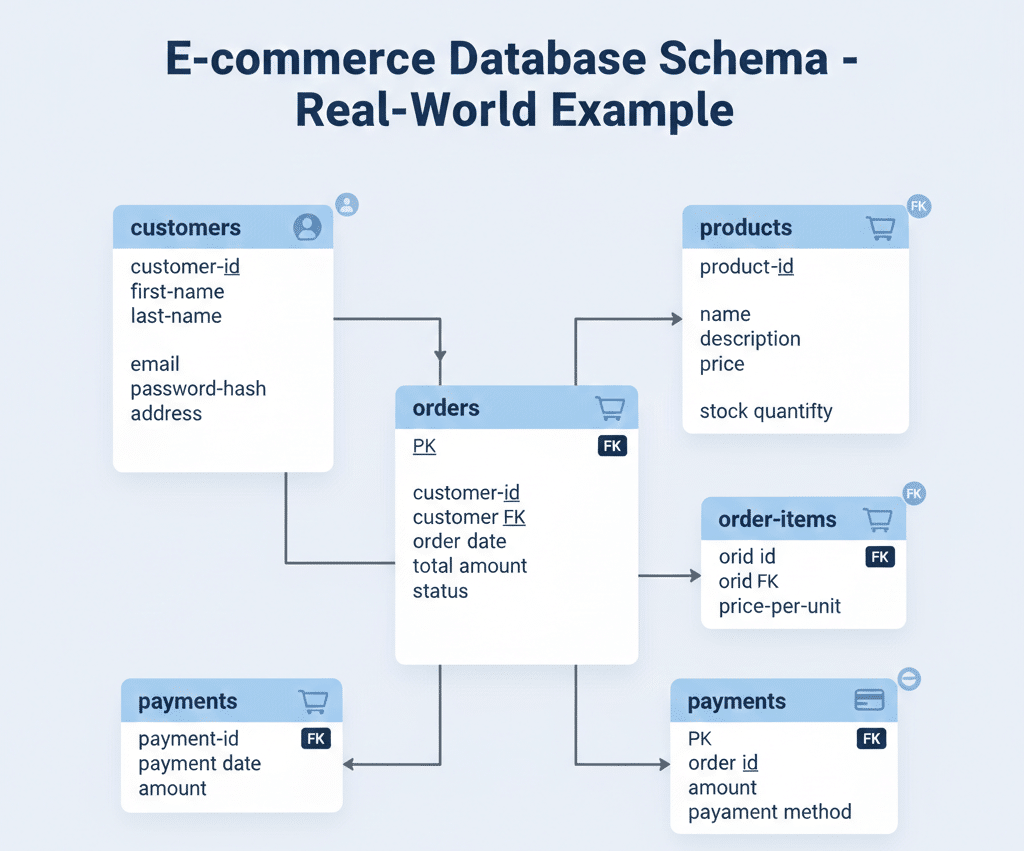
Real-world data is never stored in a single giant table. If it were, databases would be incredibly slow, full of duplicate errors, and impossible to manage. Instead, data is neatly organized into separate compartments.
In a typical e-commerce database, for example:
- Customers live in one table.
- Orders live in a completely different table.
- Payments, Products, and Shipping Details all live in their own separate tables.
While this separation is great for organization and storage efficiency, it creates a challenge for analysis. How do you see a customer’s name next to what they bought? Joins are the bridge that solves this problem. They allow SQL to combine related data and answer real business questions.
By the end of this extensive guide, you will transition from a beginner to an intermediate SQL user. You will:
- Deeply understand why joins are necessary in relational databases.
- Learn table relationships (Primary Keys and Foreign Keys) and how they act as the “glue” for your data.
- Master the four main types of joins: INNER, LEFT, RIGHT, & FULL JOIN.
- Read join queries confidently and understand how to filter and expand them.
🔗 Why Do We Need Joins?
To understand the solution, we must first fully understand the problem.
Imagine you are running a small online store. If you were using a simple spreadsheet, you might be tempted to put everything in one sheet. You would type “Rahul” in row 1, his phone number, his address, and then the product he bought. If Rahul buys a second item tomorrow, you have to type “Rahul,” his phone number, and his address all over again in row 2.
This is redundant. It wastes space and leads to errors (what if you misspell his address the second time?).
In a database, we avoid this by splitting information.
Consider this scenario with our sample data:
The customers table
This table holds strictly personal information about the people buying from you.
| customer_id | name |
|---|---|
| 1 | Rahul |
| 2 | Anita |
The orders table
This table holds strictly transactional data. notice there are no names here—only IDs.
| order_id | customer_id | amount |
|---|---|---|
| 101 | 1 | 500 |
| 102 | 1 | 1200 |
| 103 | 2 | 800 |
👉 The Business Question:
Your boss comes to you and asks: “Which customer placed which order, and what is the total amount for each person?”
If you look at just the orders table, you see that order #101 was placed by customer #1. But who is customer #1? The orders table doesn’t know. It only knows numbers.
If you look at the customers table, you see Rahul is customer #1. But you don’t know what he bought.
The data is split across tables. To answer the question, you need to mentally “draw a line” from the customer_id in the orders table to the customer_id in the customers table.
Joins allow SQL to do this connection automatically. They connect tables using a common column—in this case, customer_id.
🧩 Understanding Table Relationships
Before writing code, we need to understand the mechanics of the connection. Tables connect like puzzle pieces. One piece has a knob (Primary Key), and the other has a matching slot (Foreign Key).
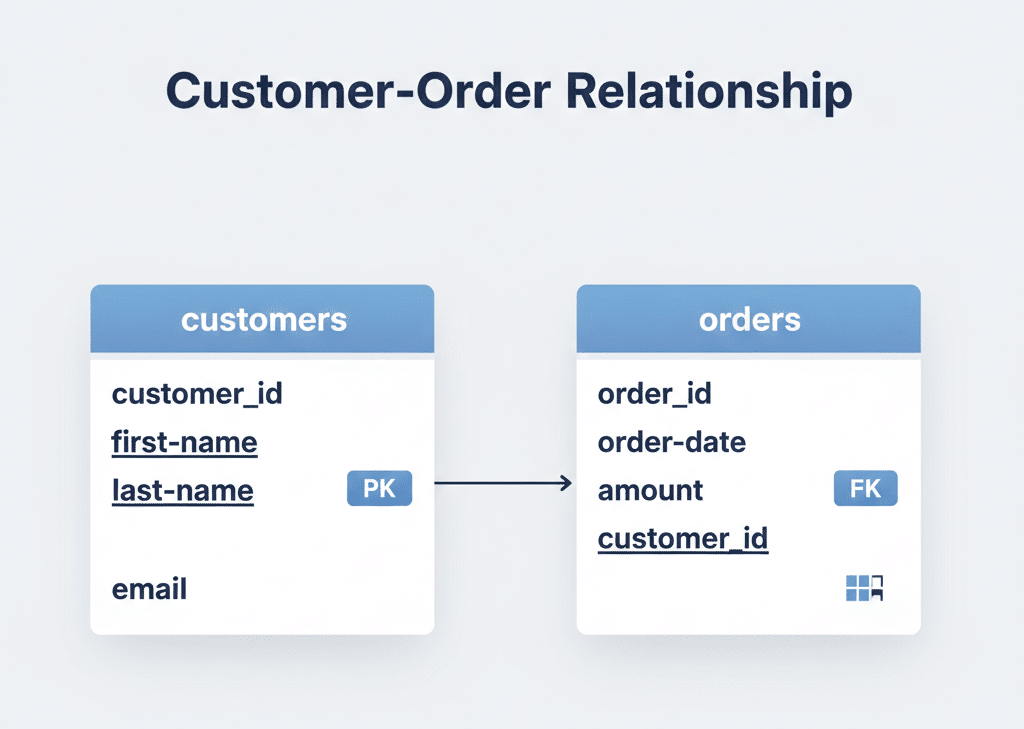
1. Primary Key (PK)
A Primary Key is a column that uniquely identifies each row in a table. It is the table’s fingerprint. No two rows can ever have the same Primary Key.
- Example:
customer_idin thecustomerstable. - Customer #1 is always Rahul. Customer #2 is always Anita. There is no ambiguity.
2. Foreign Key (FK)
A Foreign Key is a column that refers to the Primary Key of another table. It is the link or the reference point.
- Example:
customer_idin theorderstable. - When we see
1in thecustomer_idcolumn of the orders table, it is “pointing” tocustomer_id1 in the customers table.
📌 The Relationship: One-to-Many
In our example, notice that Rahul (ID 1) appears once in the customers table, but his ID appears twice in the orders table (for order 101 and 102).
- One customer can place Many orders.
- However, one specific order belongs to only one customer.
This is called a One-to-Many relationship, and it is the most common relationship you will encounter in database design. Understanding this helps you predict how many rows your query will return.
🔹 INNER JOIN (Most Common Join)
What is INNER JOIN?
The INNER JOIN is the default, most strictly filtered join type. Think of it as a Venn diagram where two circles overlap. The INNER JOIN returns only the overlapping part.
It looks at Table A and Table B and asks: “Do you have a match? Yes? Okay, I’ll show it. No? Then I will discard it.”
It returns only matching records from both tables. If a customer exists but has no orders, they are excluded. If an order exists but has no valid customer ID attached (rare, but possible), it is excluded.
Syntax
SELECT columns
FROM table1
INNER JOIN table2
ON condition;
Detailed Example
Let’s run this query on our data to see who bought what.
SELECT customers.name, orders.amount
FROM customers
INNER JOIN orders
ON customers.customer_id = orders.customer_id;
Breakdown of the Code:
FROM customers: We start with the customers table.INNER JOIN orders: We bring in the orders table.ON customers.customer_id = orders.customer_id: This is the crucial matching logic. We are telling SQL to line up the rows where the IDs are identical.
Result:
| name | amount |
|---|---|
| Rahul | 500 |
| Rahul | 1200 |
| Anita | 800 |
🧠 Meaning & Analysis:
- Row 1: SQL looked at Order 101. It saw
customer_idwas 1. It looked at the customers table, found ID 1 (Rahul), and matched them. Result: Rahul, 500.- Row 2: SQL looked at Order 102. It saw
customer_idwas 1. It looked at the customers table, found ID 1 (Rahul) again. Result: Rahul, 1200.- Row 3: SQL looked at Order 103. It saw
customer_idwas 2. It matched with Anita. Result: Anita, 800.
Key Takeaway: The query successfully combined English names with numeric financial data.
🔹 LEFT JOIN (Keep All Left Table Data)
What is LEFT JOIN?
While INNER JOIN is strict, LEFT JOIN is inclusive—but only for one side.
Imagine you want a list of all your customers, regardless of whether they have ever bought anything. Maybe you want to send a “Welcome” email to people who signed up but haven’t shopped yet. An INNER JOIN would fail here because it removes non-shoppers.
A LEFT JOIN says: “I don’t care if there is a match in the right table. Keep everything from the Left Table no matter what.”
It Returns:
- All records from the left table (the table mentioned first in the
FROMclause). - Matching records from the right table.
- NULL values if there is no match in the right table.
Example
Let’s pretend we have a third customer, “Sonia” (ID 3), in the customers table, but she hasn’t bought anything yet.
SELECT customers.name, orders.amount
FROM customers
LEFT JOIN orders
ON customers.customer_id = orders.customer_id;
📌 Use Case & Result Interpretation:
If Sonia (ID 3) exists in Customers but not Orders:
| name | amount |
|---|---|
| Rahul | 500 |
| Rahul | 1200 |
| Anita | 800 |
| Sonia | NULL |
Why NULL?
SQL tried to find an order for Sonia. It searched the orders table for customer_id = 3. It found nothing. It cannot put a number there because she spent $0, but “0” is a number. “NULL” means “absence of data.”
Meaning: Show me all customers—even those who haven’t placed orders yet. This is incredibly useful for finding “inactive” users.
🔹 RIGHT JOIN (Opposite of LEFT JOIN)
What is RIGHT JOIN?
RIGHT JOIN is simply the mirror image of LEFT JOIN. Instead of prioritizing the first table (Left), it prioritizes the second table (Right).
It Returns:
- All records from the right table.
- Matching records from the left table.
- NULL for the left side if there is no match.
Example
SELECT customers.name, orders.amount
FROM customers
RIGHT JOIN orders
ON customers.customer_id = orders.customer_id;
📌 Why is this less commonly used?
Functionally, RIGHT JOIN works perfectly fine. However, in the professional world, most developers read queries from top to bottom (Left to Right).
It is cognitively easier to say:
“Get me Customers (Left), and attach their Orders.”
Than to say:
“Get me Orders (Right), and attach the Customers who made them.”
Because you can achieve the exact same result by just swapping the table order and using a LEFT JOIN, the RIGHT JOIN is often avoided purely for readability.
🔹 FULL JOIN (Everything from Both Tables)
What is FULL JOIN?
FULL JOIN (sometimes called FULL OUTER JOIN) is the combination of both Left and Right joins. It is the “catch-all” net.
It Returns:
- All matching records.
- All records from the Left table (with NULLs on the right if no match).
- All records from the Right table (with NULLs on the left if no match).
Imagine you have a list of Customers and a separate list of event attendees.
- Some customers attended the event.
- Some customers did not attend.
- Some people attended the event but aren’t customers yet.
If you wanted a master list of everyone—customers, attendees, and those who are both—you would use a FULL JOIN.
Example
SELECT customers.name, orders.amount
FROM customers
FULL JOIN orders
ON customers.customer_id = orders.customer_id;
📌 Important Note on Support:
FULL JOIN is standard SQL, but not every database software supports it directly. For example, the very popular MySQL database does not have a FULL JOIN command. In those systems, you have to simulate it by writing a LEFT JOIN and a RIGHT JOIN and combining them with a UNION.
(This is an advanced topic, but good to know so you don’t panic if you get an error in MySQL!)
🧠 JOIN Types Summary (Beginner-Friendly)
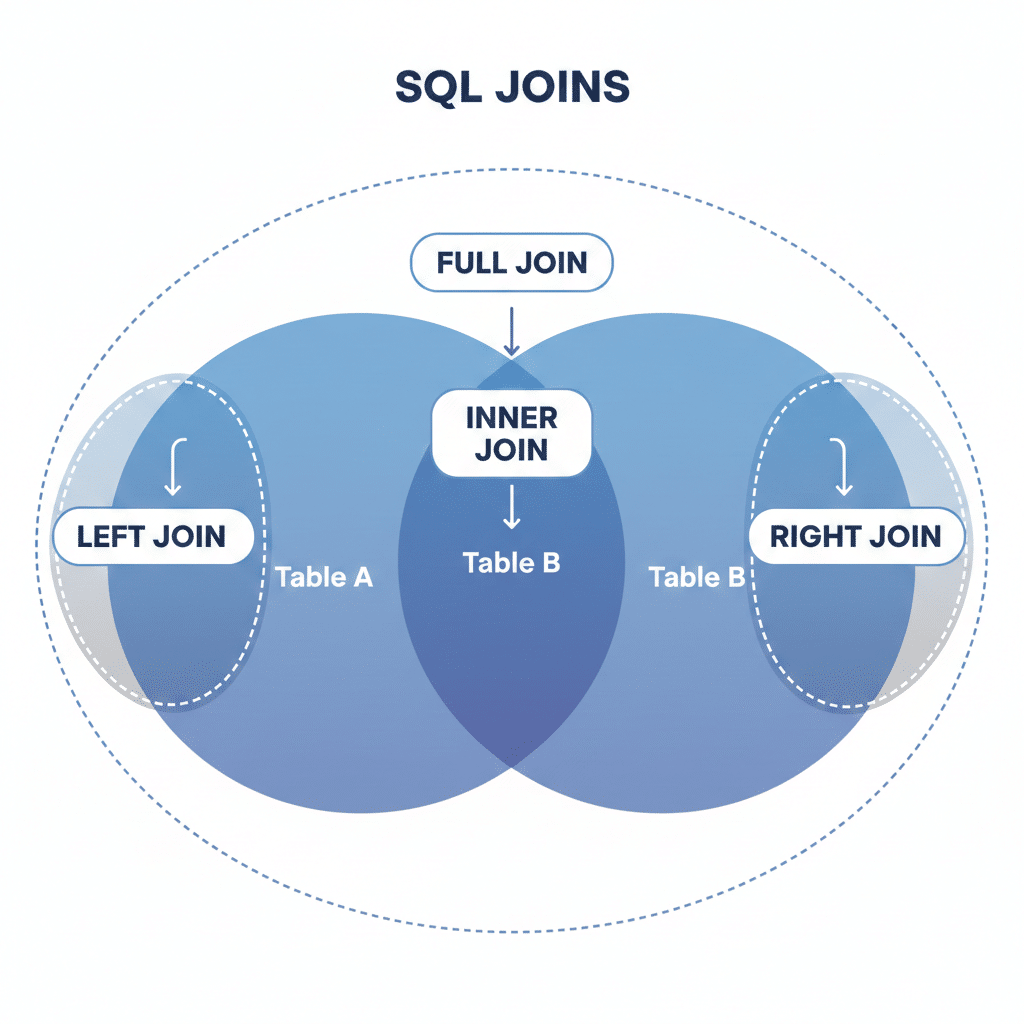
If you ever get confused, refer to this simple truth table.
| Join Type | What You Get | The Visual Analogy |
|---|---|---|
| INNER JOIN | Only matching rows | The overlap of two circles. |
| LEFT JOIN | All left + matching right | The whole left circle, plus the overlap. |
| RIGHT JOIN | All right + matching left | The whole right circle, plus the overlap. |
| FULL JOIN | Everything | Both circles entirely. |
🔹 JOIN with WHERE Clause
Just because you joined tables doesn’t mean you have to see all the data. You can filter joined data just like a normal table using the WHERE clause.
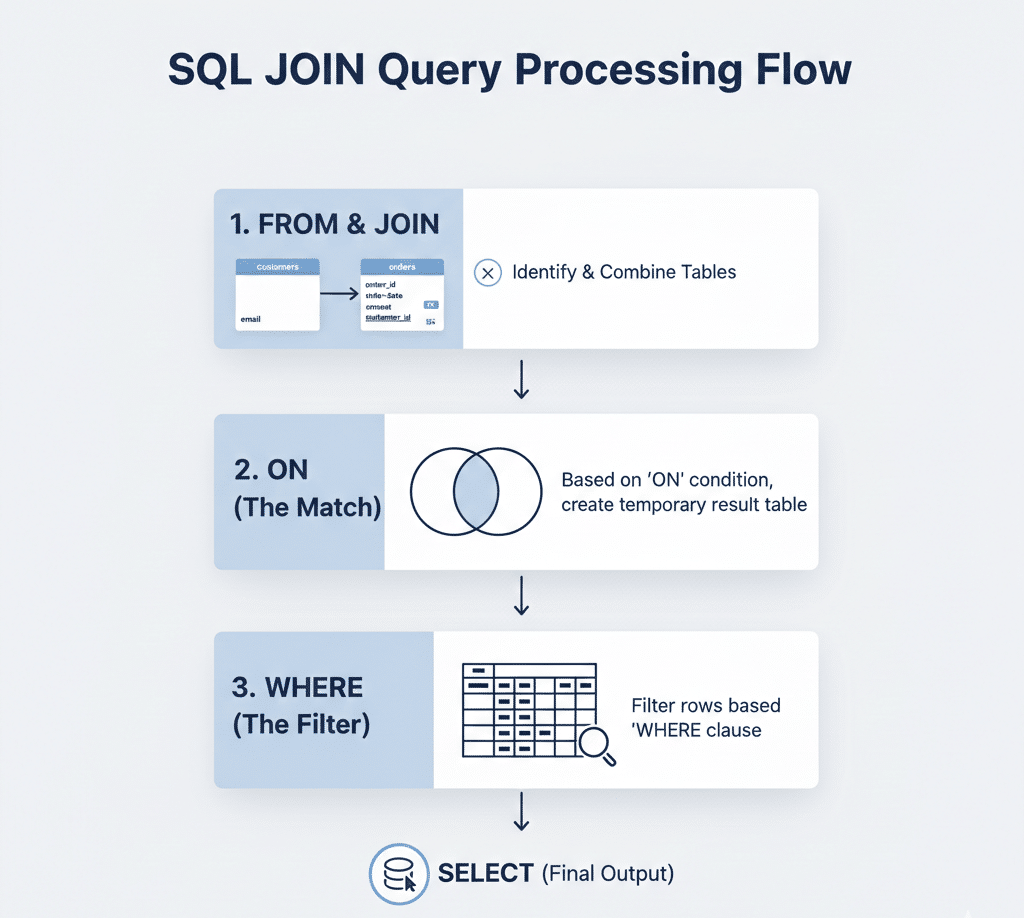
The order of operations usually goes like this:
- JOIN: SQL connects the tables to create a “virtual” combined table.
- WHERE: SQL filters that combined table based on your rules.
Example
Suppose we want to find high-value customers. We want the names of people who placed orders specifically greater than $1000.
SELECT customers.name, orders.amount
FROM customers
INNER JOIN orders
ON customers.customer_id = orders.customer_id
WHERE orders.amount > 1000;
🧠 Meaning:
SQL first joins Customers and Orders. It sees Rahul has two orders (500 and 1200) and Anita has one (800).
Then, the WHERE clause acts as a gatekeeper.
- 500 > 1000? No. (Row removed)
- 1200 > 1000? Yes. (Row kept)
- 800 > 1000? No. (Row removed)
Final Result: Only Rahul appears, with his 1200 amount.
🔹 JOIN Multiple Tables
In the real world, you rarely stop at two tables. Enterprise systems like Amazon or Netflix often join 10, 20, or even 30 tables in a single query to generate a report.
SQL handles this by “chaining” joins. You join Table A to Table B, and then join Table B to Table C.
Example:
Imagine we have a third table called payments which tracks how the customer paid (Credit Card, PayPal, Cash). The payments table links to the orders table via order_id.
SELECT customers.name, orders.amount, payments.payment_mode
FROM customers
INNER JOIN orders
ON customers.customer_id = orders.customer_id
INNER JOIN payments
ON orders.order_id = payments.order_id;
How it works:
- SQL grabs a Customer.
- It finds their Order.
- Using that Order’s ID, it jumps to the Payments table to find the Payment Mode.
📌 Real-world systems often join 3–5 tables.
This is standard practice. As long as the relationships (Foreign Keys) exist, you can keep chaining joins indefinitely.
⚠️ Common Beginner Mistakes (Very Important)
Joins can be tricky. Here are the most common pitfalls that trip up new developers.
❌ 1. Forgetting the ON condition
If you write SELECT * FROM TableA JOIN TableB but forget the ON ... = ... part, some databases will generate a Cartesian Product (Cross Join). This means every single row in Table A matches with every single row in Table B.
- If Table A has 100 rows and Table B has 100 rows, you get 10,000 rows of garbage data.
❌ 2. Joining wrong columns
Ensure you are matching the Foreign Key to the Primary Key. Don’t try to join customers.name to orders.amount. They might both be text or numbers, but the logic is flawed.
❌ 3. Using WHERE instead of ON
While you can filter connections in the WHERE clause (old-school syntax), it is much slower and harder to read. Always use ON for how tables connect, and WHERE for filtering the final results.
❌ 4. Confusing LEFT vs RIGHT JOIN
This leads to missing data.
✅ Best Practice:
Always ask yourself: “Which table contains the master list I want to keep intact?”
- Is it the Customer list?
- Is it the Product list?
That table goes on the LEFT (first in the FROM clause). Then use a LEFT JOIN. This is the safest way to ensure you don’t accidentally filter out important records.
🧪 Practice Section (Think Like SQL)
To truly learn, you must do. Try to solve these scenarios mentally or using a practice database.
1️⃣ Show all customers and their orders
- Goal: List every customer name and the amounts they spent.
- Query Type:
INNER JOIN(if you only want shoppers) orLEFT JOIN(if you want everyone).
2️⃣ Find customers who have no orders
- Goal: Find the “window shoppers.”
- Hint: Use a
LEFT JOINcustomers to orders. Then addWHERE orders.order_id IS NULL. This filters the results to show only the rows where the join failed to find a match.
3️⃣ List orders with customer names
- Goal: A simple report for the shipping team. They have the order ID, but they need to know what name to write on the box.
- Query Type:
INNER JOIN.
4️⃣ Show customers with order amount > 1000
- Goal: Identify VIP spenders.
- Hint: Join the tables first, then use
WHERE amount > 1000.
🗺️ What You Learned
Congratulations! You have navigated through the most critical concept in relational databases. Here is a summary of your new skills:
- Why joins are required: Data is split to reduce redundancy; joins bring it back together.
- Primary key & Foreign key: The “knob and slot” mechanism that allows tables to link up.
- INNER, LEFT, RIGHT, FULL JOIN: The four logic gates of data combination.
- Joining multiple tables: How to chain data from Customer → Order → Payment.
- Filtering joined data: Using
WHEREto refine your joined results.
At this point, you’ve crossed the bridge from beginner → intermediate SQL 🎯. You are no longer looking at single tables; you are looking at the entire database as an interconnected web of information.
👉 What’s Next?
Now that you can gather data from multiple sources, it is time to summarize and analyze it. Currently, our queries return lists of transactions (e.g., “Rahul: 500, Rahul: 1200”).
But a real business wants to know: “What is the TOTAL amount Rahul spent?” (i.e., 1700).
To do that, we need to learn how to count, sum, and average data.
Next Topic:
Aggregate Functions (SUM, COUNT, AVG, MIN, MAX)
👉 Continue to Aggregate Functions →
📩 Bonus Resource
To keep these concepts fresh:
👉 Download SQL Joins Cheat Sheet: A handy PDF reference for the 4 join types.
👉 Get weekly SQL challenges: Sign up for practice problems to keep your skills sharp.
🎯 Final Thought
If SQL were a human language like English or French:
- Keywords like
SELECTandFROMare the basic vocabulary. - Joins are the grammar.
Vocabulary allows you to name things, but grammar allows you to construct complex sentences and tell meaningful stories. Without joins, your data tells no story—it is just isolated words.
Once the concept of joins “clicks” in your mind, everything else in database engineering becomes significantly easier. 🚀
👉 Continue to Aggregate Functions →