

1. Introduction to SQL DISTINCT
When working with databases, duplicate data is a common challenge that can skew analysis, inflate result sets, and create confusion. The SQL DISTINCT keyword is your primary tool for eliminating duplicate rows from query results, ensuring you work with clean, unique data.
In this comprehensive guide, you’ll learn everything about the DISTINCT keyword, from basic usage to advanced optimization techniques. Whether you’re a beginner learning SQL or an experienced developer looking to optimize queries, this guide has you covered.
What Does SQL DISTINCT Do?
The DISTINCT keyword filters out duplicate rows from your query results, returning only unique combinations of the specified columns. It’s particularly useful when:
- Removing duplicate customer records
- Finding unique product categories or tags
- Identifying distinct user actions or events
- Analyzing unique combinations of attributes
- Cleaning data for reporting and analytics
Key Point: DISTINCT operates on the entire row (or specified columns), not individual values. When using DISTINCT with multiple columns, it returns unique combinations of those columns.
2. Basic Syntax and Usage
The SQL DISTINCT keyword is placed immediately after the SELECT statement and before the column names:
Basic Syntax: SELECT DISTINCT column1, column2, ... FROM table_name WHERE condition;
Components Breakdown
| Component | Description | Required |
|---|---|---|
SELECT | SQL command to retrieve data | Yes |
DISTINCT | Keyword to remove duplicates | Yes (for this operation) |
column1, column2 | Columns to select and evaluate for uniqueness | Yes |
FROM table_name | Source table | Yes |
WHERE condition | Optional filter criteria | No |
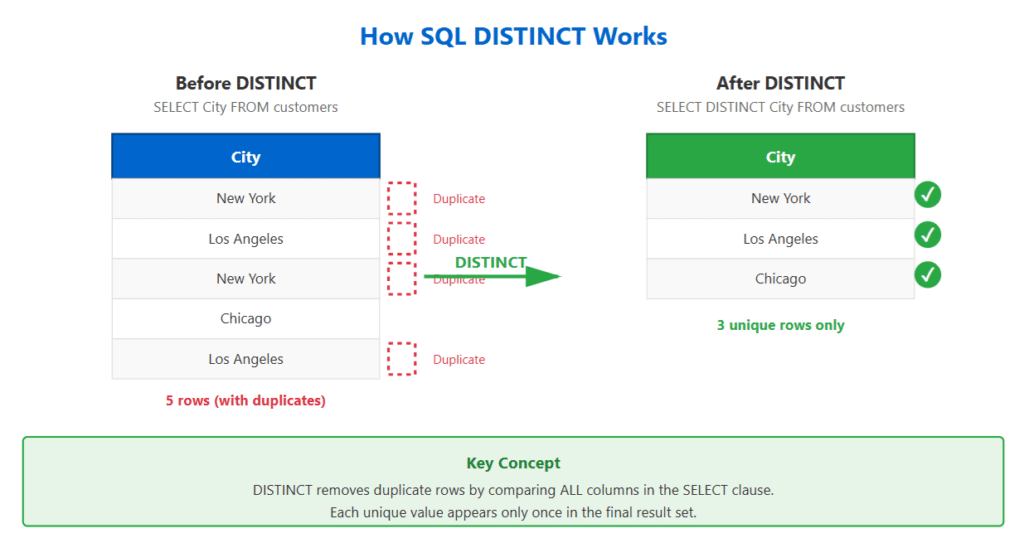
3. SQL DISTINCT with Single Column
Let’s start with the simplest use case: finding unique values in a single column.
Example: Customer Cities
Suppose you have a customers table and want to find all unique cities where your customers are located:
-- Sample customers table
+----+---------------+-------------+
| ID | CustomerName  | City        |
+----+---------------+-------------+
| 1  | John Smith    | New York    |
| 2  | Jane Doe      | Los Angeles |
| 3  | Bob Johnson   | New York    |
| 4  | Alice Brown   | Chicago     |
| 5  | Charlie Davis | Los Angeles |
+----+---------------+-------------+
— Query to get unique cities
SELECT DISTINCT City FROM customers;
Result:
+-------------+
| City        |
+-------------+
| New York    |
| Los Angeles |
| Chicago     |
+-------------+
Notice that even though “New York” appears twice and “Los Angeles” appears twice in the original table, the SQL DISTINCT keyword returns each city only once.
Pro Tip: When using DISTINCT with a single column, the result is automatically sorted in most database systems, though you shouldn’t rely on this behavior. Always use ORDER BY explicitly if you need sorted results.
4. SQL DISTINCT with Multiple Columns
When you use SQL DISTINCT with multiple columns, SQL returns unique combinations of those columns. This is crucial to understand for proper usage.
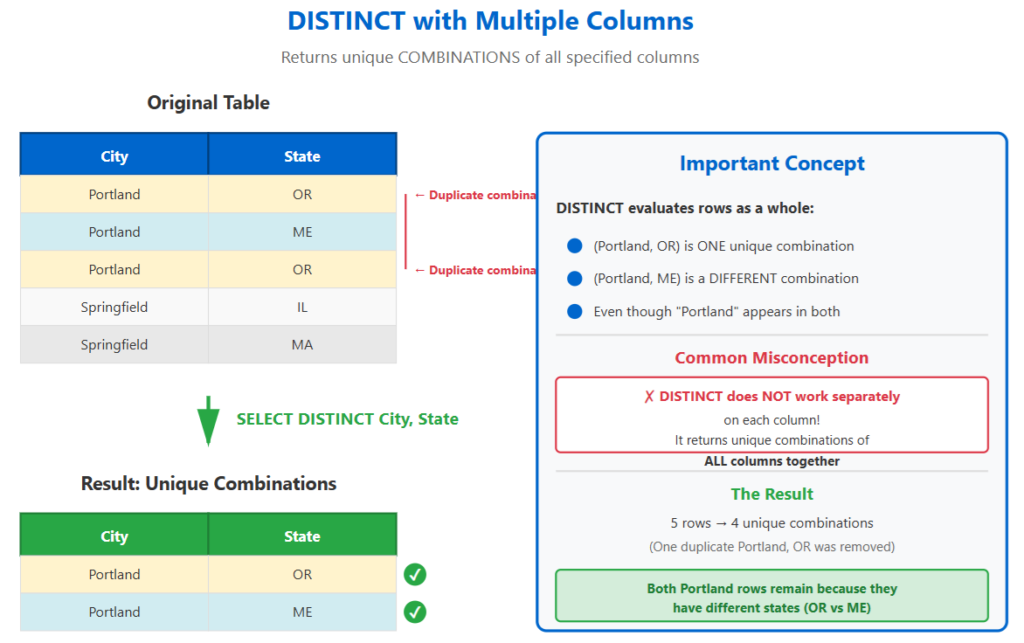
Example: Unique City and State Combinations
— Expanded customers table
+----+---------------+-------------+-------+
| ID | CustomerName  | City        | State |
+----+---------------+-------------+-------+
| 1 | John Smith     | Portland    | OR    |
| 2 | Jane Doe       | Portland    | ME    |
| 3 | Bob Johnson    | Portland    | OR    |
| 4 | Alice Brown    | Springfield | IL    |
| 5 | Charlie Davis  | Springfield | MA    |
+----+---------------+-------------+-------+
— Get unique city and state combinations
SELECT DISTINCT City, State FROM customers;
Result:
+-------------+-------+
| City        | State |
+-------------+-------+
| Portland    | OR |
| Portland    | ME |
| Springfield | IL |
| Springfield | MA |
+-------------+-------+
Notice that “Portland” appears twice because the combination of (Portland, OR) is different from (Portland, ME). This demonstrates that SQL DISTINCT evaluates the entire row, not individual columns.
Common Mistake: Many beginners expect DISTINCT to apply to each column separately. Remember: DISTINCT returns unique combinations of ALL specified columns together.
5.SQL DISTINCT with Aggregate Functions
SQL DISTINCT becomes especially powerful when combined with aggregate functions like COUNT, SUM, AVG, MIN, and MAX.
Using SQL DISTINCT Inside Aggregate Functions
-- Orders table example
+----------+------------+--------+
| OrderID  | CustomerID | Amount |
+----------+------------+--------+
| 1001     | 1          | 250.00 |
| 1002     | 2          | 150.00 |
| 1003     | 1          | 350.00 |
| 1004     | 3          | 250.00 |
| 1005     | 2          | 450.00 |
+----------+------------+--------+
-- Count total orders
SELECT COUNT(*) AS TotalOrders FROM orders;
-- Result: 5 -- Count unique customers who placed orders
SELECT COUNT(DISTINCT CustomerID) AS UniqueCustomers FROM orders;
-- Result: 3 -- Count unique order amounts
SELECT COUNT(DISTINCT Amount) AS UniqueAmounts FROM orders;
-- Result: 4
SUM with DISTINCT
-- Calculate sum of unique amounts (not commonly used but valid)
SELECT SUM(DISTINCT Amount) AS SumUniqueAmounts FROM orders;
-- Result: 1200.00 (250 + 150 + 350 + 450)
Note: Using DISTINCT with SUM, AVG, MIN, or MAX is less common than with COUNT, but can be useful in specific scenarios where you want to eliminate duplicate values before aggregation.
6. COUNT DISTINCT – Counting Unique Values
COUNT(DISTINCT column) is one of the most frequently used combinations in SQL. It answers the question: “How many unique values exist?”
Practical Examples
-- E-commerce analytics table
CREATE TABLE page_views ( view_id INT, user_id INT, product_id INT, view_date DATE );
-- How many unique users viewed products today?
SELECT COUNT(DISTINCT user_id) AS unique_visitors FROM page_views WHERE view_date = CURRENT_DATE;
-- How many unique products were viewed?
SELECT COUNT(DISTINCT product_id) AS unique_products_viewed FROM page_views WHERE view_date = CURRENT_DATE;
-- Multiple counts in one query
SELECT COUNT(*) AS total_views, COUNT(DISTINCT user_id) AS unique_users, COUNT(DISTINCT product_id) AS unique_products, COUNT(DISTINCT view_date) AS days_with_activity FROM page_views;
COUNT(*) vs COUNT(column) vs COUNT(DISTINCT column)
| Function | What It Counts | Includes NULLs? |
|---|---|---|
COUNT(*) | Total number of rows | Yes |
COUNT(column) | Non-NULL values in column | No |
COUNT(DISTINCT column) | Unique non-NULL values | No |
7. SQL DISTINCT vs GROUP BY
Both SQL DISTINCT and GROUP BY can eliminate duplicates, but they serve different purposes and have different use cases.
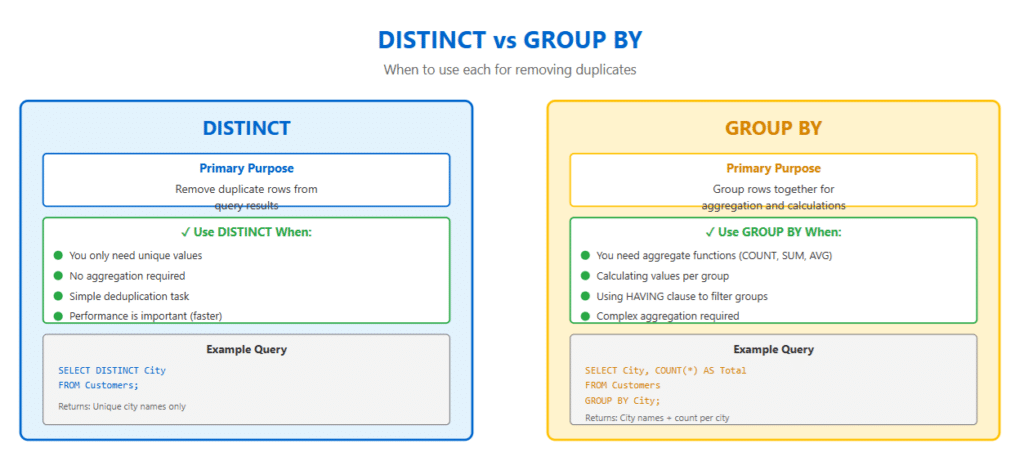
When Results Are Identical
— These two queries produce the same result
SELECT DISTINCT City FROM customers;
SELECT City FROM customers GROUP BY City;
Key Differences
| Aspect | DISTINCT | GROUP BY |
|---|---|---|
| Primary Purpose | Remove duplicates from result set | Group rows for aggregation |
| Aggregate Functions | Can only use inside functions | Can use in SELECT with grouped columns |
| Performance | Generally faster for simple deduplication | Required for complex aggregations |
| HAVING Clause | Cannot use | Can filter grouped results |
When to Use GROUP BY Instead
-- GROUP BY is required when you need aggregates per group
SELECT City, COUNT(*) AS CustomerCount, AVG(OrderTotal) AS AvgOrderValue FROM customers GROUP BY City;
-- DISTINCT cannot do this!
-- This would be INVALID:
-- SELECT DISTINCT City, COUNT(*) FROM customers;
Rule of Thumb: Use DISTINCT for simple deduplication. Use GROUP BY when you need to perform calculations or aggregations on groups of data.
8. Performance Considerations
Understanding the performance implications of DISTINCT is crucial for writing efficient queries, especially with large datasets.
How DISTINCT Works Internally
When you use DISTINCT, the database must:
- Retrieve all rows matching the WHERE clause
- Sort the result set (or use hashing)
- Compare adjacent rows to identify duplicates
- Return only unique rows
This process can be expensive with large datasets.
Performance Optimization Tips
-- ❌ SLOW: DISTINCT on large table without WHERE clause
SELECT DISTINCT product_category FROM products;
-- 10 million rows --
✅ BETTER: Add WHERE clause to reduce rows first
SELECT DISTINCT product_category FROM products WHERE active = 1;
-- Only 50,000 active products --
✅ BEST: Index the column(s) being DISTINCT-ed
CREATE INDEX idx_product_category ON products(product_category);
SELECT DISTINCT product_category FROM products WHERE active = 1;
Index Considerations
-- Create covering index for optimal performance
CREATE INDEX idx_covering ON orders(customer_id, order_date);
-- This query can use index-only scan
SELECT DISTINCT customer_id, order_date FROM orders WHERE order_date >= '2026-01-01';
Performance Comparison: DISTINCT vs EXISTS
-- Scenario: Find customers who have placed orders
-- Using DISTINCT (may be slower)
SELECT DISTINCT c.customer_id, c.customer_name FROM customers c INNER JOIN orders o ON c.customer_id = o.customer_id;
-- Using EXISTS (often faster)
SELECT c.customer_id, c.customer_name FROM customers c WHERE EXISTS ( SELECT 1 FROM orders o WHERE o.customer_id = c.customer_id );
Warning: Using DISTINCT to “fix” poorly written queries with unnecessary JOINs is a code smell. Instead, investigate why duplicates are appearing and restructure your query properly.
9. Best Practices and Common Pitfalls
Best Practices
1. Be Specific with Columns
— ❌ Avoid selecting all columns with DISTINCT
SELECT DISTINCT * FROM large_table;
— ✅ Select only the columns you need
SELECT DISTINCT user_id, action_type FROM user_activities;
2. Use Appropriate Indexes
— Create indexes on columns used with DISTINCT
CREATE INDEX idx_status ON orders(status);
SELECT DISTINCT status FROM orders;
3. Consider Alternatives for Large Datasets
— For very large tables, consider materialized views
CREATE MATERIALIZED VIEW unique_categories AS SELECT DISTINCT category FROM products;
— Refresh periodically instead of running DISTINCT each time
REFRESH MATERIALIZED VIEW unique_categories;
Common Pitfalls
Pitfall 1: Misunderstanding Multi-Column DISTINCT
— ❌ WRONG: Expecting separate DISTINCT per column
SELECT DISTINCT first_name, last_name FROM employees;
— Returns unique combinations, not unique first names OR unique last names
— ✅ CORRECT: If you need unique first names
SELECT DISTINCT first_name FROM employees;
— And unique last names
SELECT DISTINCT last_name FROM employees;
Pitfall 2: Using DISTINCT with ORDER BY Different Columns
— ❌ This may cause errors or unexpected results
SELECT DISTINCT customer_id FROM orders ORDER BY order_date;
— order_date not in SELECT —
✅ CORRECT: Include all ORDER BY columns in
SELECT SELECT DISTINCT customer_id, order_date FROM orders ORDER BY order_date;
Pitfall 3: NULL Handling
— DISTINCT treats all NULLs as equal
SELECT DISTINCT status FROM orders;
— If there are 3 rows with NULL status, only one NULL appears in result
— To count NULLs separately or exclude them:
SELECT DISTINCT status FROM orders WHERE status IS NOT NULL;
10. Real-World Examples
Example 1: E-commerce – Finding Unique Product Tags
— Products can have multiple tags
— Get all unique tags for filtering UI
SELECT DISTINCT tag FROM product_tags WHERE active = 1 ORDER BY tag;
— Result might be: Bestseller, Clearance, New Arrival, On Sale, Premium
Example 2: Analytics – Unique Daily Active Users
— Calculate daily active users for the last 7 days
SELECT activity_date, COUNT(DISTINCT user_id) AS daily_active_users FROM user_activities
WHERE activity_date >= CURRENT_DATE – INTERVAL ‘7 days’ GROUP BY activity_date
ORDER BY activity_date;
+--------------+--------------------+
| activity_date| daily_active_users |
+--------------+--------------------+
| 2026-02-01   | 1,247 |
| 2026-02-02   | 1,356 |
| 2026-02-03   | 1,189 |
| 2026-02-04   | 1,421 |
| 2026-02-05   | 1,534 |
| 2026-02-06   | 1,298 |
| 2026-02-07   | 1,467 |
+--------------+--------------------+
Example 3: CRM – Identifying Cross-Selling Opportunities
-- Find customers who bought product A but not product B
SELECT DISTINCT c.customer_id, c.email FROM customers c
INNER JOIN orders o
ON c.customer_id = o.customer_id
INNER JOIN order_items oi
ON o.order_id = oi.order_id
WHERE oi.product_id = 'PROD_A'
AND NOT EXISTS ( SELECT 1 FROM orders o2 INNER
JOIN order_items oi2
ON o2.order_id = oi2.order_id
WHERE o2.customer_id = c.customer_id
AND oi2.product_id = 'PROD_B' );
Example 4: HR – Department Diversity Analysis
-- Count unique job titles per department
SELECT department, COUNT(DISTINCT job_title) AS unique_positions, COUNT(DISTINCT employee_id) AS total_employees FROM employees
WHERE employment_status = 'Active'
GROUP BY department
ORDER BY unique_positions DESC;
11. Advanced Techniques
Technique 1: DISTINCT with Subqueries
-- Find products that are in at least one active order
SELECT DISTINCT p.product_id, p.product_name FROM products p
WHERE p.product_id IN ( SELECT DISTINCT product_id FROM order_items oi
INNER JOIN orders o
ON oi.order_id = o.order_id
WHERE o.status = 'Active' );
Technique 2: DISTINCT with CASE Statements
-- Get unique customer segments based on purchase behavior
SELECT DISTINCT customer_id,
CASE WHEN total_purchases > 10 THEN 'VIP'
WHEN total_purchases BETWEEN 5 AND 10 THEN 'Regular' ELSE 'Occasional' END AS customer_segment
FROM ( SELECT customer_id, COUNT(*) AS total_purchases FROM orders GROUP BY customer_id ) AS customer_stats;
Technique 3: DISTINCT with Window Functions
-- Find the first unique purchase date for each customer
SELECT DISTINCT customer_id,
FIRST_VALUE(order_date) OVER ( PARTITION BY customer_id ORDER BY order_date ) AS first_purchase_date
FROM orders;
Technique 4: DISTINCT in Multiple CTEs
-- Complex analysis using multiple DISTINCT operations
WITH unique_viewers AS
( SELECT DISTINCT user_id, product_id FROM product_views WHERE view_date >= '2026-01-01' ),
unique_buyers AS ( SELECT DISTINCT oi.product_id, o.customer_id FROM order_items oi INNER JOIN orders o
ON oi.order_id = o.order_id
WHERE o.order_date >= '2026-01-01' )
SELECT uv.product_id, COUNT(DISTINCT uv.user_id) AS total_viewers,
COUNT(DISTINCT ub.customer_id) AS total_buyers,
ROUND( COUNT(DISTINCT ub.customer_id)::NUMERIC / COUNT(DISTINCT uv.user_id) * 100, 2 ) AS conversion_rate
FROM unique_viewers uv
LEFT JOIN unique_buyers ub
ON uv.product_id = ub.product_id
GROUP BY uv.product_id;
12. Frequently Asked Questions
Q1: Does DISTINCT work with all data types?
Answer: Yes, DISTINCT works with all SQL data types including integers, strings, dates, and even complex types like JSON or arrays in PostgreSQL. However, for complex types, the database needs a way to determine equality, which may impact performance.
Q2: Can I use multiple DISTINCT keywords in one query?
Answer: No, you cannot use multiple DISTINCT keywords for different columns in the same SELECT statement. However, you can use DISTINCT inside multiple aggregate functions:
SELECT COUNT(DISTINCT customer_id) AS unique_customers,
COUNT(DISTINCT product_id) AS unique_products
FROM orders;
Q3: How does DISTINCT handle NULL values?
Answer: DISTINCT treats all NULL values as equal to each other. If you have multiple rows with NULL in the column(s) specified, only one NULL will appear in the result set. To exclude NULLs entirely, add a WHERE clause:
SELECT DISTINCT column_name FROM table_name WHERE column_name IS NOT NULL;
Q4: Is DISTINCT case-sensitive?
Answer: This depends on your database collation settings. In MySQL with default settings, ‘Apple’ and ‘apple’ are treated as the same. In PostgreSQL, they’re different. To force case-insensitive DISTINCT:
SELECT DISTINCT UPPER(column_name) FROM table_name;
Q5: Can DISTINCT improve query performance?
Answer: Generally, no. DISTINCT adds overhead because the database must identify and remove duplicates. However, if DISTINCT significantly reduces the result set size and that result is used in subsequent operations, it might indirectly improve overall performance. The key is proper indexing and query optimization.
Q6: What’s the difference between DISTINCT and UNIQUE?
Answer: DISTINCT is a query operator that filters results. UNIQUE is a constraint applied to table columns during table creation to prevent duplicate values from being inserted. They serve different purposes at different stages of data handling.
Q7: How do I get distinct rows based on one column but return all columns?
Answer: This is a common requirement with no perfect DISTINCT solution. You need to use window functions or subqueries:
-- Using ROW_NUMBER to get first occurrence
SELECT * FROM ( SELECT *,
ROW_NUMBER() OVER (PARTITION BY email ORDER BY created_date) AS rn
FROM customers ) sub
WHERE rn = 1;
Q8: Can I use SQL DISTINCT in UPDATE or DELETE statements?
Answer: No, SQL DISTINCT is only valid in SELECT statements. For UPDATE or DELETE operations affecting unique rows, use subqueries or CTEs with SQL DISTINCT in the SELECT portion.
🎯 SQL DISTINCT Knowledge Quiz
Test your understanding of the SQL DISTINCT keyword with these 7 questions. Good luck!
Conclusion
The SQL DISTINCT keyword is a powerful tool for removing duplicate rows and ensuring data uniqueness in your query results. Throughout this comprehensive guide, we’ve covered:
- The fundamental syntax and purpose of DISTINCT
- Using DISTINCT with single and multiple columns
- Combining DISTINCT with aggregate functions like COUNT
- Understanding the differences between DISTINCT and GROUP BY
- Performance considerations and optimization techniques
- Best practices and common pitfalls to avoid
- Real-world examples across various industries
- Advanced techniques for complex scenarios
Remember these key takeaways:
- DISTINCT operates on entire rows – when using multiple columns, it returns unique combinations
- Performance matters – always consider indexes and query optimization
- Choose the right tool – use DISTINCT for simple deduplication, GROUP BY for aggregations
- NULL handling – DISTINCT treats all NULLs as equal
- COUNT(DISTINCT column) is one of the most useful combinations in analytics
As you continue working with SQL, you’ll find that mastering DISTINCT is essential for data analysis, reporting, and building efficient database applications. Practice with real datasets, experiment with different scenarios, and always monitor query performance.
Happy querying!