

The SQL SELECT statement is the cornerstone of database querying and one of the most fundamental commands every database professional, developer, and data analyst must master. Whether you’re retrieving customer information, analyzing sales data, or building complex reports, the SQL SELECT statement is your gateway to accessing and manipulating data stored in relational databases.
In this comprehensive guide, we’ll explore everything you need to know about SQL SELECT statements, from basic syntax to advanced querying techniques. By the end of this article, you’ll have the knowledge and confidence to write efficient, powerful SQL queries that extract exactly the data you need.
What is the SQL SELECT Statement?
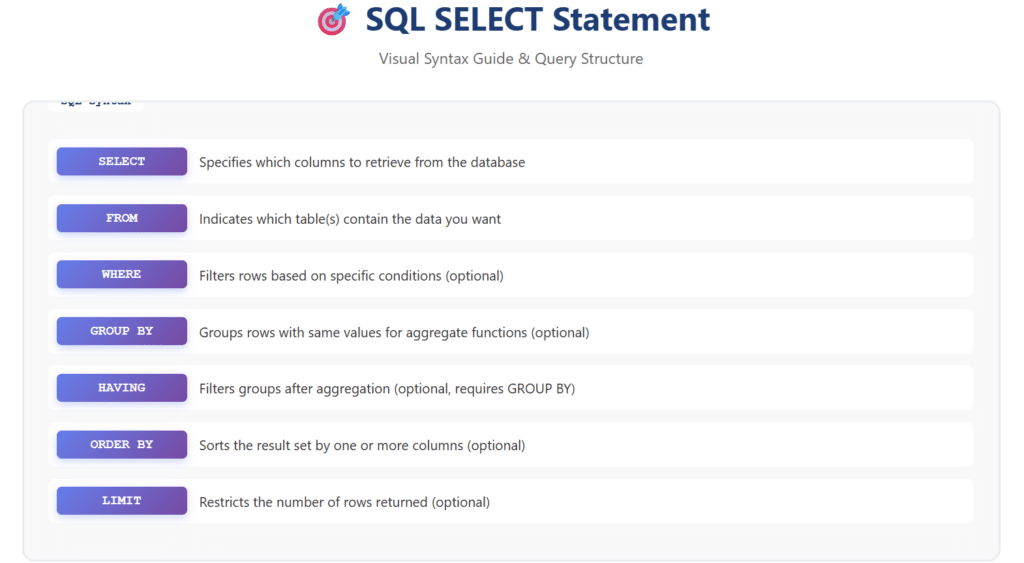
The SQL SELECT statement is a Data Query Language (DQL) command used to retrieve data from one or more database tables. It allows you to specify which columns you want to retrieve, filter rows based on specific conditions, sort results, perform calculations, and combine data from multiple tables. Think of it as asking your database a question and receiving a customized answer in the form of a result set.
SQL (Structured Query Language) is the standard language for managing relational databases, and the SELECT statement is arguably its most frequently used command. Every major database system including MySQL, PostgreSQL, SQL Server, Oracle, and SQLite supports the SELECT statement with largely similar syntax, making it a universally valuable skill.
Why the SELECT Statement Matters
Understanding the SELECT statement is crucial because:
- Data Retrieval: It’s the primary method for extracting information from databases
- Business Intelligence: Enables data analysis and report generation
- Application Development: Powers the data layer of virtually every software application
- Database Administration: Essential for monitoring, troubleshooting, and maintaining databases
- Career Advancement: SQL proficiency is among the most sought-after technical skills
Basic SQL SELECT Syntax
The most basic form of a SELECT statement follows this structure:
SELECT column1, column2, column3
FROM table_name;
Let’s break down each component:
- SELECT: The keyword that initiates the query
- column1, column2, column3: The specific columns you want to retrieve
- FROM: Specifies which table contains the data
- table_name: The name of the table you’re querying
Selecting All Columns
To retrieve all columns from a table, you can use the asterisk (*) wildcard:
SELECT *
FROM employees;
While convenient, using SELECT * is generally discouraged in production code because it:
- Returns unnecessary data, wasting bandwidth and memory
- Makes code harder to maintain and understand
- Can cause unexpected results if table structure changes
- Reduces query performance, especially with large tables
Selecting Specific Columns
Best practice involves explicitly naming the columns you need:
SELECT employee_id, first_name, last_name, email, hire_date
FROM employees;
This approach provides better performance, clearer code, and predictable results.
Practical Examples: Basic SELECT Queries
Let’s work with a sample employees table to demonstrate various SELECT operations:
-- Sample data structure
-- employees table:
-- employee_id | first_name | last_name | email | department | salary | hire_date
Example 1: Retrieving Employee Names
SELECT first_name, last_name
FROM employees;
This query returns only the first and last names of all employees in the database.
Example 2: Retrieving Complete Employee Records
SELECT employee_id, first_name, last_name, email, department, salary, hire_date
FROM employees;
This retrieves all relevant information about each employee, explicitly listing each column for clarity and maintainability.
The WHERE Clause: Filtering Your Data
The WHERE clause is one of the most powerful components of the SELECT statement, allowing you to filter rows based on specific conditions. Only rows that meet the specified criteria will be included in the result set.
Basic WHERE Syntax
SELECT column1, column2
FROM table_name
WHERE condition;
Comparison Operators
SQL supports various comparison operators for filtering data:
- = Equal to
- != or <> Not equal to
- > Greater than
- < Less than
- >= Greater than or equal to
- <= Less than or equal to
- BETWEEN Between a range (inclusive)
- IN Matches any value in a list
- LIKE Pattern matching with wildcards
- IS NULL Checks for NULL values
WHERE Clause Examples
Example 1: Filter by Department
SELECT first_name, last_name, department
FROM employees
WHERE department = 'Sales';
This query retrieves all employees who work in the Sales department.
Example 2: Filter by Salary Range
SELECT first_name, last_name, salary
FROM employees
WHERE salary >= 50000 AND salary <= 80000;
Or using the BETWEEN operator:
SELECT first_name, last_name, salary
FROM employees
WHERE salary BETWEEN 50000 AND 80000;
Both queries return employees with salaries between $50,000 and $80,000, inclusive.
Example 3: Filter by Multiple Departments
SELECT employee_id, first_name, last_name, department
FROM employees
WHERE department IN ('Sales', 'Marketing', 'IT');
This retrieves employees from Sales, Marketing, or IT departments using the IN operator for cleaner syntax.
Example 4: Pattern Matching with LIKE
SELECT first_name, last_name, email
FROM employees
WHERE email LIKE '%@gmail.com';
The LIKE operator uses wildcards: % matches any sequence of characters, and _ matches any single character. This query finds all employees with Gmail email addresses.
Example 5: Finding NULL Values
SELECT employee_id, first_name, last_name
FROM employees
WHERE email IS NULL;
This identifies employees without email addresses recorded in the database.
Logical Operators: AND, OR, and NOT
Logical operators allow you to combine multiple conditions in your WHERE clause, creating sophisticated filters.
AND Operator
The AND operator requires all conditions to be true:
SELECT first_name, last_name, department, salary
FROM employees
WHERE department = 'Engineering'
  AND salary > 70000;
This returns only engineering employees earning more than $70,000.
OR Operator
The OR operator returns rows where at least one condition is true:
SELECT first_name, last_name, department
FROM employees
WHERE department = 'Sales'
   OR department = 'Marketing';
NOT Operator
The NOT operator negates a condition:
SELECT first_name, last_name, department
FROM employees
WHERE NOT department = 'Sales';
This retrieves all employees except those in Sales.
Combining Logical Operators
You can create complex conditions by combining operators. Use parentheses to control evaluation order:
SELECT first_name, last_name, department, salary
FROM employees
WHERE (department = 'Engineering' OR department = 'IT')
  AND salary > 60000;
This query finds high-earning employees in technical departments.
Sorting Results with ORDER BY
The ORDER BY clause sorts your result set based on one or more columns. By default, sorting is ascending (ASC), but you can specify descending order (DESC).
Basic ORDER BY Syntax
SELECT column1, column2
FROM table_name
ORDER BY column1 [ASC|DESC];
ORDER BY Examples
Example 1: Sort by Last Name
SELECT first_name, last_name, hire_date
FROM employees
ORDER BY last_name ASC;
This sorts employees alphabetically by last name.
Example 2: Sort by Salary (Highest First)
SELECT first_name, last_name, salary
FROM employees
ORDER BY salary DESC;
This displays employees from highest to lowest salary.
Example 3: Multiple Column Sorting
SELECT first_name, last_name, department, salary
FROM employees
ORDER BY department ASC, salary DESC;
This first sorts by department alphabetically, then within each department, sorts by salary from highest to lowest.
Limiting Results with LIMIT and TOP
When working with large datasets, you often want to retrieve only a specific number of rows. Different database systems use different syntax:
MySQL, PostgreSQL, SQLite (LIMIT)
SELECT first_name, last_name, salary
FROM employees
ORDER BY salary DESC
LIMIT 10;
This retrieves the top 10 highest-paid employees.
SQL Server (TOP)
SELECT TOP 10 first_name, last_name, salary
FROM employees
ORDER BY salary DESC;
OFFSET for Pagination
Combine LIMIT with OFFSET for pagination:
SELECT first_name, last_name, email
FROM employees
ORDER BY employee_id
LIMIT 20 OFFSET 40;
This skips the first 40 rows and returns the next 20 (rows 41-60), useful for implementing page 3 of results with 20 items per page.
DISTINCT: Eliminating Duplicates
The DISTINCT keyword removes duplicate rows from your result set, returning only unique values.
Basic DISTINCT Usage
SELECT DISTINCT department
FROM employees;
This returns a list of all unique departments in the company, without duplicates.
DISTINCT with Multiple Columns
SELECT DISTINCT department, job_title
FROM employees;
This returns unique combinations of department and job title.
Aggregate Functions: COUNT, SUM, AVG, MIN, MAX
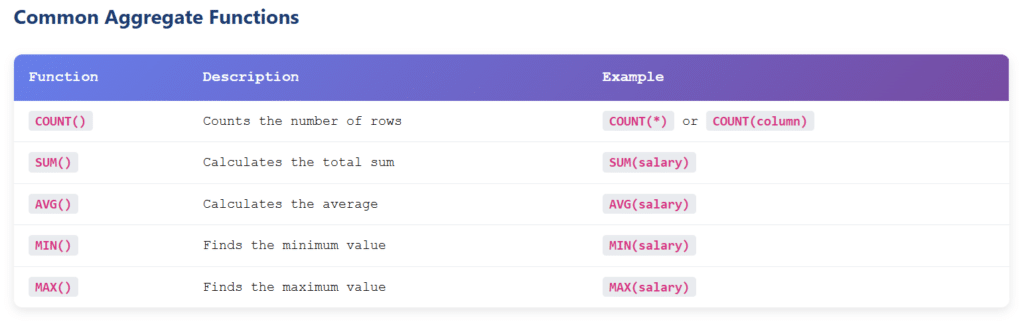
Aggregate functions perform calculations on multiple rows and return a single value. They’re essential for data analysis and reporting.
COUNT Function
COUNT returns the number of rows:
SELECT COUNT(*) AS total_employees
FROM employees;
Or count non-NULL values in a specific column:
SELECT COUNT(email) AS employees_with_email
FROM employees;
SUM Function
SELECT SUM(salary) AS total_payroll
FROM employees;
This calculates the total salary expenses across all employees.
AVG Function
SELECT AVG(salary) AS average_salary
FROM employees
WHERE department = 'Engineering';
This computes the average salary for engineering employees.
MIN and MAX Functions
SELECT
    MIN(salary) AS lowest_salary,
    MAX(salary) AS highest_salary
FROM employees;
This finds the minimum and maximum salaries in the company.
GROUP BY: Grouping Data for Analysis
The GROUP BY clause groups rows with the same values in specified columns, allowing you to perform aggregate functions on each group.
Basic GROUP BY Syntax
SELECT column1, aggregate_function(column2)
FROM table_name
GROUP BY column1;
GROUP BY Examples
Example 1: Count Employees by Department
SELECT department, COUNT(*) AS employee_count
FROM employees
GROUP BY department
ORDER BY employee_count DESC;
This shows how many employees work in each department.
Example 2: Average Salary by Department
SELECT
    department,
    AVG(salary) AS avg_salary,
    MIN(salary) AS min_salary,
    MAX(salary) AS max_salary
FROM employees
GROUP BY department;
This provides salary statistics for each department.
Example 3: Multiple Column Grouping
SELECT
    department,
    job_title,
    COUNT(*) AS employee_count,
    AVG(salary) AS avg_salary
FROM employees
GROUP BY department, job_title
ORDER BY department, job_title;
This groups by both department and job title, providing detailed breakdowns.
HAVING Clause: Filtering Grouped Data
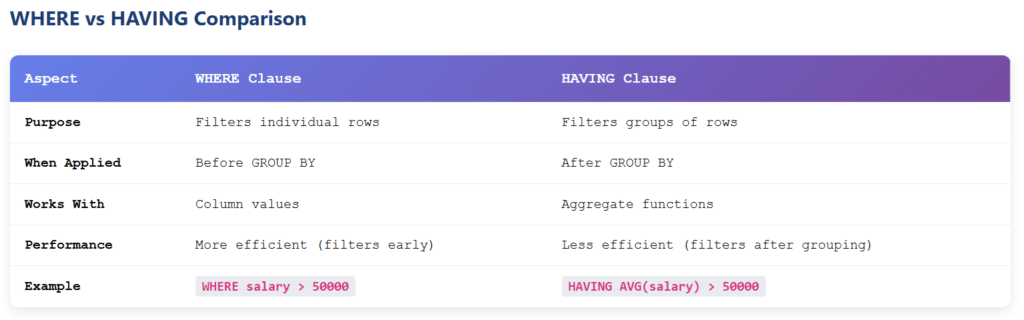
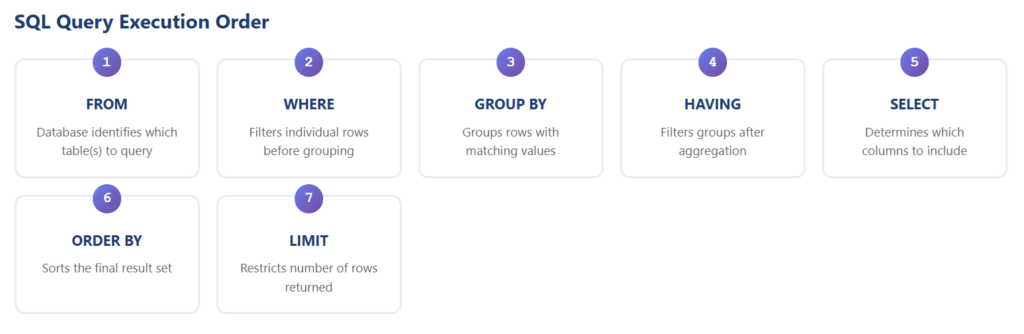
The HAVING clause filters groups after aggregation, while WHERE filters individual rows before aggregation.
HAVING vs WHERE
- WHERE: Filters rows before grouping and aggregation
- HAVING: Filters groups after aggregation
HAVING Examples
Example 1: Departments with More Than 5 Employees
SELECT department, COUNT(*) AS employee_count
FROM employees
GROUP BY department
HAVING COUNT(*) > 5;
Example 2: High-Paying Departments
SELECT
    department,
    AVG(salary) AS avg_salary
FROM employees
GROUP BY department
HAVING AVG(salary) > 70000
ORDER BY avg_salary DESC;
This identifies departments where the average salary exceeds $70,000.
Example 3: Combining WHERE and HAVING
SELECT
    department,
    COUNT(*) AS employee_count,
    AVG(salary) AS avg_salary
FROM employees
WHERE hire_date >= '2020-01-01'
GROUP BY department
HAVING COUNT(*) >= 3
ORDER BY avg_salary DESC;
This finds departments with at least 3 employees hired since 2020, showing their average salaries.
Joining Tables: Combining Data from Multiple Sources
Real-world databases typically store related data across multiple tables. SQL joins allow you to combine this data based on related columns.
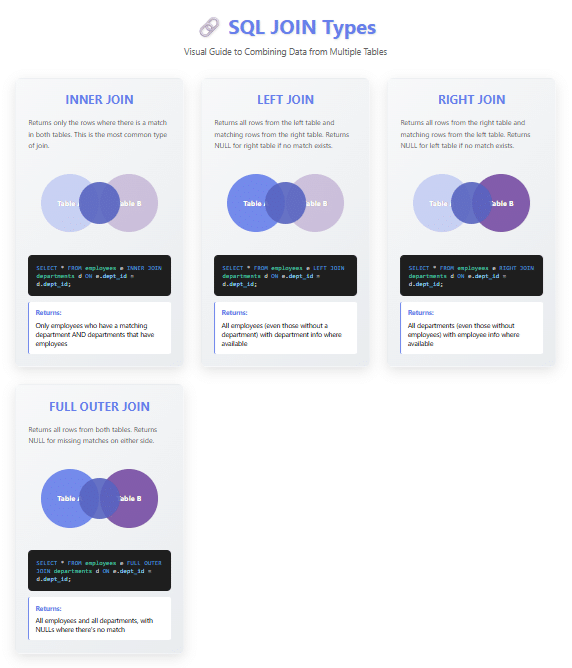
Types of Joins
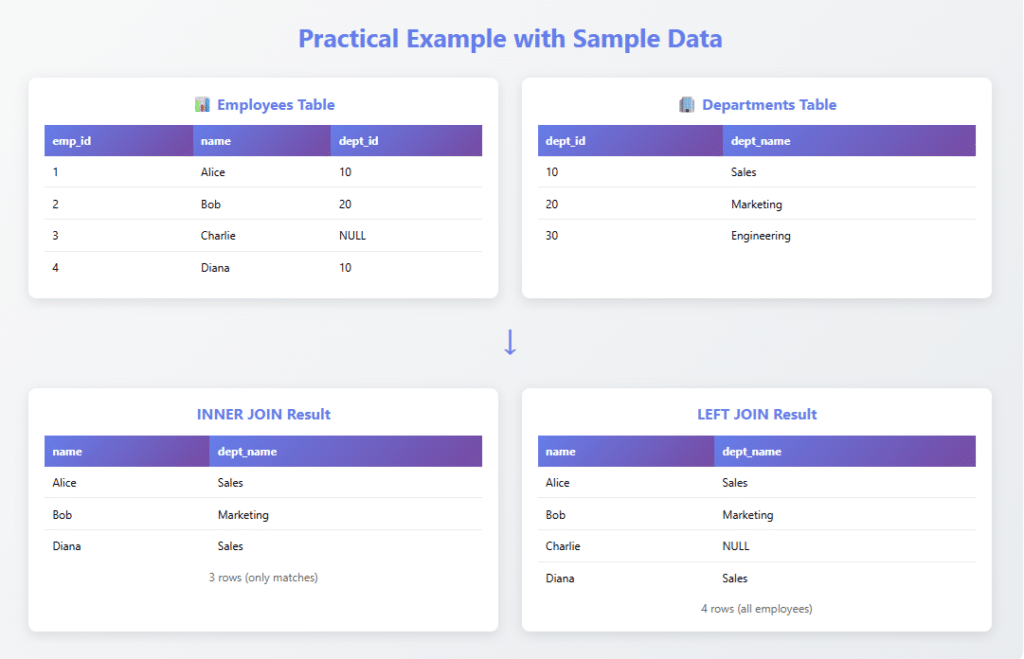
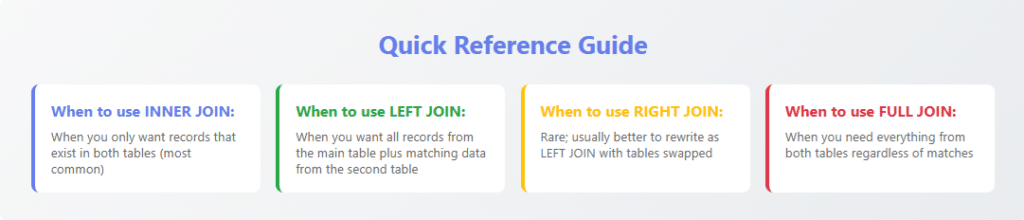
- INNER JOIN: Returns only matching rows from both tables
- LEFT JOIN (LEFT OUTER JOIN): Returns all rows from the left table and matching rows from the right
- RIGHT JOIN (RIGHT OUTER JOIN): Returns all rows from the right table and matching rows from the left
- FULL JOIN (FULL OUTER JOIN): Returns all rows from both tables
- CROSS JOIN: Returns the Cartesian product of both tables
INNER JOIN Example
Let’s say we have two tables: employees and departments.
SELECT
    e.employee_id,
    e.first_name,
    e.last_name,
    d.department_name,
    d.location
FROM employees e
INNER JOIN departments d ON e.department_id = d.department_id;
This combines employee information with their department details. Note the use of table aliases (e and d) for cleaner syntax.
LEFT JOIN Example
SELECT
    e.first_name,
    e.last_name,
    d.department_name
FROM employees e
LEFT JOIN departments d ON e.department_id = d.department_id;
This returns all employees, including those not assigned to any department (department_name would be NULL).
Multiple Joins
SELECT
    e.first_name,
    e.last_name,
    d.department_name,
    p.project_name,
    p.start_date
FROM employees e
INNER JOIN departments d ON e.department_id = d.department_id
INNER JOIN projects p ON e.employee_id = p.project_manager_id;
This joins three tables to show employees, their departments, and projects they manage.
Subqueries: Queries Within Queries
A subquery is a SELECT statement nested inside another SQL statement. Subqueries can appear in SELECT, FROM, WHERE, and HAVING clauses.
Subquery in WHERE Clause
SELECT first_name, last_name, salary
FROM employees
WHERE salary > (
    SELECT AVG(salary)
    FROM employees
);
This finds all employees earning above the company average.
Subquery with IN Operator
SELECT first_name, last_name, department_id
FROM employees
WHERE department_id IN (
    SELECT department_id
    FROM departments
    WHERE location = 'New York'
);
This retrieves employees working in New York departments.
Correlated Subquery
SELECT
    e1.first_name,
    e1.last_name,
    e1.salary,
    e1.department_id
FROM employees e1
WHERE salary > (
    SELECT AVG(salary)
    FROM employees e2
    WHERE e2.department_id = e1.department_id
);
This finds employees earning above their department’s average salary. The subquery references the outer query (correlated).
Column Aliases and Calculated Fields
Aliases make your results more readable and allow you to create calculated fields.
Column Aliases
SELECT
    first_name AS "First Name",
    last_name AS "Last Name",
    salary AS "Annual Salary"
FROM employees;
Calculated Fields
SELECT
    first_name,
    last_name,
    salary,
    salary * 1.10 AS salary_with_raise,
    salary * 0.15 AS estimated_tax
FROM employees;
This calculates a 10% raise and estimates 15% tax for each employee.
String Concatenation
-- MySQL, PostgreSQL
SELECT
    CONCAT(first_name, ' ', last_name) AS full_name,
    email
FROM employees;

-- SQL Server
SELECT
    first_name + ' ' + last_name AS full_name,
    email
FROM employees;
Advanced SELECT Techniques
CASE Statements
CASE expressions add conditional logic to your queries:
SELECT
    first_name,
    last_name,
    salary,
    CASE
        WHEN salary < 40000 THEN 'Entry Level'
        WHEN salary BETWEEN 40000 AND 70000 THEN 'Mid Level'
        WHEN salary BETWEEN 70001 AND 100000 THEN 'Senior Level'
        ELSE 'Executive Level'
    END AS salary_grade
FROM employees;
UNION and UNION ALL
UNION combines results from multiple SELECT statements, removing duplicates:
SELECT first_name, last_name, 'Employee' AS type
FROM employees
UNION
SELECT first_name, last_name, 'Contractor' AS type
FROM contractors
ORDER BY last_name;
Use UNION ALL to keep duplicates and improve performance when you know there are no duplicates.
Window Functions (Advanced)
Window functions perform calculations across rows related to the current row:
SELECT
    first_name,
    last_name,
    department,
    salary,
    AVG(salary) OVER (PARTITION BY department) AS dept_avg_salary,
    RANK() OVER (PARTITION BY department ORDER BY salary DESC) AS dept_salary_rank
FROM employees;
This shows each employee’s salary alongside their department’s average and their rank within the department.
SQL SELECT Best Practices
- Explicitly list columns rather than using SELECT *
- Use meaningful aliases to make results clear and readable
- Filter early with WHERE to reduce data processing
- Index frequently queried columns for better performance
- Use EXPLAIN/EXPLAIN ANALYZE to understand query execution plans
- Avoid SELECT DISTINCT when possible as it can be expensive
- Use appropriate JOIN types based on your data relationships
- Format queries consistently for better readability and maintenance
- Comment complex queries to explain business logic
- Test queries on sample data before running on production databases
Common SQL SELECT Mistakes to Avoid
1. Selecting Too Much Data
Always retrieve only the columns and rows you need. Unnecessary data transfer wastes resources and slows applications.
2. Not Using Indexes
Queries on unindexed columns can be extremely slow on large tables. Work with your DBA to ensure proper indexing.
3. Incorrect NULL Handling
Remember that NULL is not equal to anything, including NULL. Use IS NULL or IS NOT NULL instead of = or !=.
4. Ambiguous Column Names in Joins
Always qualify column names with table aliases when joining tables to avoid ambiguity errors.
5. Forgetting the WHERE Clause
Accidentally running UPDATE or DELETE queries that affect all rows is a common disaster. Always include appropriate WHERE clauses.
Performance Optimization Tips
- Use indexes strategically: Create indexes on columns frequently used in WHERE, JOIN, and ORDER BY clauses
- Limit result sets: Use LIMIT/TOP to restrict rows returned during development and testing
- Avoid functions on indexed columns: WHERE UPPER(last_name) = ‘SMITH’ prevents index usage; use WHERE last_name = ‘Smith’ instead
- Use EXISTS instead of IN for subqueries: Often faster for large datasets
- Analyze query plans: Use database-specific tools to identify bottlenecks
- Consider materialized views: For complex, frequently-run queries
- Partition large tables: Improves query performance on massive datasets
Real-World Use Cases
E-commerce: Product Search and Filtering
SELECT
    p.product_id,
    p.product_name,
    p.price,
    c.category_name,
    AVG(r.rating) AS avg_rating,
    COUNT(r.review_id) AS review_count
FROM products p
INNER JOIN categories c ON p.category_id = c.category_id
LEFT JOIN reviews r ON p.product_id = r.product_id
WHERE p.price BETWEEN 50 AND 200
  AND p.in_stock = 1
GROUP BY p.product_id, p.product_name, p.price, c.category_name
HAVING AVG(r.rating) >= 4.0
ORDER BY avg_rating DESC, review_count DESC
LIMIT 20;
Financial Reporting: Monthly Sales Summary
SELECT
    DATE_FORMAT(order_date, '%Y-%m') AS month,
    COUNT(DISTINCT order_id) AS total_orders,
    COUNT(DISTINCT customer_id) AS unique_customers,
    SUM(order_total) AS total_revenue,
    AVG(order_total) AS avg_order_value
FROM orders
WHERE order_date >= DATE_SUB(CURDATE(), INTERVAL 12 MONTH)
  AND order_status = 'completed'
GROUP BY DATE_FORMAT(order_date, '%Y-%m')
ORDER BY month DESC;
Customer Analytics: Identifying VIP Customers
SELECT
    c.customer_id,
    c.first_name,
    c.last_name,
    c.email,
    COUNT(o.order_id) AS total_orders,
    SUM(o.order_total) AS lifetime_value,
    MAX(o.order_date) AS last_order_date
FROM customers c
INNER JOIN orders o ON c.customer_id = o.customer_id
WHERE o.order_status = 'completed'
GROUP BY c.customer_id, c.first_name, c.last_name, c.email
HAVING COUNT(o.order_id) >= 10
   AND SUM(o.order_total) >= 5000
ORDER BY lifetime_value DESC;
Conclusion
The SQL SELECT statement is an incredibly powerful and versatile tool for data retrieval and analysis. From simple queries that retrieve a few columns to complex operations involving multiple joins, subqueries, and window functions, mastering SELECT opens up endless possibilities for working with relational databases.
Throughout this guide, we’ve covered:
- Basic SELECT syntax and column selection
- Filtering data with WHERE clauses and logical operators
- Sorting and limiting results
- Eliminating duplicates with DISTINCT
- Aggregate functions and data summarization
- Grouping data with GROUP BY and filtering groups with HAVING
- Joining multiple tables to combine related data
- Advanced techniques including subqueries, CASE statements, and window functions
- Best practices, common mistakes, and performance optimization
- Real-world examples demonstrating practical applications
The key to mastering SQL SELECT statements is practice. Start with simple queries on sample databases, gradually incorporating more complex features as you become comfortable. Experiment with different approaches to solving the same problem, and always pay attention to query performance.
Remember that SQL is a standardized language, but different database systems have their own extensions and variations. As you advance in your SQL journey, explore the specific features and optimizations available in your database platform of choice.
Whether you’re building web applications, performing data analysis, generating business reports, or managing database systems, the SELECT statement will be your constant companion. Invest time in understanding its nuances, and you’ll be rewarded with the ability to extract meaningful insights from your data efficiently and effectively.
Keep practicing, stay curious, and happy querying!Don’t forget to test your knowledge.
🎯 SQL SELECT Statement Quiz
Test your knowledge of SQL queries with 7 challenging questions
Quiz Complete!
Frequently Asked Questions (FAQ)
What is the difference between SELECT * and selecting specific columns?
SELECT * retrieves all columns from a table, which can be convenient during development but is inefficient in production. Selecting specific columns improves performance by reducing data transfer, makes code more maintainable, provides clearer intent, and prevents issues if the table structure changes. Always explicitly list the columns you need in production queries.
When should I use WHERE versus HAVING?
Use WHERE to filter individual rows before any grouping or aggregation occurs. Use HAVING to filter groups after aggregation with GROUP BY. For example, use WHERE to filter employees by department, and HAVING to filter departments based on their average salary. WHERE is processed first and is more efficient, so filter as much as possible with WHERE before using HAVING.
What's the difference between INNER JOIN and LEFT JOIN?
INNER JOIN returns only rows where there's a match in both tables. LEFT JOIN returns all rows from the left table and matching rows from the right table; if there's no match, NULL values are returned for the right table's columns. Use INNER JOIN when you only want records that exist in both tables, and LEFT JOIN when you want all records from one table regardless of matches in the other.
How can I improve the performance of my SELECT queries?
Key strategies include: creating appropriate indexes on frequently queried columns, selecting only necessary columns instead of using SELECT *, adding effective WHERE clauses to filter data early, using LIMIT to restrict result sets, avoiding functions on indexed columns in WHERE clauses, analyzing query execution plans with EXPLAIN, and considering database-specific optimizations like query caching or materialized views.
What does NULL mean in SQL and how do I work with it?
NULL represents the absence of a value—it's neither zero nor an empty string. NULL behaves uniquely: NULL equals nothing (not even another NULL), arithmetic operations with NULL return NULL, and you must use IS NULL or IS NOT NULL to test for NULL values. To handle NULLs in calculations, use functions like COALESCE() or IFNULL() to provide default values.
Can I use multiple ORDER BY columns, and how does it work?
Yes, you can order by multiple columns. SQL first sorts by the first column specified, then for rows with identical values in that column, it sorts by the second column, and so on. For example, ORDER BY department ASC, salary DESC would first sort by department alphabetically, then within each department, sort by salary from highest to lowest.
What's the difference between UNION and UNION ALL?
UNION combines results from multiple SELECT statements and removes duplicate rows, requiring extra processing to identify and eliminate duplicates. UNION ALL also combines results but keeps all rows including duplicates, making it faster. Use UNION when you need to eliminate duplicates, and UNION ALL when you know duplicates don't exist or when you want to keep them.
How do subqueries work and when should I use them?
A subquery is a SQL SELECT statement nested inside another SQL statement (in SELECT, FROM, WHERE, or HAVING clauses). Use subqueries when you need to filter based on aggregated data, compare values to aggregate results, or work with data from multiple steps of logic. However, joins often perform better than subqueries, so consider alternatives for complex queries.
What are aggregate functions and how do they work with GROUP BY?
Aggregate functions (COUNT, SUM, AVG, MIN, MAX) perform calculations on multiple rows and return a single value. When used with GROUP BY, these functions calculate values for each group separately. For example, SELECT department, AVG(salary) FROM employees GROUP BY department calculates the average salary for each department. Without GROUP BY, aggregate functions operate on all rows.
Is SQL case-sensitive?
SQL keywords (SELECT, FROM, WHERE) are not case-sensitive in most database systems—you can write them in uppercase, lowercase, or mixed case. However, table and column names may be case-sensitive depending on your database system and configuration. String comparisons in WHERE clauses are typically case-sensitive unless you use functions like UPPER() or LOWER(). Best practice is to use consistent capitalization for keywords and match the exact case for object names.