
Introduction
Choosing the right database management system (DBMS) is one of the most critical decisions in software development. PostgreSQL vs MySQL vs SQL Server are three of the most popular relational database systems powering millions of applications worldwide. Each offers unique strengths, licensing models, and architectural approaches that make them suitable for different scenarios.
In this comprehensive guide, we’ll dive deep into the key differences between these three database giants, examining their performance characteristics, feature sets, pricing models, scalability options, and ideal use cases. Whether you’re building a startup application, managing enterprise data, or making a strategic technology decision, this comparison will help you make an informed choice.
Quick Comparison Overview
Before diving into details, here is a snapshot of how these databases compare:
| Feature | PostgreSQL | MySQL | SQL Server |
| License | Open Source (PostgreSQL License) | Open Source (GPL) | Proprietary (Microsoft) |
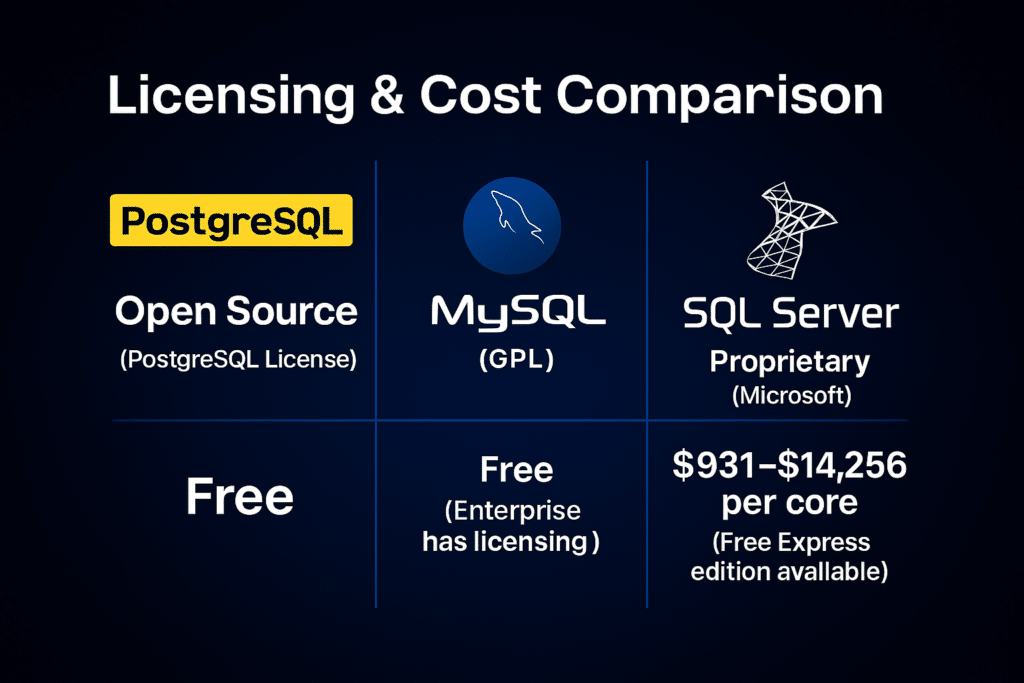
| Cost | Free | Free (Enterprise has licensing) | $931-$14,256 per core (Free Express edition available) |
| Platform Support | Windows, Linux, macOS, Unix | Windows, Linux, macOS, Unix | Windows, Linux (since 2017) |
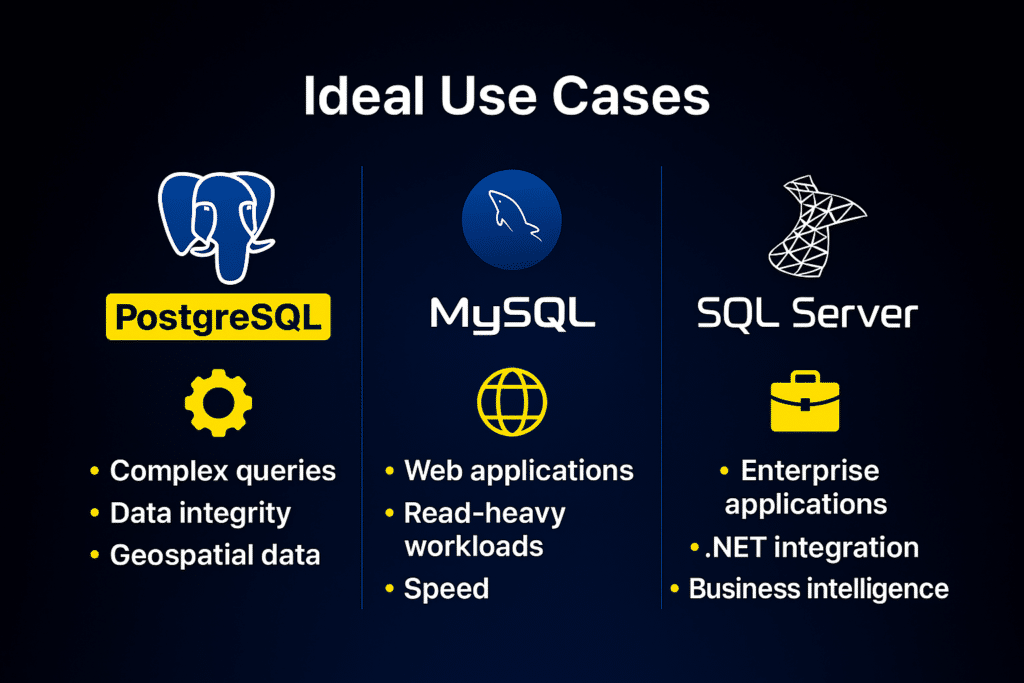
| Best For | Complex queries, data integrity, geospatial data | Web applications, read-heavy workloads, speed | Enterprise applications, .NET integration, business intelligence |
1. Licensing and Cost Comparison
PostgreSQL: Completely Free and Open
PostgreSQL operates under the PostgreSQL License, a liberal open-source license similar to MIT and BSD licenses. This means you can use, modify, and distribute PostgreSQL without any licensing fees, even for commercial applications. There are no hidden costs, enterprise editions with paywalls, or feature restrictions based on licensing tiers.
Cost implications: Zero licensing costs make PostgreSQL extremely attractive for startups and cost-conscious organizations. However, factor in operational costs like hosting, maintenance, and support contracts if needed.
MySQL: Open Source with Commercial Options
MySQL is dual-licensed under the GNU General Public License (GPL) and a proprietary commercial license. The community edition is free and open source, while MySQL Enterprise Edition (owned by Oracle) offers additional features, tools, and support for a fee.
Cost implications: Free for most use cases, but organizations requiring enterprise features like MySQL Enterprise Backup, MySQL Enterprise Monitor, or official support will need to pay. MySQL Enterprise Edition pricing varies based on server count and support level, typically ranging from several thousand to tens of thousands of dollars annually.
SQL Server: Proprietary with Multiple Editions
Microsoft SQL Server is a proprietary database with several editions, each targeting different use cases and budgets. The main editions include:
Express Edition: Free but limited (10 GB database size limit, 1 GB memory, 4 cores)
Standard Edition: $931 per core (2-core minimum) or $3,717 server + CAL licensing
Enterprise Edition: $14,256 per core (2-core minimum), offering advanced features like in-memory OLTP, advanced security, and unlimited virtualization
Cost implications: SQL Server can be expensive for large deployments. However, cloud options like Azure SQL Database offer flexible pay-as-you-go pricing, and the tight integration with Microsoft’s ecosystem can reduce total cost of ownership for Windows-centric organizations.
2. Performance Comparison
Read vs Write Operations
MySQL traditionally excels at read-heavy workloads. Its default storage engine, InnoDB, is optimized for high-speed reads, making it ideal for content management systems, e-commerce platforms, and web applications where most operations are SELECT queries. Benchmarks consistently show MySQL delivering faster read performance in scenarios with minimal concurrent writes.
PostgreSQL shines in complex query scenarios and write-intensive workloads. Its MVCC (Multi-Version Concurrency Control) architecture handles concurrent transactions efficiently without read locks. PostgreSQL’s query optimizer is sophisticated, often outperforming MySQL on complex JOIN operations, subqueries, and analytical queries.
SQL Server delivers balanced performance across read and write operations with enterprise-grade optimization. Its query optimizer is among the most advanced, leveraging features like columnstore indexes, in-memory OLTP, and intelligent query processing. For mixed workloads, SQL Server often matches or exceeds both PostgreSQL and MySQL, especially in Windows environments.
Real-World Performance Example
Consider an e-commerce platform handling 10,000 concurrent users:
MySQL: Achieves ~45,000 reads/second with simple product catalog queries. Write performance (cart updates, order creation) averages ~8,000 writes/second.
PostgreSQL: Handles ~35,000 reads/second for similar queries but maintains ~12,000 writes/second under heavy concurrent transactions with better consistency guarantees.
SQL Server: Delivers ~40,000 reads/second and ~10,000 writes/second with enhanced analytics capabilities through columnstore indexes, making real-time reporting significantly faster.
3. Feature Comparison
Data Types and Extensibility
PostgreSQL is renowned for its extensive data type support and extensibility. It natively supports JSON/JSONB, arrays, hstore (key-value store), geometric types, network addresses, and even custom types. PostgreSQL’s extension ecosystem includes PostGIS for geospatial data, pg_trgm for fuzzy text search, and the ability to write custom functions in multiple languages including Python, Perl, and JavaScript.
Example: Storing and querying geospatial data in PostgreSQL:
CREATE TABLE locations (
    id SERIAL PRIMARY KEY,
    name VARCHAR(100),
    coordinates GEOGRAPHY(POINT, 4326)
);
SELECT name FROM locations WHERE ST_DWithin(coordinates, ST_MakePoint(-122.4194, 37.7749)::geography, 5000);
MySQL supports standard data types effectively and has added JSON support in recent versions. However, its extensibility is more limited compared to PostgreSQL. MySQL focuses on reliability and speed for conventional relational data structures rather than exotic data types.
SQL Server offers comprehensive data type support including XML, spatial data, hierarchical data (HIERARCHYID), and JSON (from SQL Server 2016). It includes built-in support for full-text search, rich analytics through T-SQL extensions, and integration with machine learning services for in-database ML.
Transaction Handling and ACID Compliance
All three databases are fully ACID-compliant, ensuring data integrity through Atomicity, Consistency, Isolation, and Durability. However, their approaches differ:
PostgreSQL: Uses MVCC without read locks, providing excellent concurrency. Supports advanced features like savepoints, two-phase commits, and sophisticated isolation levels (Read Uncommitted, Read Committed, Repeatable Read, Serializable).
MySQL: InnoDB storage engine provides full ACID compliance with row-level locking. Performance-optimized for web applications but historically had limitations with complex transactions compared to PostgreSQL.
SQL Server: Offers enterprise-grade transaction support with features like snapshot isolation, distributed transactions, and advanced locking mechanisms. Includes built-in high availability through Always On Availability Groups.
Replication and High Availability
PostgreSQL: Supports streaming replication, logical replication, and synchronous/asynchronous replication. Tools like Patroni and pg_auto_failover enable automated failover. PostgreSQL 14+ introduced enhanced logical replication features.
MySQL: Offers master-slave replication, master-master replication, and Group Replication for automated failover. MySQL Cluster provides in-memory, shared-nothing clustering for 99.999% availability.
SQL Server: Provides Always On Availability Groups, database mirroring, log shipping, and failover clustering. These enterprise features are polished, well-documented, and integrate seamlessly with Windows Server.
4. Scalability Analysis
Vertical Scaling (Scale Up)
All three databases handle vertical scaling well, utilizing additional CPU cores, memory, and faster storage effectively. However:
SQL Server excels with high-end hardware, leveraging features like in-memory OLTP and columnstore indexes to maximize multi-core performance.
PostgreSQL scales efficiently with parallel query execution (from version 9.6+), JIT compilation, and partitioning.
MySQL benefits from vertical scaling but historically showed limitations beyond a certain threshold compared to PostgreSQL and SQL Server in complex query scenarios.
Horizontal Scaling (Scale Out)
PostgreSQL: Native support is limited for horizontal scaling. Third-party solutions like Citus (now part of PostgreSQL ecosystem), TimescaleDB, and Postgres-XL enable sharding and distributed queries. PostgreSQL 15+ has improved partition pruning and parallel query capabilities.
MySQL: Horizontal scaling through read replicas is straightforward. MySQL Cluster provides distributed, shared-nothing architecture. Vitess (created by YouTube, now CNCF project) enables massive horizontal scaling of MySQL.
SQL Server: Offers scale-out through read-scale replicas in Availability Groups. Azure SQL Database Hyperscale enables near-instant database scalability up to 100 TB.
5. Ideal Use Cases and Scenarios
When to Choose PostgreSQL
Best for:
1. Complex analytical applications requiring advanced SQL features (window functions, CTEs, recursive queries)
2. Geospatial applications using PostGIS extension
3. Applications requiring strong data integrity and ACID compliance
4. Projects needing JSON document storage alongside relational data
5. Organizations wanting to avoid vendor lock-in with a truly open-source solution
Real-world examples: Instagram, Uber, Netflix, Reddit, and Spotify use PostgreSQL for its reliability and advanced features.
When to Choose MySQL
Best for:
1. Web applications with read-heavy workloads
2. Content management systems (WordPress, Drupal, Joomla)
3. E-commerce platforms requiring fast product catalog queries
4. Applications where simplicity and speed matter more than advanced features
5. Organizations already invested in LAMP/LEMP stack infrastructure
Real-world examples: Facebook, YouTube, Twitter, Airbnb, and GitHub historically used or currently use MySQL for core services.
When to Choose SQL Server
Best for:
1. Enterprise applications in Microsoft-centric environments
2. .NET application development with Entity Framework
3. Business intelligence and reporting with SQL Server Reporting Services (SSRS)
4. Data warehousing and ETL processes with SQL Server Integration Services (SSIS)
5. Organizations requiring enterprise support and comprehensive documentation
Real-world examples: Stack Overflow, Dell, HP, and numerous Fortune 500 companies rely on SQL Server for mission-critical applications.
6. Security Features Comparison
PostgreSQL offers robust security through SSL connections, row-level security policies, column-level encryption, and comprehensive role-based access control. Extensions like pgcrypto enable advanced cryptographic functions.
Example of row-level security:
CREATE POLICY user_policy ON documents FOR SELECT USING (user_id = current_user_id());
MySQL provides SSL/TLS encryption, privilege management, password policies, and account locking. MySQL Enterprise Edition adds features like MySQL Enterprise Firewall, data masking, and audit logging.
SQL Server includes enterprise-grade security with Always Encrypted, Transparent Data Encryption (TDE), Dynamic Data Masking, row-level security, and comprehensive auditing. Integration with Active Directory simplifies authentication in Windows environments.
7. Community and Ecosystem
PostgreSQL: Vibrant open-source community with active development. Strong ecosystem of extensions, tools, and cloud providers. Growing corporate support from companies like Amazon (RDS, Aurora), Google (Cloud SQL), and Microsoft (Azure Database for PostgreSQL).
MySQL: Massive community with decades of accumulated knowledge. Extensive documentation, tutorials, and third-party tools. Divided ecosystem between Oracle’s MySQL and MariaDB (a popular fork).
SQL Server: Strong commercial support from Microsoft with comprehensive documentation. Large enterprise user base. Growing open-source community since SQL Server on Linux launch. Rich ecosystem of Microsoft and third-party tools.
8. Migration Considerations
Migrating between these databases requires careful planning:
MySQL to PostgreSQL: Generally straightforward for standard SQL. Watch for differences in string comparison (case sensitivity), AUTO_INCREMENT vs SERIAL, and MySQL-specific functions. Tools like pgloader automate much of the process.
PostgreSQL to MySQL: May require downgrading complex features. PostgreSQL’s arrays, custom types, and advanced SQL features don’t have direct MySQL equivalents.
SQL Server to PostgreSQL/MySQL: Requires converting T-SQL to standard SQL. Tools like AWS Schema Conversion Tool can assist. Watch for proprietary features like HIERARCHYID, spatial indexes, and SQL Server-specific syntax.
PostgreSQL/MySQL to SQL Server: SQL Server Migration Assistant (SSMA) helps automate conversion. Generally smoother than the reverse due to SQL Server’s comprehensive feature set.
9. Cloud Deployment Options
All three databases have mature cloud offerings:
PostgreSQL: Amazon RDS/Aurora PostgreSQL, Google Cloud SQL, Azure Database for PostgreSQL, DigitalOcean Managed Databases, and many others. Aurora PostgreSQL offers up to 3x performance improvement over standard PostgreSQL.
MySQL: Amazon RDS/Aurora MySQL, Google Cloud SQL, Azure Database for MySQL, Oracle MySQL Cloud Service. Aurora MySQL compatible offers 5x performance over standard MySQL.
SQL Server: Azure SQL Database (deeply integrated PaaS), Amazon RDS for SQL Server, Google Cloud SQL for SQL Server. Azure offers unique benefits like Hyperscale tier, serverless compute, and built-in AI.
10. Decision-Making Framework
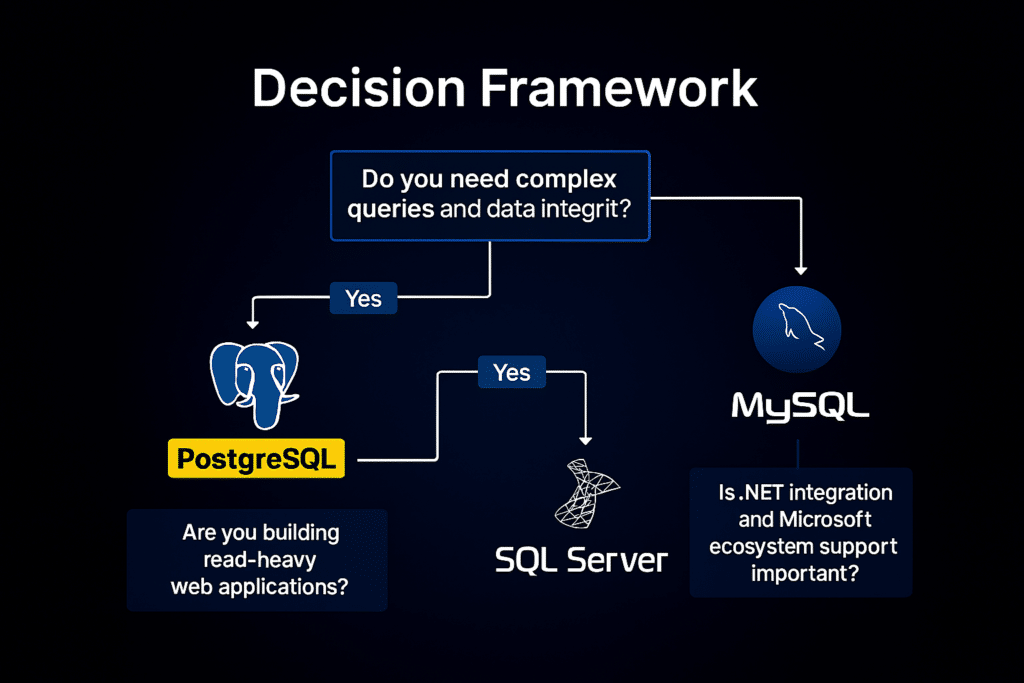
Choose PostgreSQL if you prioritize data integrity, complex queries, extensibility, and want a truly open-source solution with no licensing concerns. Ideal for analytical applications, geospatial projects, and organizations valuing standards compliance.
Choose MySQL if you need proven speed for read-heavy web applications, have a LAMP/LEMP stack, or want the simplest path to get a reliable database running quickly. Best for content-driven websites, e-commerce, and straightforward CRUD applications.
Choose SQL Server if you operate in a Microsoft ecosystem, need enterprise support and polish, require advanced business intelligence tools, or have budget for licensing in exchange for comprehensive features and support. Optimal for .NET applications, enterprise resource planning, and data warehousing.
Conclusion
PostgreSQL vs MySQL vs SQL Server each represent excellent choices for different scenarios. PostgreSQL excels in complex analytical workloads and extensibility, MySQL dominates web application performance and simplicity, and SQL Server delivers enterprise-grade features with Microsoft ecosystem integration.
The best database doesn’t exist in absolute terms—only the best database for your specific requirements. Consider your performance needs, budget constraints, team expertise, and long-term scalability plans when making your choice.
For startups and open-source advocates, PostgreSQL offers unmatched flexibility without licensing costs. For rapid web development, MySQL provides proven speed and simplicity. For enterprise deployments in Windows environments, SQL Server delivers polished tools and comprehensive support. Understanding these distinctions enables you to select the database that aligns with your project’s unique demands.