

The SQL WHERE clause is one of the most fundamental and powerful components of database querying. Whether you’re a beginner learning SQL or an experienced developer optimizing complex queries, understanding how to effectively use the WHERE clause is essential for extracting precise data from your databases. In this comprehensive guide, we’ll explore everything you need to know about the SQL WHERE clause, from basic syntax to advanced filtering techniques.
What is the SQL WHERE Clause?
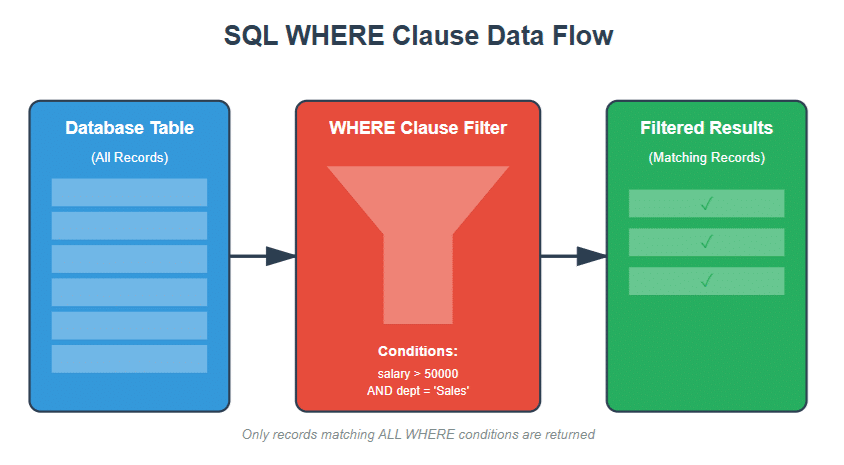
The SQL WHERE clause is a filter that allows you to specify conditions for selecting data from a database table. It acts as a conditional statement that determines which rows should be included in the query results. Think of it as a sieve that only lets through the data that meets your specific criteria.
The WHERE clause can be used with various SQL statements including:
- SELECT – To retrieve specific rows from a table
- UPDATE – To modify only certain rows
- DELETE – To remove specific rows from a table
Key Point: The WHERE clause filters data at the database level before it’s returned to your application, making it much more efficient than filtering data in your application code.
Basic Syntax and Structure
The fundamental syntax of the WHERE clause is straightforward:
SELECT column1, column2, ... FROM table_name WHERE condition;
Simple Example
Let’s start with a basic example using a hypothetical “employees” table:
SELECT first_name, last_name, salary FROM employees WHERE salary > 50000;
This query retrieves the names and salaries of all employees earning more than $50,000.
Comparison Operators in SQL WHERE Clause
SQL provides several comparison operators that you can use within the WHERE clause to compare values. Understanding these operators is crucial for writing effective queries.
| Operator | Description | Example |
|---|---|---|
| = | Equal to | WHERE age = 30 |
| != | Not equal to | WHERE status != ‘active’ |
| <> | Not equal to (alternative) | WHERE status <> ‘active’ |
| > | Greater than | WHERE price > 100 |
| < | Less than | WHERE quantity < 50 |
| >= | Greater than or equal to | WHERE score >= 75 |
| <= | Less than or equal to | WHERE age <= 65 |

Practical Examples with Comparison Operators
Example 1: Filtering Numeric Values
-- Find all products with a price greater than $99.99
SELECT product_name, price, category
FROM products
WHERE price > 99.99;
Example 2: Filtering Text Values
-- Find all customers from New York
SELECT customer_id, customer_name, city
FROM customers
WHERE city = 'New York';
Important Note: String comparisons in SQL are case-sensitive in some database systems (like PostgreSQL) but case-insensitive in others (like MySQL by default). Always check your database documentation.
Example 3: Filtering Dates
-- Find all orders placed after January 1, 2024
SELECT order_id, customer_id, order_date
FROM orders
WHERE order_date > '2024-01-01';
Logical Operators: AND, OR, NOT
Logical operators allow you to combine multiple conditions in your WHERE clause, enabling more complex and precise filtering.
The AND Operator
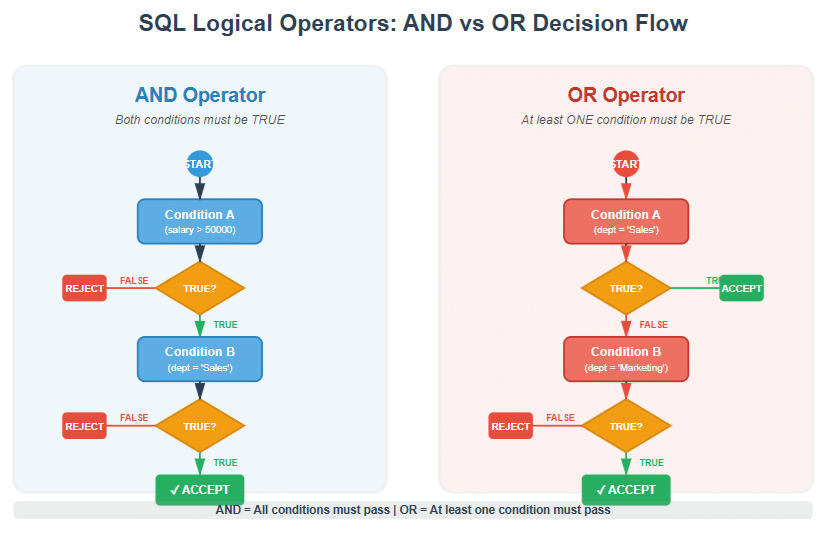
The AND operator returns TRUE only when all conditions are met. It’s used when you need records that satisfy multiple criteria simultaneously.
-- Find employees who earn more than $50,000 AND work in Sales
SELECT employee_id, first_name, last_name, salary, department
FROM employees
WHERE salary > 50000 AND department = 'Sales';
This query will only return employees who satisfy both conditions: earning over $50,000 AND working in the Sales department.
The OR Operator
The OR operator returns TRUE when at least one of the conditions is met. Use it when you want records that satisfy any of several criteria.
-- Find employees who work in Sales OR Marketing
SELECT employee_id, first_name, last_name, department
FROM employees
WHERE department = 'Sales' OR department = 'Marketing';
The NOT Operator
The NOT operator reverses the result of a condition. It returns TRUE when the condition is FALSE.
-- Find all employees NOT in the IT department
SELECT employee_id, first_name, last_name, department
FROM employees
WHERE NOT department = 'IT';
-- Alternative syntax
SELECT employee_id, first_name, last_name, department
FROM employees
WHERE department != 'IT';
Combining Multiple Logical Operators
You can combine AND, OR, and NOT operators to create complex filtering conditions. Use parentheses to control the order of evaluation.
-- Find employees who:
-- (Work in Sales OR Marketing) AND earn more than $60,000
SELECT employee_id, first_name, last_name, department, salary
FROM employees
WHERE (department = 'Sales' OR department = 'Marketing') AND salary > 60000;
Pro Tip: Always use parentheses when combining AND and OR operators to make your query intentions clear and avoid unexpected results due to operator precedence.
Special Operators: IN, BETWEEN, LIKE, and IS NULL
The IN Operator
The IN operator allows you to specify multiple values in a WHERE clause, providing a cleaner alternative to multiple OR conditions.
-- Instead of this:
SELECT * FROM
employees
WHERE department = 'Sales' OR department = 'Marketing' OR department = 'HR';
-- Use this:
SELECT * FROM employees
WHERE department IN ('Sales', 'Marketing', 'HR');
The IN operator is particularly useful when working with subqueries:
-- Find all orders for customers from specific cities
SELECT order_id, customer_id, order_date
FROM orders
WHERE customer_id IN ( SELECT customer_id
FROM customers
WHERE city IN ('New York', 'Los Angeles', 'Chicago') );
The BETWEEN Operator
The BETWEEN operator selects values within a specified range. The range is inclusive, meaning both the start and end values are included.
-- Find employees with salaries between $40,000 and $80,000
SELECT employee_id, first_name, last_name, salary
FROM employees
WHERE salary BETWEEN 40000 AND 80000;
-- This is equivalent to:
SELECT employee_id, first_name, last_name, salary
FROM employees
WHERE salary >= 40000 AND salary <= 80000;
BETWEEN works with dates as well:
-- Find orders placed in January 2024
SELECT order_id, customer_id, order_date, total_amount
FROM orders
WHERE order_date BETWEEN '2024-01-01' AND '2024-01-31';
The LIKE Operator (Pattern Matching)
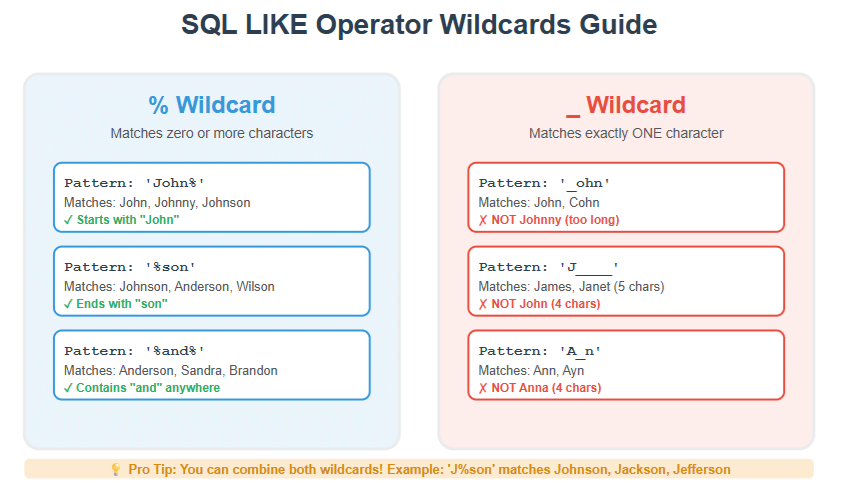
The LIKE operator is used for pattern matching with text data. It uses two wildcard characters:
- % – Represents zero or more characters
- _ – Represents exactly one character
-- Find all customers whose name starts with 'John'
SELECT customer_id, customer_name
FROM customers
WHERE customer_name LIKE 'John%';
-- Find all customers whose name ends with 'son'
SELECT customer_id, customer_name
FROM customers
WHERE customer_name LIKE '%son';
-- Find all customers whose name contains 'and'
SELECT customer_id, customer_name
FROM customers
WHERE customer_name LIKE '%and%';
-- Find customers with exactly 5-character names starting with 'J'
SELECT customer_id, customer_name
FROM customers
WHERE customer_name LIKE 'J____';
Case-Insensitive Pattern Matching
In some databases, you might need case-insensitive searching:
-- MySQL (case-insensitive by default)
SELECT * FROM products WHERE product_name LIKE '%laptop%';
-- PostgreSQL (case-insensitive using ILIKE)
SELECT * FROM products
WHERE product_name ILIKE '%laptop%';
-- SQL Server (using LOWER or UPPER)
SELECT * FROM products
WHERE LOWER(product_name) LIKE LOWER('%laptop%');
Working with NULL Values
NULL represents missing or unknown data in SQL. It’s not the same as zero, an empty string, or any other value. This uniqueness requires special handling in WHERE clauses.
Critical Concept: You cannot use = or != to compare NULL values. You must use IS NULL or IS NOT NULL operators.
IS NULL Operator
-- Find all employees without an assigned phone number
SELECT employee_id, first_name, last_name
FROM employees
WHERE phone_number IS NULL;
-- WRONG - This won't work!
SELECT employee_id, first_name, last_name
FROM employees
WHERE phone_number = NULL; -- Returns no results
IS NOT NULL Operator
-- Find all employees who have an email address
SELECT employee_id, first_name, last_name, email
FROM employees
WHERE email IS NOT NULL;
Combining NULL Checks with Other Conditions
-- Find employees in Sales who don't have a phone number
SELECT employee_id, first_name, last_name, department
FROM employees
WHERE department = 'Sales' AND phone_number IS NULL;
-- Find high-earning employees with complete contact info
SELECT employee_id, first_name, last_name, salary
FROM employees
WHERE salary > 70000 AND email IS NOT NULL AND phone_number IS NOT NULL;
Advanced Filtering Examples
Now that we’ve covered the fundamentals, let’s explore some advanced real-world scenarios that demonstrate the power of the WHERE clause.
Example 1: E-commerce Product Search
-- Find all electronics products priced between $200 and $1000,
-- in stock, and with customer ratings of 4 or higher
SELECT product_id, product_name, price, stock_quantity, average_rating, category
FROM products
WHERE category = 'Electronics' AND price BETWEEN 200 AND 1000
AND stock_quantity > 0 AND average_rating >= 4.0
ORDER BY average_rating DESC, price ASC;
Example 2: Customer Segmentation
-- Find premium customers: those who have made more than 5 purchases
-- OR have a total purchase value exceeding $5,000
SELECT customer_id, customer_name, total_purchases, total_spent,
CASE WHEN total_purchases > 5 THEN 'Frequent Buyer'
WHEN total_spent > 5000 THEN 'High Value' ELSE 'Premium' END as customer_segment
FROM customers
WHERE total_purchases > 5 OR total_spent > 5000
ORDER BY total_spent DESC;
Example 3: Date Range with Multiple Conditions
-- Find all orders from Q1 2024 that were either
-- large orders (over $1,000) or expedited shipping
SELECT order_id, customer_id, order_date, total_amount, shipping_method
FROM orders
WHERE order_date BETWEEN '2024-01-01' AND '2024-03-31'
AND (total_amount > 1000 OR shipping_method = 'Expedited')
ORDER BY order_date DESC;
Example 4: String Pattern Matching with Multiple Conditions
-- Find all employees whose email is from company domain
-- and whose last name starts with 'S' or 'M'
SELECT employee_id, first_name, last_name, email, hire_date
FROM employees
WHERE email LIKE '%@company.com'
AND (last_name LIKE 'S%' OR last_name LIKE 'M%') AND hire_date >= '2020-01-01';
Example 5: Excluding Multiple Values
-- Find all active projects except those in testing or archived status
SELECT project_id, project_name, status, start_date, assigned_to
FROM projects
WHERE status NOT IN ('Testing', 'Archived', 'Cancelled')
AND start_date >= '2024-01-01'
ORDER BY start_date DESC;
Best Practices and Performance Tips
Writing efficient WHERE clauses is crucial for database performance, especially when working with large datasets. Here are essential best practices:
1. Use Indexes Effectively
-- Good: Filtering on indexed column
SELECT * FROM employees
WHERE employee_id = 1001;
-- Less optimal: Filtering on non-indexed column
SELECT * FROM employees WHERE middle_name = 'James';
Create indexes on columns frequently used in WHERE clauses:
-- Create an index to speed up queries
CREATE INDEX idx_employees_department ON employees(department);
CREATE INDEX idx_orders_date ON orders(order_date);
2. Avoid Functions on Indexed Columns
-- Bad: Function prevents index usage
SELECT * FROM employees
WHERE YEAR(hire_date) = 2024;
-- Good: Index can be used
SELECT * FROM employees
WHERE hire_date BETWEEN '2024-01-01' AND '2024-12-31';
3. Use Specific Columns Instead of SELECT *
-- Less efficient
SELECT * FROM employees
WHERE department = 'Sales';
-- More efficient
SELECT employee_id, first_name, last_name, email
FROM employees
WHERE department = 'Sales';
4. Put the Most Restrictive Conditions First
While modern query optimizers are smart, it’s still good practice to order your conditions from most to least restrictive:
-- Better ordering
SELECT * FROM orders
WHERE order_date = '2024-01-15'
-- Most restrictive
AND customer_id > 1000
-- Moderately restrictive
AND status IN ('Shipped', 'Delivered');
-- Least restrictive
5. Use EXISTS Instead of IN for Subqueries
-- Less efficient with large subquery results
SELECT * FROM customers
WHERE customer_id IN ( SELECT customer_id FROM orders WHERE order_date > '2024-01-01' );
-- More efficient
SELECT * FROM customers c
WHERE EXISTS ( SELECT 1 FROM orders o
WHERE o.customer_id = c.customer_id AND o.order_date > '2024-01-01' );
6. Be Careful with OR Conditions
OR conditions can prevent index usage. Sometimes it’s better to use UNION:
-- May not use indexes efficiently
SELECT * FROM employees
WHERE department = 'Sales' OR salary > 100000;
-- May perform better
SELECT * FROM employees
WHERE department = 'Sales'
UNION
SELECT * FROM employees
WHERE salary > 100000;
7. Avoid LIKE with Leading Wildcards
-- Cannot use index efficiently
SELECT * FROM products
WHERE product_name LIKE '%phone%';
-- Can use index
SELECT * FROM products
WHERE product_name LIKE 'phone%';
Performance Tip: Always test your queries with EXPLAIN or EXPLAIN ANALYZE to understand how the database executes them and identify optimization opportunities.
Common Mistakes to Avoid
Mistake 1: Using = with NULL
-- WRONG
SELECT * FROM employees
WHERE manager_id = NULL;
-- CORRECT
SELECT * FROM employees
WHERE manager_id IS NULL;
Mistake 2: Incorrect Parentheses with AND/OR
-- WRONG - Not what you intended
SELECT * FROM products
WHERE category = 'Electronics' OR category = 'Computers'
AND price > 500;
-- This is interpreted as:
-- category = 'Electronics' OR (category = 'Computers' AND price > 500)
-- CORRECT
SELECT * FROM products
WHERE (category = 'Electronics' OR category = 'Computers') AND price > 500;
Mistake 3: Using LIKE Instead of = for Exact Matches
-- Less efficient
SELECT * FROM customers
WHERE email LIKE 'john@example.com';
-- More efficient
SELECT * FROM customers
WHERE email = 'john@example.com';
Mistake 4: Not Considering Case Sensitivity
-- May not find 'john@EXAMPLE.com' in case-sensitive databases
SELECT * FROM customers
WHERE email = 'john@example.com';
-- Better approach
SELECT * FROM customers
WHERE LOWER(email) = LOWER('john@example.com');
Mistake 5: Comparing Different Data Types
-- Problematic: comparing string to number
SELECT * FROM products
WHERE price = '99.99';
-- Better: use appropriate data type
SELECT * FROM products
WHERE price = 99.99;
Database-Specific Considerations
Different database systems have slight variations in WHERE clause syntax and behavior:
MySQL
- String comparisons are case-insensitive by default
- Supports REGEXP for pattern matching
- Can use both != and <> for not equal
PostgreSQL
- String comparisons are case-sensitive
- Offers ILIKE for case-insensitive pattern matching
- Supports advanced operators like ~~ (equivalent to LIKE)
SQL Server
- Case sensitivity depends on collation settings
- Uses TOP instead of LIMIT for row limiting
- Supports full-text search with CONTAINS and FREETEXT
Conclusion
The SQL WHERE clause is a powerful tool for filtering and retrieving precise data from your databases. By mastering comparison operators, logical operators, and special operators like IN, BETWEEN, and LIKE, you can write efficient and effective queries that return exactly the data you need.
Remember these key takeaways:
- Always use appropriate operators for your conditions
- Handle NULL values correctly with IS NULL and IS NOT NULL
- Use parentheses to clarify complex logical conditions
- Optimize your queries by leveraging indexes and avoiding function calls on indexed columns
- Test your queries and use EXPLAIN to understand performance characteristics
As you continue working with SQL, practice writing different types of WHERE clauses and pay attention to performance. With time and experience, constructing efficient and precise filters will become second nature.
Frequently Asked Questions (FAQs)
Q1: What is the difference between WHERE and HAVING in SQL?
The WHERE clause filters rows before any grouping occurs, while HAVING filters groups after the GROUP BY operation. WHERE is used with individual rows and cannot use aggregate functions, whereas HAVING works with grouped data and can use aggregate functions like SUM, COUNT, AVG, etc.
-- WHERE filters rows before grouping
SELECT department, COUNT(*)
FROM employees
WHERE salary > 50000
GROUP BY department;
-- HAVING filters after grouping
SELECT department, COUNT(*) as emp_count
FROM employees
GROUP BY department
HAVING COUNT(*) > 10;
Q2: Can I use multiple WHERE clauses in a single SQL query?
No, you can only have one WHERE clause per query. However, you can include multiple conditions within that single WHERE clause using AND, OR, and NOT operators. If you need to filter data in multiple steps, consider using subqueries or Common Table Expressions (CTEs).
Q3: How do I filter for records that are NOT in a list of values?
Use the NOT IN operator to exclude multiple values:
SELECT * FROM employees
WHERE department NOT IN ('HR', 'Legal', 'Accounting');
Alternatively, you can combine NOT with IN or use multiple != conditions with AND.
Q4: Why doesn’t my WHERE clause work with NULL values when using = NULL?
NULL represents unknown or missing data, and SQL follows three-valued logic (TRUE, FALSE, UNKNOWN). Comparing anything with NULL using = or != always results in UNKNOWN, which is treated as FALSE in WHERE clauses. Always use IS NULL or IS NOT NULL when checking for NULL values.
Q5: How can I make my WHERE clause case-insensitive?
The approach depends on your database system:
- MySQL: String comparisons are case-insensitive by default
- PostgreSQL: Use ILIKE instead of LIKE, or use LOWER() function
- SQL Server: Depends on collation; use LOWER() or UPPER() functions for consistency
-- Universal approach using LOWER()
SELECT * FROM customers
WHERE LOWER(email) = LOWER('john@example.com');
Q6: What’s the performance impact of using functions in WHERE clauses?
Using functions on columns in WHERE clauses can significantly impact performance because it prevents the database from using indexes. The database must evaluate the function for every row. Instead, try to rewrite conditions without functions or create function-based indexes if your database supports them.
Q7: Can I use WHERE clause with UPDATE and DELETE statements?
Yes, and it’s highly recommended! Using WHERE with UPDATE and DELETE ensures you only modify or remove specific rows. Without a WHERE clause, UPDATE will change all rows and DELETE will remove all rows from the table.
-- Update specific rows
UPDATE employees SET salary = salary * 1.1
WHERE department = 'Sales' AND performance_rating >= 4;
-- Delete specific rows
DELETE FROM orders WHERE order_date < '2020-01-01' AND status = 'Cancelled';
Q8: What’s the difference between AND and OR operators in terms of precedence?
AND has higher precedence than OR, meaning AND conditions are evaluated first. This can lead to unexpected results if you don’t use parentheses properly. Always use parentheses to make your intentions clear when combining AND and OR operators.
-- Without parentheses (AND evaluated first) WHERE category = 'A' OR category = 'B' AND price > 100
-- Interpreted as: category = 'A' OR (category = 'B' AND price > 100)
-- With parentheses (explicit intention) WHERE (category = 'A' OR category = 'B') AND price > 100
Lets play and learn SQL:
🔍 Interactive SQL WHERE Clause Visualizer
Experiment with different conditions and see real-time filtering results
Build Your WHERE Clause
Generated SQL Query
📚 SQL WHERE Clause Examples
Interactive examples demonstrating different WHERE clause patterns